Clover Integration
Create the Newo project
If this project already exists in Newo Builder, skip this subsection and continue with the integration-specific settings below.
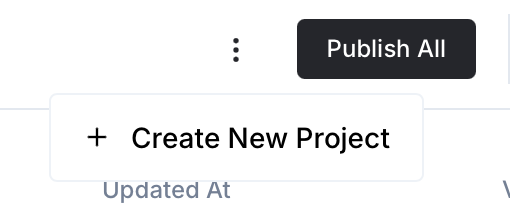
- In Newo Builder, open the projects list and click Create Project (or Create New Project from the top-right menu).
- Fill IDN and Title. The exact names do not matter; use any clear names your team will recognize.
- In Registry, choose the release channel:
- staging — the newest module fixes appear here first. Use it when you need the latest fix, but expect possible unfinished changes.
- production — the final stable version for live projects.
- In Module, select the module for this integration.
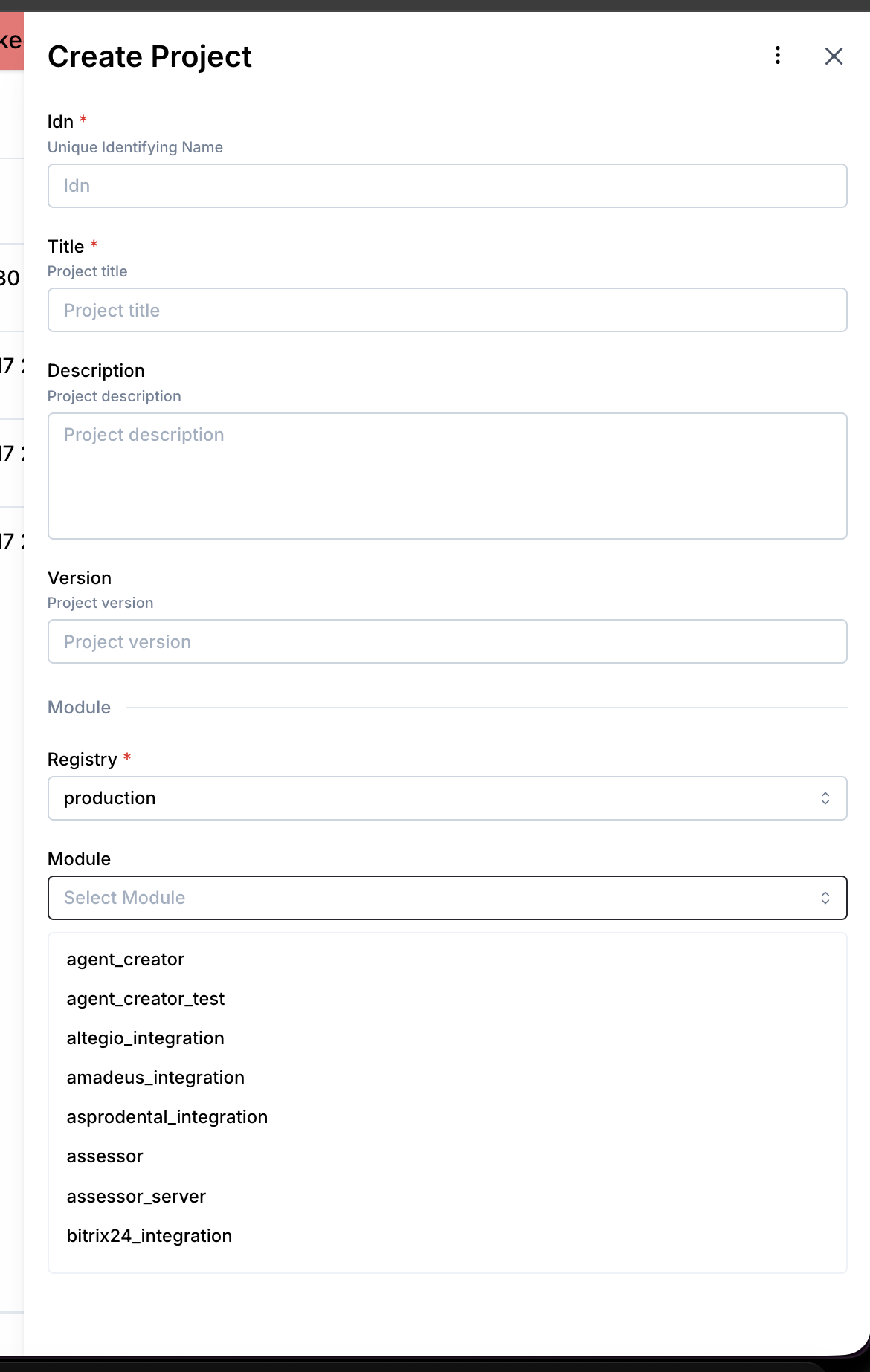 5. Leave Module version on Latest version unless support tells you to pin a specific version, then click Create.
Overview
The Clover integration connects a Newo conversational agent to Clover so the agent can:
- create orders from live Clover menu items
- check the status of recent orders
- cancel existing orders
This integration is for order-taking workflows, not appointment scheduling. In NAF terms, the old generic "availability" path is repurposed here for order-status lookup.
Supported Features
| Feature | Supported | Notes |
|---|---|---|
| Create order | Yes | Uses synchronized Clover items and creates a Clover order |
| Check order status | Yes | Looks up recent orders for the customer |
| Cancel order | Yes | Cancels an existing Clover order |
| OAuth authentication | Yes | Via Clover connector flow |
| Merchant API token authentication | Yes | Direct token mode for one merchant |
| Payment capture | No | The integration creates and manages orders, not payment checkout |
| Multi-merchant selection UI | No | clover_merchant_id is still set explicitly per project |
Authentication Modes
OAuth mode
Use OAuth when:
- you want Clover connector-based authentication
- you have
clover_app_id,clover_app_secret, andclover_oauth_code
Main attributes:
clover_auth_type=OAuthclover_app_idclover_app_secretclover_oauth_code
Token mode
Use token mode when:
- you have a merchant-generated Clover API token
- you want direct single-merchant authentication without the connector bootstrap
Main attributes:
clover_auth_type=Tokenclover_api_tokenclover_merchant_id
In token mode, connector setup is skipped by design and requests are sent directly with Authorization: Bearer <token>.
Main Attributes
User-facing Clover attributes
| Attribute | Purpose |
|---|---|
clover_auth_type | Selects OAuth or Token mode |
clover_api_token | Merchant API token for token mode |
clover_oauth_code | One-time OAuth code for connector authorization |
clover_app_id | Clover OAuth app id |
clover_app_secret | Clover OAuth app secret |
clover_base_url | Clover API base URL |
clover_merchant_id | Merchant id used in Clover API paths |
clover_order_type | Order type label for created orders |
clover_availability_days | Recent-order lookback window for status lookup |
clover_enable_booking | Enables order creation tool |
clover_enable_slot_check | Enables order-status lookup tool |
clover_enable_cancellation | Enables order cancellation tool |
clover_setup_scenarios | Controls Workflow Builder scenario setup |
Hidden or system-managed Clover attributes
| Attribute | Purpose |
|---|---|
clover_static_data_update_interval | Menu cache refresh interval in seconds |
clover_available_items | Serialized Clover item cache used for item matching |
clover_menu_prompt_context | Readable menu snapshot for debugging |
clover_static_data_updated_at | Timestamp of the last successful menu refresh |
clover_last_menu_sync_status | Latest sync result |
clover_order_type_id | Resolved Clover order type id |
clover_override_agent_attributes | Enables Clover setup overrides for standard NAF settings |
setup_persona_id | Internal setup persona id used during connector and tool setup |
Legacy Note
Current Clover code no longer uses clover_check_availability_on_conversation_start.
If you still see that attribute on an older deployed project, it is a leftover from the legacy Clover implementation and can be treated as deprecated compatibility state rather than an active runtime setting.
Tooling Model
The integration uses custom tools registered into project_attributes_settings_platform_tools:
clover_create_order_toolclover_check_order_status_toolclover_cancel_order_tool
At the same time, SetupFlow overrides these generic NAF tools so they are not used accidentally:
check_availability_toolcreate_booking_toolcancel_booking_tool
All Clover custom tools are configured with useConversationHistory: false.
Operational Notes
- Exact menu matching is driven by the synchronized
clover_available_itemscache. - Menu grounding is appended into project RAG context rather than being hardcoded in static prompts.
- The integration assumes one Clover merchant per project.
project_publish_finishruns setup, and setup triggers the internal static-data refresh path.
Testing and Verification
Recommended verification sequence after setup or publish:
- Confirm Clover attributes are present and populated correctly.
- Confirm
project_attributes_settings_platform_toolscontains Clover custom tools. - Trigger a menu refresh and verify
clover_available_itemsandclover_last_menu_sync_status. - Test create-order flow with exact menu item names.
- Test order-status lookup for the created order.
- Test cancellation for that same order.