Pipedrive Integration
What the AI can do
Summary
Pipedrive Integration connects Pipedrive CRM with Newo Platform and lets a Newo agent manage appointment-style activities inside Pipedrive.
It currently supports:
- checking availability by reading existing Pipedrive activities
- booking appointments with automatic contact lookup or contact creation
- cancelling booked appointments
- identifying existing callers by phone and loading future bookings into persona memory
- token-based auth and connector-based OAuth auth
The integration is aimed at service businesses and sales teams that want a conversational agent to schedule, confirm, and cancel meetings in Pipedrive.
Common use cases
- When a caller asks for available times -> the agent reads Pipedrive activities and computes free slots
- When a caller confirms a slot -> the agent creates or reuses a Pipedrive person and books an activity
- When a caller wants to cancel -> the agent deletes the matching Pipedrive activity
- When the caller phone number is known -> the agent loads the matching person and future bookings into prompt context
- When the session starts and preload is enabled -> the agent silently preloads nearest available slots
Features at a glance
| Feature | Supported | Notes |
|---|---|---|
| Availability check | ✅ | Uses activities_list and computes free slots locally |
| Booking creation | ✅ | Uses persons + activities APIs |
| Booking cancellation | ✅ | Deletes activity by booking_id |
| Existing client detection | ✅ | Phone-based lookup through persons/search |
| Prompt context preload | ✅ | Future bookings injected into prompt sections |
| Session-start slot preload | ✅ | Controlled by pipedrive_check_availability_on_conversation_start |
| Token auth | ✅ | x-api-token header through http connector |
| OAuth auth | ✅ | oauth_code + create_extension_connector through api connector |
| Reschedule flow | ❌ | Use cancel + rebook |
| Deal / pipeline management | ❌ | Not implemented |
| Multi-location routing | ❌ | Single Pipedrive workspace/account per integration |
Before You Start
Before setup:
- active Pipedrive account
- for
Tokenauth: a Pipedrive API token - for
OAuthauth: a Pipedrive app authorization flow that yieldsoauth_code - a correct tenant domain in
pipedrive_base_api_url, because runtime requests target the workspace-specific Pipedrive URL even in OAuth mode
Setup
Create the Newo project
If this project already exists in Newo Builder, skip this subsection and continue with the integration-specific settings below.
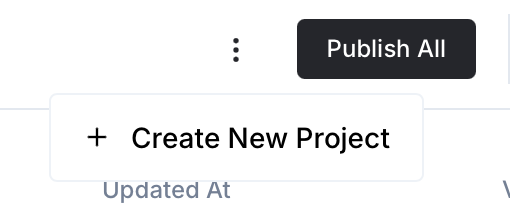
- In Newo Builder, open the projects list and click Create Project (or Create New Project from the top-right menu).
- Fill IDN and Title. The exact names do not matter; use any clear names your team will recognize.
- In Registry, choose the release channel:
- staging — the newest module fixes appear here first. Use it when you need the latest fix, but expect possible unfinished changes.
- production — the final stable version for live projects.
- In Module, select the module for this integration.
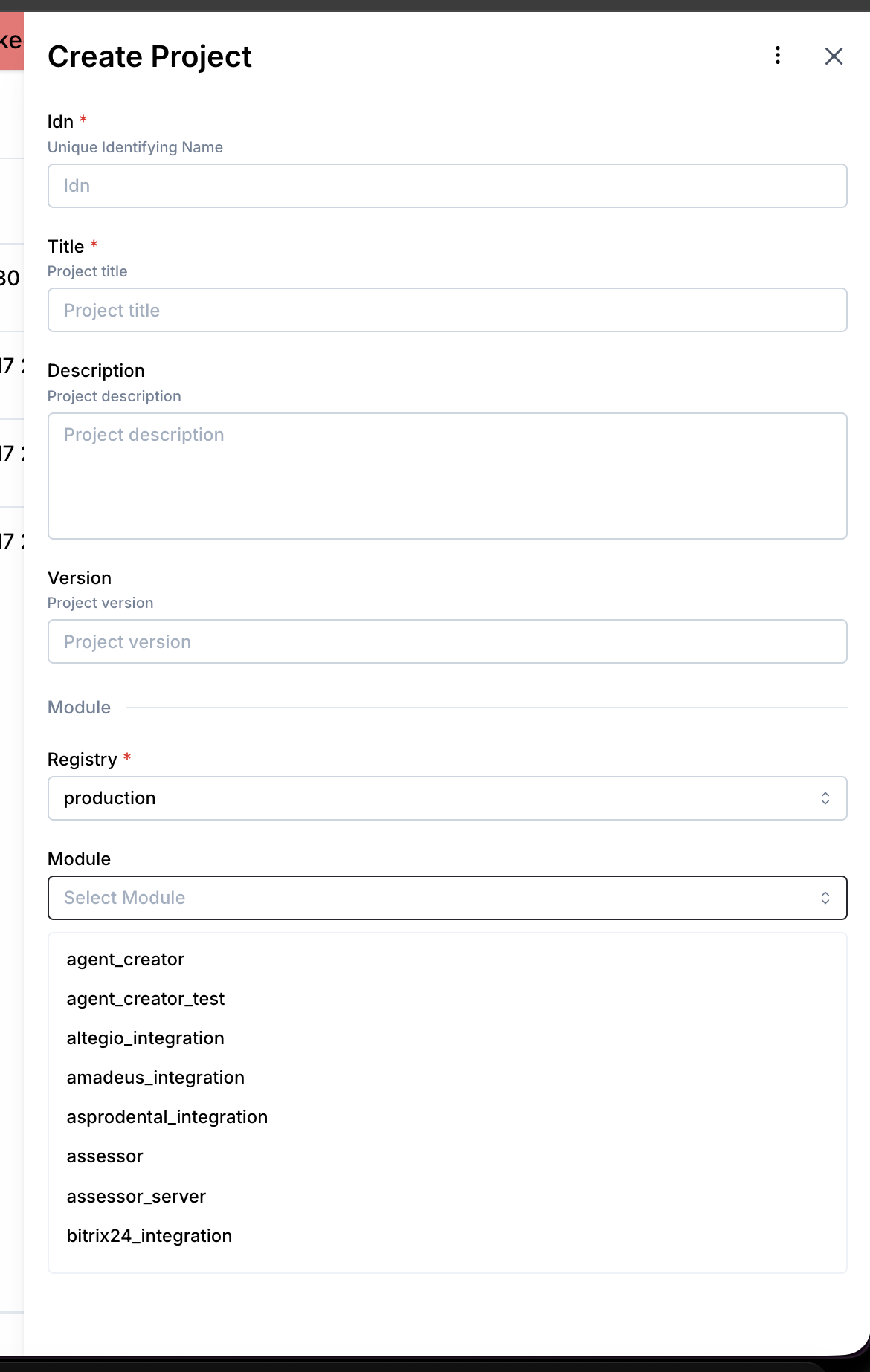 5. Leave Module version on Latest version unless support tells you to pin a specific version, then click Create.
3.1 Authentication Modes
The integration has two auth modes:
-
Token
- operator sets
pipedrive_auth_type = Token - runtime sends
x-api-token - this is the simplest direct API path
- operator sets
-
OAuth
- operator sets
pipedrive_auth_type = OAuth - operator pastes
pipedrive_oauth_code SetupFlow/_setupConnectorSkillcreates a Pipedrive extension connector viacreate_extension_connector- the visible authorization link currently uses placeholder app credentials in the repo and should be replaced with the real Pipedrive app credentials when they are known
- runtime API calls then go through the
apiconnector instead of the raw token header path
- operator sets
3.2 Operator-Facing Attributes
| Attribute | Required | Description |
|---|---|---|
pipedrive_auth_type | Yes | OAuth or Token |
pipedrive_api_token | Required for Token | Pipedrive API token used in x-api-token header |
pipedrive_oauth_code | Required for OAuth | One-time authorization code used to create the OAuth connector |
pipedrive_base_api_url | Yes | Required workspace URL such as https://your-company.pipedrive.com |
project_business_time_zone | Yes | Shared project timezone used for slot interpretation and UTC conversion before booking |
pipedrive_show_for_days | No | Availability window size, default 1 |
pipedrive_duration | No | Default appointment duration in minutes, default 30 |
pipedrive_enable_availability | No | Enable / disable availability tool |
pipedrive_enable_booking | No | Enable / disable booking tool |
pipedrive_enable_cancellation | No | Enable / disable cancellation tool |
pipedrive_check_availability_on_conversation_start | No | Silent slot preload at session start |
pipedrive_setup_scenarios | No | Publish default canvas/library content |
3.3 System-Managed Hidden Attributes
These are not meant for normal operator editing but are part of the integration contract:
| Attribute | Purpose |
|---|---|
pipedrive_setup_persona_id | Setup persona used for setup-time operations |
pipedrive_availability_extraction_schema | LLM extraction schema for availability |
pipedrive_availability_extraction_instructions | LLM extraction instructions for availability |
pipedrive_booking_extraction_schema | LLM extraction schema for booking |
pipedrive_booking_extraction_instructions | LLM extraction instructions for booking |
pipedrive_cancellation_extraction_schema | LLM extraction schema for cancellation |
pipedrive_cancellation_extraction_instructions | LLM extraction instructions for cancellation |
3.4 What SetupFlow Does
On publish, SetupFlow:
- registers both
apiandhttpconnectors namedpipedrive_connector - creates/maintains the hidden setup persona
- publishes operator-facing and hidden attributes
- registers custom Newo tools through
_setupToolsSkill - when
pipedrive_auth_type = OAuth, runs_setupConnectorSkillto create the OAuth extension connector
How to use the integration
4.3 Important Runtime Rules
- The integration uses custom tools, not generic NAF booking tools.
search_booking_toolis still expected to stay available in ConvoAgent for booking lookup.- Availability and booking extractions are LLM-assisted through hidden JSON schemas and extraction prompts.
- Booking now converts the caller-confirmed local time into UTC before sending
due_dateanddue_timeto Pipedrive. - Activity creation in
v2usesparticipantswith a primary participant instead of writableperson_id.
How to test that everything works
Recommended checks:
- Publish the project and verify
SetupFlowruns without runtime errors. - Confirm custom tools are present in
project_attributes_settings_platform_tools. - In
Tokenmode, run availability + booking + cancellation smoke tests. - In
OAuthmode, verifypipedrive_oauth_codeleads to connector creation and business requests go throughpipedrive_connector. - Verify a booking creates:
- person lookup/create in
v2 - activity create in
v2 participantspayload instead ofperson_id- UTC
due_date/due_timewhile user-facing confirmation remains local
- person lookup/create in
Recent live evidence in this repo:
- slot truncation fix validated by a prod e2e run
- booking create validated on prod after the
participantsfix - post-fix live booking payload used
participantsanddue_time=12:00UTC for a3 PM Europe/Istanbuluser-facing slot
FAQ
Q: Does the integration use generic NAF booking tools?
A: No. It registers custom tools pipedrive_check_availability, pipedrive_book_appointment, and pipedrive_cancel_appointment, while overriding the generic booking tools to stay disabled.
Q: Are appointments stored as Pipedrive deals?
A: No. They are stored as Pipedrive activities.
Q: How is the contact linked to a booked activity?
A: In v2, the booking payload uses participants with a primary participant instead of writable person_id.
Q: What time format is sent to Pipedrive on booking?
A: The user-facing slot is handled in local business time, then converted to UTC before due_date / due_time are sent in the activity create payload.
Q: What happens if the caller already exists in Pipedrive?
A: The integration stores pipedrive_person_id, reuses that contact for booking, and loads future bookings into persona memory for the conversation.
Q: Can I use OAuth without a raw API token?
A: Yes. The integration now supports connector-based OAuth through oauth_code + create_extension_connector. Token mode remains available separately.