Square Integration
Connects Square Appointments with the Newo AI agent so callers and chat visitors can ask about services, book new appointments, and cancel existing ones — entirely by voice or chat, no receptionist required.
What the AI can do
- Answer "do you offer X?" questions. The agent searches the business's real Square catalog for any service the customer asks about, including variations, prices, and duration.
- Check live availability. Open time slots are pulled live from Square Bookings.
- Book the appointment. Once the customer picks a slot and gives their details, the agent creates the booking in Square — staff sees it immediately.
- Cancel an appointment, even one made on a different day. The agent recognises the returning customer by phone, fetches their upcoming bookings from Square, presents them, and cancels the one the customer points to.
- Handle multiple upcoming bookings safely. When the customer has more than one booking on file, the agent reads the list back and asks which one to cancel — never guesses.
- Hide existing-client-only services from new callers. Services flagged in Square as "for existing clients only" (e.g. pre-paid packages) are silently dropped from new callers' availability and consultation answers, with a polite explanation if asked by name and an offer to start with a non-gated alternative. Returning customers identified by phone see the full catalog. Works in chat too — the integration looks the caller up in Square mid-conversation as soon as a phone number is shared.
- Route multi-service requests. If a customer wants two or more services in one appointment, the agent politely hands off to a human manager.
Service catalog — how it syncs to the agent
Square is the single source of truth for services. The agent does not rely on the Products & Services list on the canvas — it queries Square directly.
| When it happens | What the agent does |
|---|---|
| Every Publish All | InitFlow clears the last-sync timestamp and dispatches a fresh catalog fetch through CatalogFlow. The Square catalog (items with product type Appointments Service) is paginated for the selected location and the AKB is upserted. |
| First customer session after a deploy | CatalogFlow/MaybeSyncCatalogOnSessionSkill (subscribed to session_started) inspects the last-sync timestamp. If older than 2 hours (or empty), it kicks off a refresh — guaranteeing freshness even if no operator has hit Publish All. |
| New / renamed / re-priced service in Square | Hit Publish All in Newo for an immediate refresh, or wait for the 2h TTL to roll over on the next inbound chat / call. |
| Service deleted in Square | Same — next sync removes it from AKB. |
Two coordinating attributes manage the cycle:
square_catalog_last_sync_at— UTC timestamp of the most recent successful sync. Drives the 2h TTL gate onsession_started. Cleared on every Publish All so the publish-time refresh always runs.square_catalog_sync_in_progress— UTC timestamp of an in-flight sync (used as a race lock). Cleared by the success / HTTP-error / platform-runtime_errorpaths. Stale locks older than 10 minutes are auto-taken-over so a crashed sync can never permanently block future syncs.
There is no operator-visible knob — the cycle is self-managing.
What the agent actually knows about each service
For every bookable variation the agent stores:
- Service name (parent item, e.g. Eyebrow Threading).
- Variation name (e.g. Regular, Yearly Colour Refresh).
- Description from the Square catalog (if any).
- Price — the fixed amount with its currency, or "variable" for variable-price services so the agent never quotes a wrong number.
- Duration in minutes.
Only bookable services reach the agent
Variations marked as "not available for booking" in Square, or restricted to a different location, are filtered out at sync time. The agent only ever offers and books what Square itself considers bookable right now.
Gating services to existing clients only
Some services should never be offered to new callers — typically pre-paid packages or course-of-treatments where the customer has already been seen and assessed. The integration supports a marker phrase in the Square service description that tags such services as existing-client-only.
How to mark a service. Open the service in Square Appointments and put the marker phrase anywhere in the description (case-insensitive). The default marker is Only for existing client:
Only for existing client
Pre-paid 5-session course of CO2 Laser Resurfacing. Includes…
Operators can change the exact phrasing through the Gated Services Marker setting (square_gated_services_marker). Any phrase works; e.g. set it to [Existing clients only] and use that bracketed prefix in Square instead.
What the agent does. On every customer turn, the integration filters AKB matches whose summary contains the marker (case-insensitive substring match). The Square service description is embedded in the summary's Description: … segment by the catalog sync, so the marker phrase ends up where the filter looks:
| Caller status | What's filtered |
|---|---|
| Existing client (phone matched in Square) | Nothing — full catalog visible. |
| New caller (phone not in Square or never identified) | Every gated service is dropped from availability/consultation results. |
| Caller explicitly asked for a gated service | Agent gets a structured "not available for new clients" signal and replies politely: "That service is for existing clients only, but I can help with [non-gated alternative] instead — would you like that?" The block fires only when the caller's wording is specific enough to disambiguate the gated variation from non-gated ones — e.g. "Tattoo Removal Package". A generic parent term like "Tattoo Removal" silently falls through to LLM substitution against the non-gated variations instead of triggering the block. |
Chat workaround. Voice channels auto-identify the caller by phone on conversation start. In chat there is no caller-id, so the integration runs the lookup mid-conversation: as soon as the customer shares a phone number, the agent quietly hits Square (/v2/customers/search), then re-triggers the availability check with a verified status. If the caller is in Square the gate lifts automatically; otherwise the gate stays in place.
Returning-customer recognition
When a phone number is detected on the conversation (caller-id on phone, or the customer mentions one in chat), the agent:
- Searches Square customers by E.164 phone number.
- Loads the customer's profile (name, email, address) into a private prompt section.
- Pulls the customer's upcoming bookings (next 90 days) and stores them on the persona.
This means by the time the customer says "please cancel my appointment" the agent already has the booking in front of it — no searching, no awkward "what's your booking ID?" question. It also works across sessions: a customer who books today and calls tomorrow is recognised on the second call.
The behaviour is gated by Existing Client Lookup ; turn it off if you don't want a Square API call per session.
Features at a glance
| Feature | Included |
|---|---|
| Answer questions about any service from the Square catalog | ✅ |
| Quote prices and durations from the live catalog | ✅ |
| Check live availability | ✅ |
| Book appointment | ✅ |
| Cancel appointment (current session) | ✅ |
| Cancel appointment created on a different day | ✅ |
| Auto-recognise returning customer by phone, pre-load their bookings | ✅ |
| Hide existing-client-only services from new callers (configurable marker) | ✅ |
| Re-verify caller in chat when phone shared mid-conversation | ✅ |
| Disambiguate multi-booking cancel — agent asks which one | ✅ |
| Auto-create customer profile in Square during booking | ✅ |
| Reuse existing Square customer when phone matches | ✅ |
| Assign the right team member to each slot | ✅ |
| Multi-service request — transfer to a human | ✅ |
| Two auth methods: Personal Access Token (simple) or OAuth 2.0 | ✅ |
| Reschedule in one step | ❌ (cancel + rebook) |
| Take payments in Square | ❌ (Square handles payment at the appointment as normal) |
Scenarios
The integration ships with three editable scenarios on the canvas. Operators can tweak them in Newo; the agent picks up the changes on the next publish.
Scenario 9 — Service Consultation in Square
Runs when the customer is asking about a service without yet asking to book.
- Identify what the customer is asking about. The scenario branches in four ways:
- Specific service ("eyebrow threading", "Hydra Facial") → straight to catalog lookup.
- Body area or category ("what for my legs?", "popular brow options", "something for hair removal") → catalog lookup using the area as the search hint. The agent never gets stuck on "tell me a specific name".
- Comparative follow-up ("which is cheapest?", "what's the longest one?", "what's the difference between 1 session and 3?") about variations the agent just listed → answered directly from the data already in the previous turn. No second catalog call.
- Fully generic ("what services do you offer?") → polite ask for an area first.
- Look up the catalog — agent says "Let me check our services for you, I will get back to you shortly."
- Present matches with price and duration so the customer can compare on the spot:
- Found → confirm the service is offered, list up to N variations (configurable, default 3), quote price and duration each, invite the customer to book.
- Not found → politely decline and invite the customer to describe what they need so the agent can suggest a related service.
- If the customer wants to book, hand off to Scheduling Appointment in Square via Agent; otherwise wrap up.
Anti-hallucination guard. The agent must never voice a catalog service name that did not come from a recent consultation tool result. If the customer asks "what's popular?" before any catalog lookup has run, the agent first asks which area, then runs the lookup, then answers — it never invents service names from generic spa knowledge.
Triggered by intent "[T] Service Consultation in Square".
Scenario 7 — Scheduling Appointment in Square via Agent
Runs when the customer wants a new appointment. Each data-gathering step delegates to a shared NAF procedure (Gathering Preferred Date and Time, Reconfirming or Gathering Phone Number, Reconfirming or Gathering First and Last Name) so the agent reuses the same channel-aware logic as the rest of the system.
- Service Identification. Ask what service the customer wants. As soon as a single service is named the agent moves on — availability is the source of truth.
- Capture preferred date AND time via the Gathering Preferred Date and Time procedure. The procedure reconfirms vague phrases ("any day", "tomorrow afternoon") explicitly before the agent commits to a value. The availability code-phrase is forbidden until both date AND time are captured.
- Capture phone number via the Reconfirming or Gathering Phone Number procedure. Collecting phone BEFORE availability is intentional: it lets the integration do an existing-client lookup against Square (
/v2/customers/search) and lift the existing-client gate (see §Gating below) for callers who turn out to be in Square. Channel-aware:- Phone channel — the procedure sees the caller-id from
<UserInformation>and just asks permission to use the existing number. - Chat channel — the procedure asks the User to share a phone number when none is on file.
- Phone channel — the procedure sees the caller-id from
- Check live slots — agent says "Let me check available time slots for you, I will get back to you shortly."
- Read the
<AvailableSlots>block:- Slot matches the captured preference → confirm in one short line: "Yes, [date] at [time] is available — would you like me to book it?".
- Slot doesn't match → offer 2–3 nearest alternatives from the same day (or week if the day is empty) verbatim from
<AvailableSlots>; ask the customer to pick. - Loading → wait, give a brief answer to anything the customer asks meanwhile.
- Error → during working hours, transfer to a human; outside hours, relay a message to the manager.
- Multiple-match disambiguation (
status="needs_clarification") → list the candidates the agent received, ask the customer to pick. After they pick, repeat step 4 (re-say the code-phrase) so the tool fires again with the clarified service. - Existing-client-only block (
status="not_available_for_new_clients") → the requested service is reserved for existing clients and the phone we have on file is not in Square. Politely tell the caller, offer a non-gated alternative we DO offer to new callers, and do NOT proceed to confirmation. If the caller claims existing-client status under a different phone number, return to step 3 to recapture phone, then re-fire availability via step 4. - No catalog match (
status="no_match") → ask the caller to specify the service more precisely and return to step 1.
- Customer Name via the Reconfirming or Gathering First and Last Name procedure. Skipped automatically if first and last name are already on file from earlier in the conversation.
- Read back the booking — service, day, time — and ask "Should I go ahead and book [service] on [date] at [time]?". On confirm, proceed to step 8.
- Submit the booking — agent says "Give me a moment, I will book your appointment right now." → booking is created in Square.
- If the customer asks for two or more services at any point, the agent transfers to a human manager.
Phone is taken exactly as captured in E.164 format (e.g. +447426906344); domestic formats like 07426906344 are not accepted by Square.
Triggered by intent "[L] Appointment in Square via Agent".
Scenario 8 — Canceling Appointment in Square via Agent
Runs when the customer wants to cancel.
- Agent says "Give me a moment to double-check if I have information about your bookings, I will get back to you shortly." The integration has already populated the
<ExistingBookings>prompt section either from the current-session booking, the persona cache, or a fresh phone lookup against Square. - Read
<ExistingBookings>:- Empty → during working hours, transfer to a human; outside hours, relay a message to the manager.
- One booking → present its date/time, ask "are you sure?".
- Multiple bookings → list them and ask which one to cancel. Once the customer points at one, the integration uses an LLM extraction validated against the actual booking_id list to pick the right one.
- Customer confirms → agent says "Give me a moment, I will cancel your booking right now." → cancellation confirmed in Square.
Triggered by intent "[T] Cancellation in Square via Agent".
Each scenario's exact code-phrase is required — it is the trigger that signals the agent to actually call Square. If you rewrite a scenario, keep those phrases intact.
Example dialogs
Example 1 — Consultation
Customer: Tell me about microblading, what are my options? Agent: Let me check our services for you, I will get back to you shortly. Agent: Yes, we offer microblading. We have Microblading for £300, 90 minutes, and Microblading Yearly Colour Refresh for £180, also 90 minutes. Which one would you like?
Example 2 — Direct booking (no consultation step)
Customer: Hi, I'd like to book Microblading Yearly Colour Refresh. Agent: Let me check available time slots for you, I will get back to you shortly. Agent: I have Friday May 1 at 12:45 PM, 2:15 PM, and 3:45 PM. Which works? Customer: 2:15 PM. Agent: May I have your name, phone, and email? Customer: Sophia Reyes, +447426906344, sophia.reyes@example.com. Agent: Give me a moment, I will book your appointment right now. Agent: You're all set, Sophia — your appointment is confirmed for Friday May 1 at 2:15 PM.
Example 3 — Cross-session cancel
Customer calls back the next day to cancel the booking from Example 2.
Customer: Hi, I need to cancel my appointment. My phone is +447426906344. Agent: Give me a moment to double-check if I have information about your bookings, I will get back to you shortly. (Agent looks up the customer in Square, finds their upcoming booking.) Agent: I found one upcoming booking for you on Friday May 1 at 2:15 PM. Are you sure you want to cancel? Customer: Yes, cancel it please. Agent: Give me a moment, I will cancel your booking right now. Agent: Your appointment for Friday May 1 at 2:15 PM has been successfully cancelled.
Example 4 — Multi-booking cancel
Customer: Hi, please cancel my appointment. My phone is +447426906344. Agent: Give me a moment to double-check if I have information about your bookings, I will get back to you shortly. Agent: I found two upcoming bookings: April 28 at 2:15 PM and April 30 at 5 PM. Which one would you like to cancel? Customer: April 30 at 5 PM please. Agent: Are you sure you want to cancel your booking for April 30 at 5 PM? Customer: Yes. Agent: Give me a moment, I will cancel your booking right now. Agent: Your booking for April 30 at 5 PM has been successfully cancelled.
Example 5 — Multi-service → manager
Customer: I'd like to book microblading and lip filler in the same visit. Agent: For appointments with multiple services, I'll need to connect you with our manager so they can arrange everything together. One moment…
Example 6 — Policy question (not a service lookup)
Customer: Can I come drunk to my appointment? Agent: We recommend avoiding alcohol for 24 hours before and after your treatment.
Policy questions are answered from the Business Context on the canvas, not from the catalog.
Setup
Create the Newo project
If this project already exists in Newo Builder, skip this subsection and continue with the integration-specific settings below.
- In Newo Builder, open the projects list and click Create Project (or Create New Project from the top-right menu).
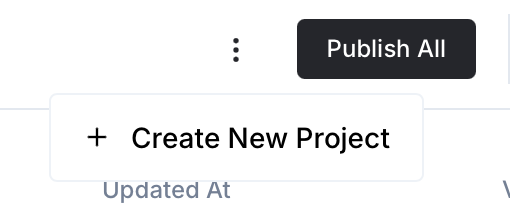
- Fill IDN and Title. The exact names do not matter; use any clear names your team will recognize.
- In Registry, choose the release channel:
- staging — the newest module fixes appear here first. Use it when you need the latest fix, but expect possible unfinished changes.
- production — the final stable version for live projects.
- In Module, select the module for this integration.
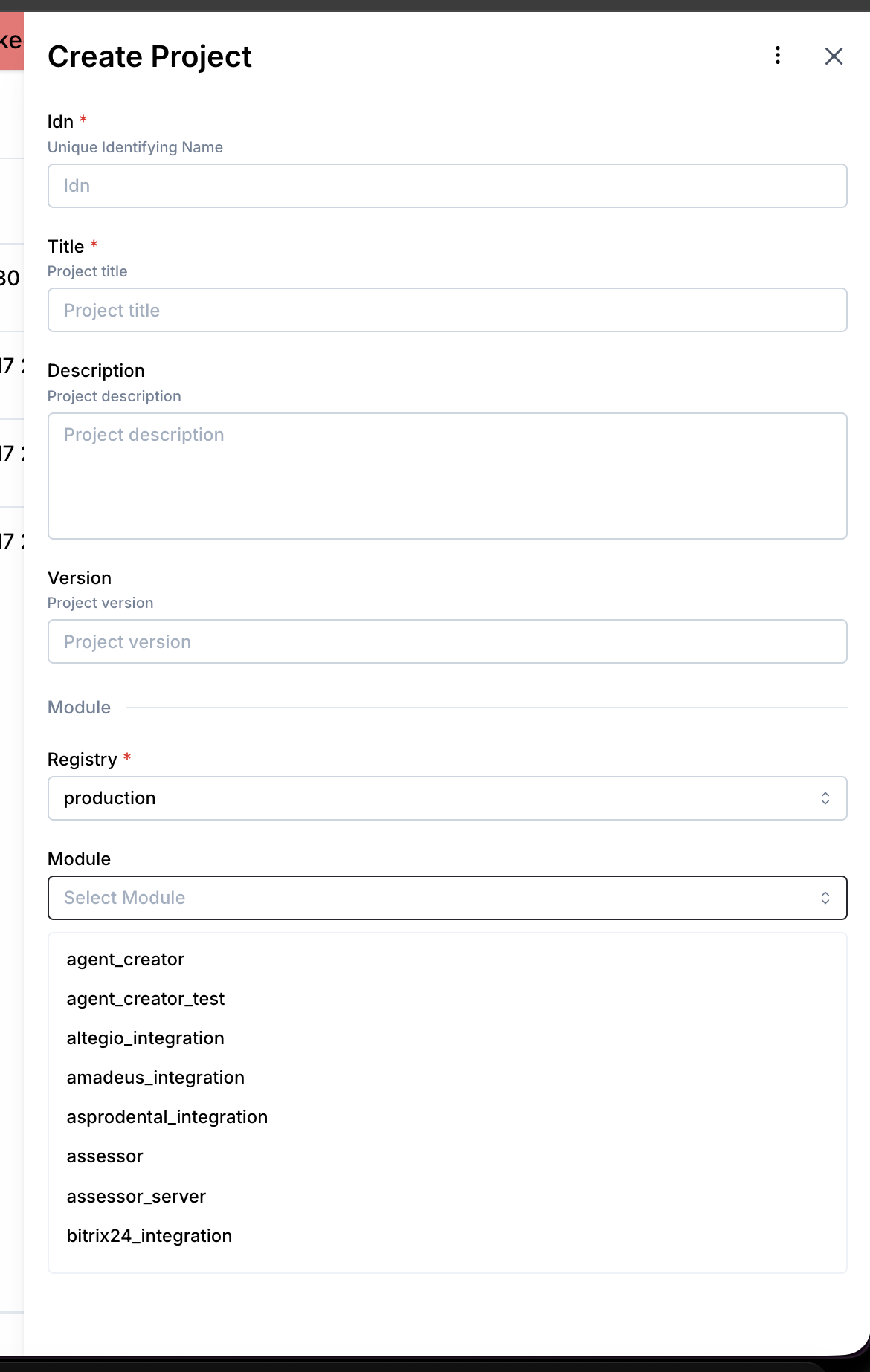 5. Leave Module version on Latest version unless support tells you to pin a specific version, then click Create.
A step-by-step walkthrough with screenshots is in Square Onboarding Guide (PDF). The section below is the short version.
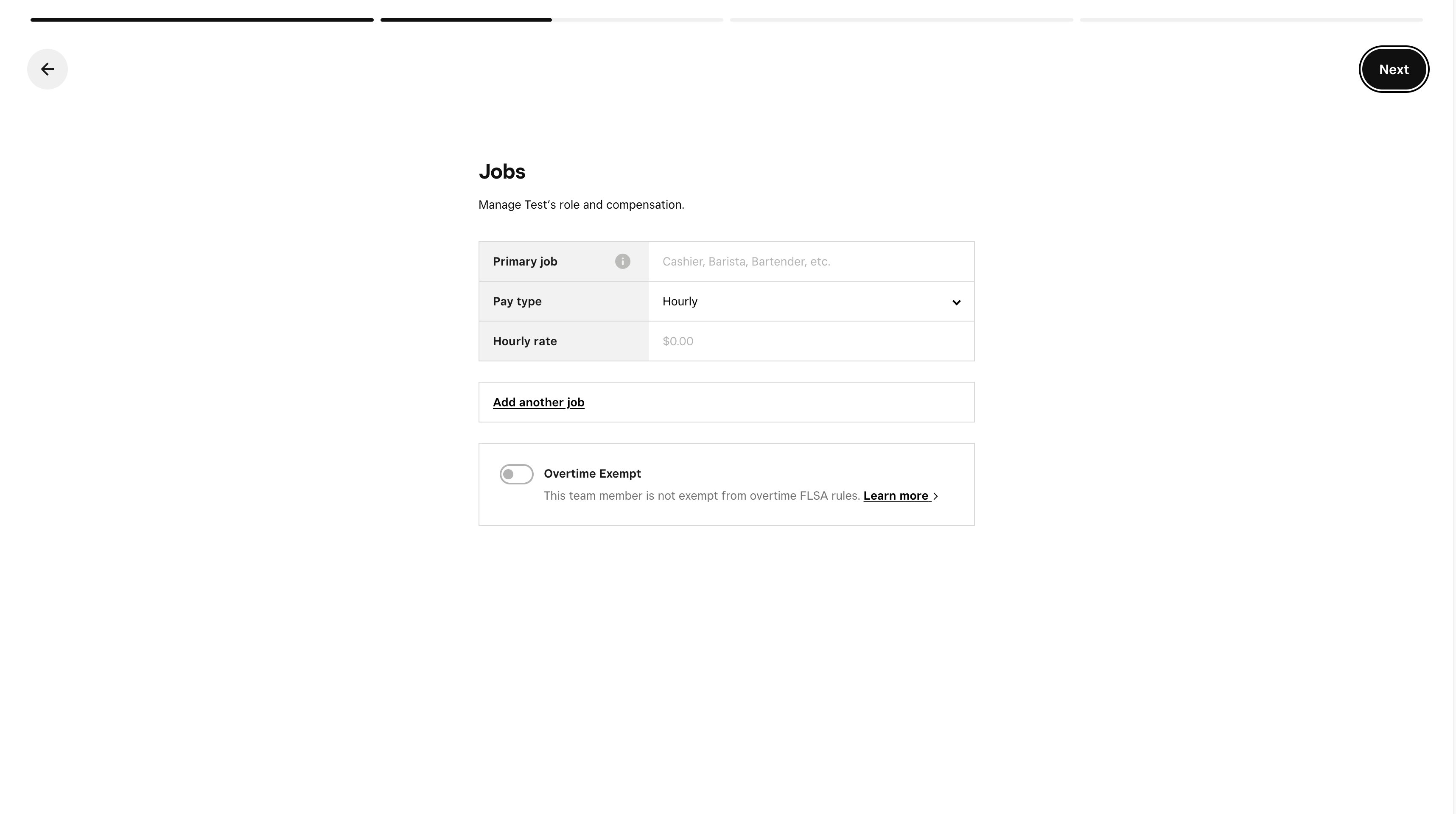
1. Prepare your Square account
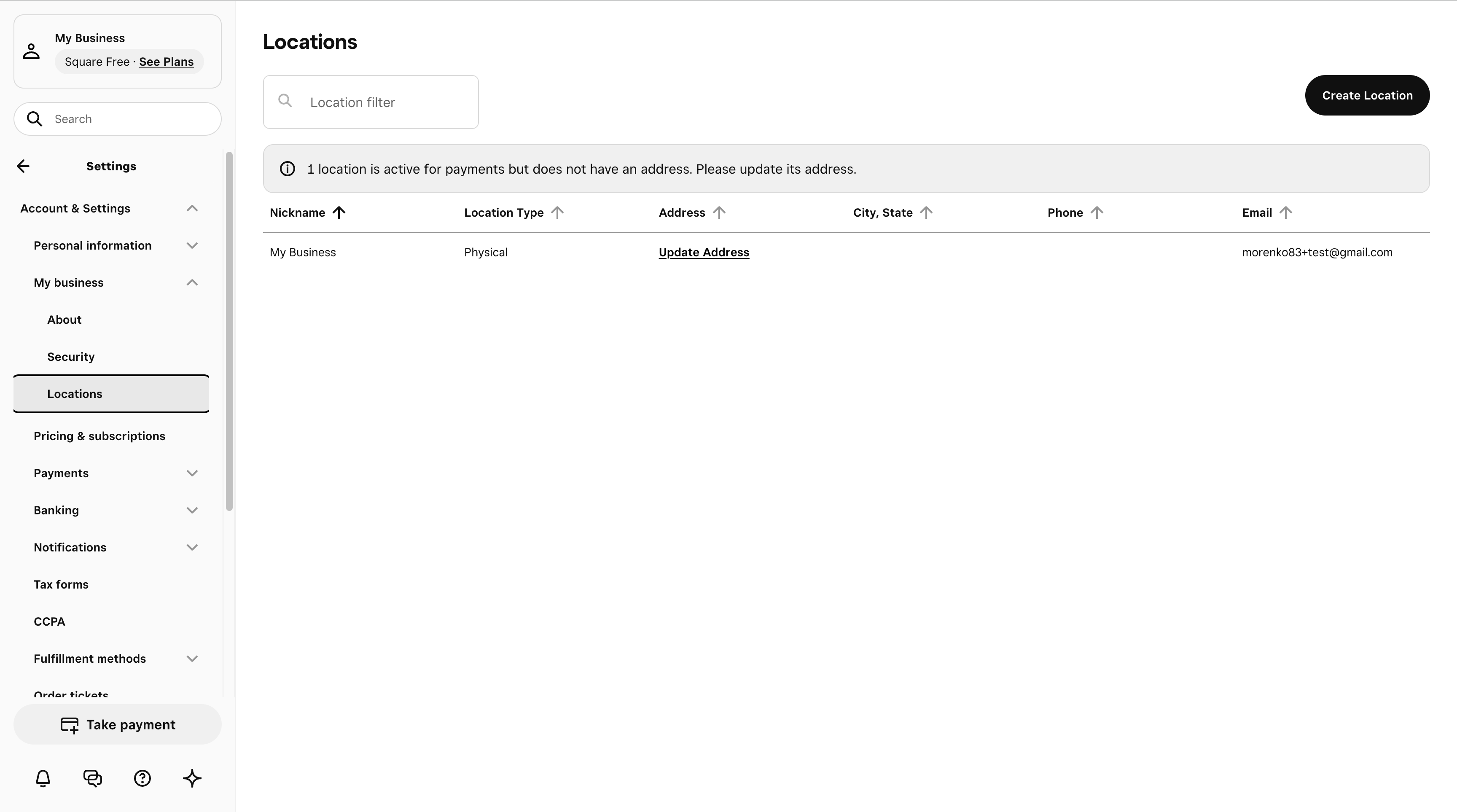
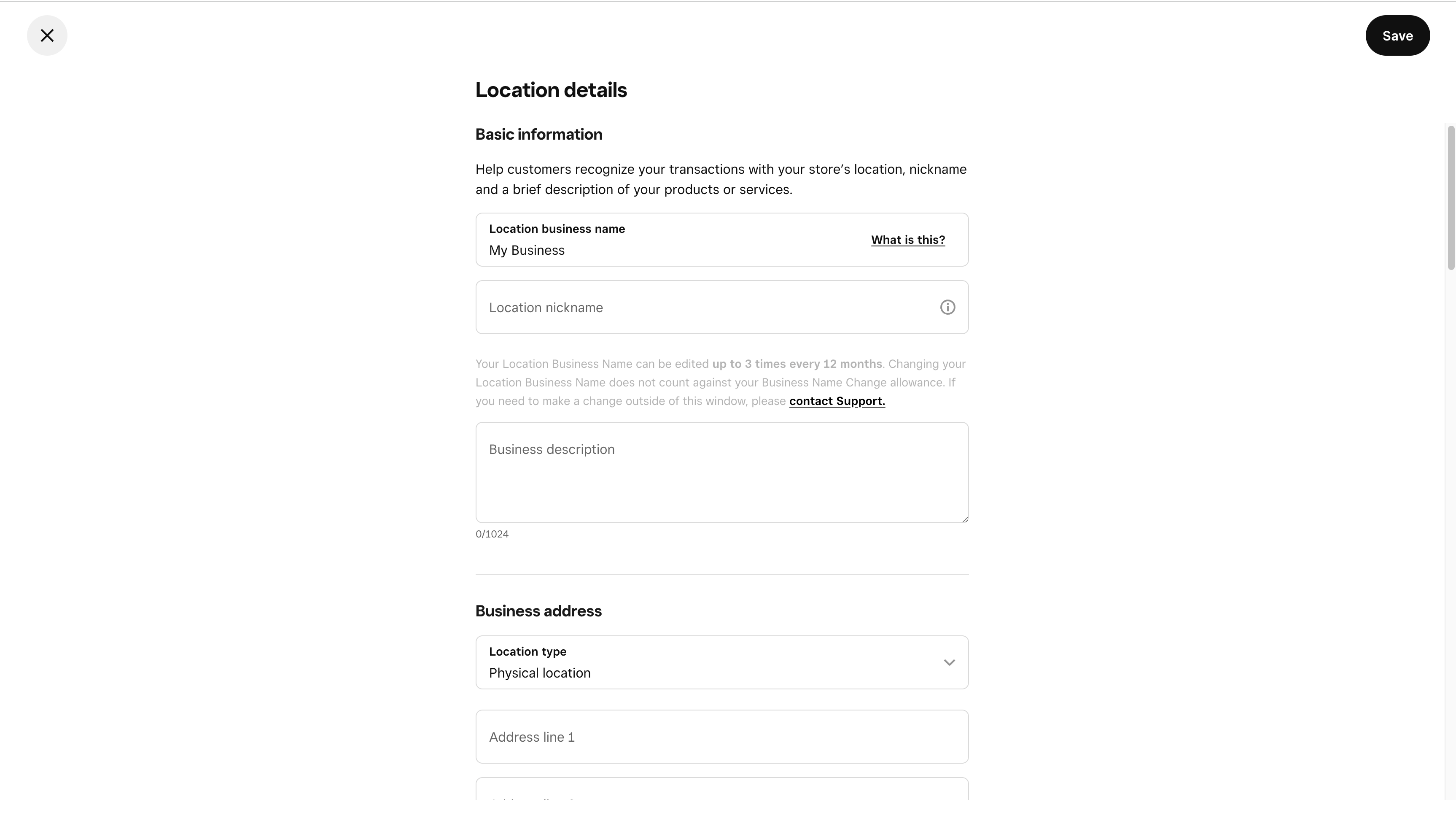
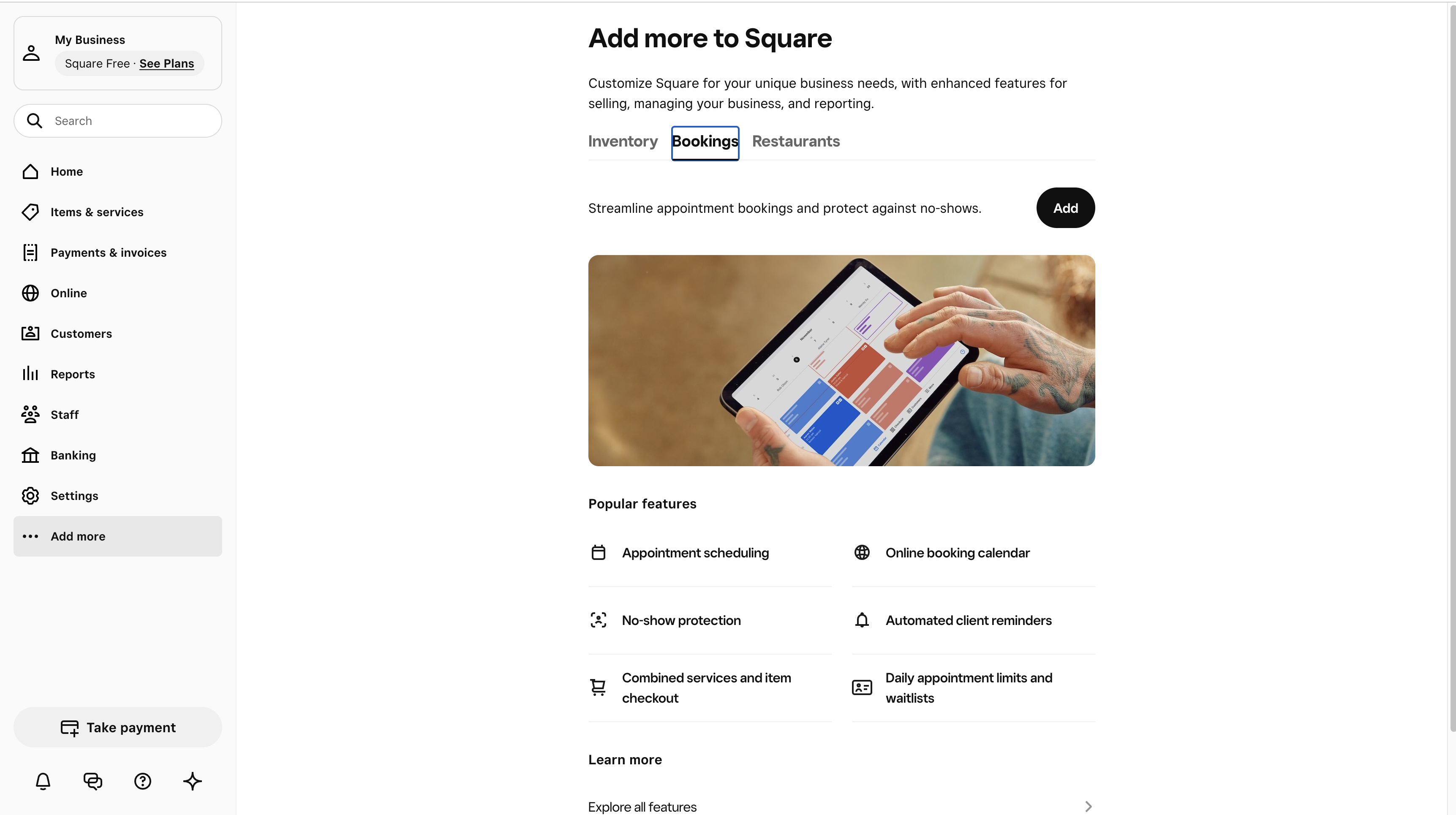
1a. Add a location
Open Square Dashboard → Locations and make sure at least one location exists. Set its address, timezone, and business hours.

1b. Turn on Square Appointments for the location
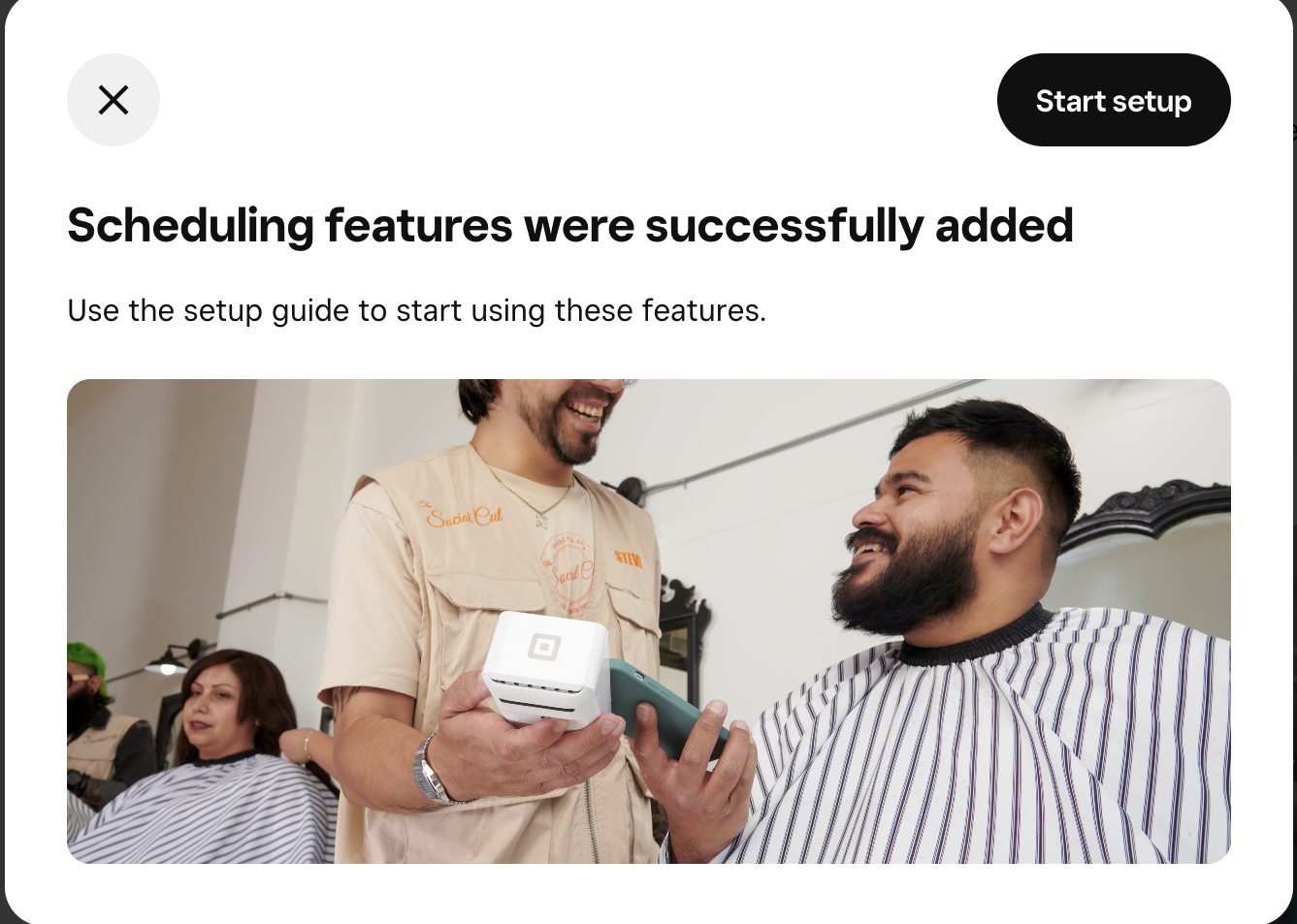
Open Square Appointments → Settings and enable Appointments for the location.
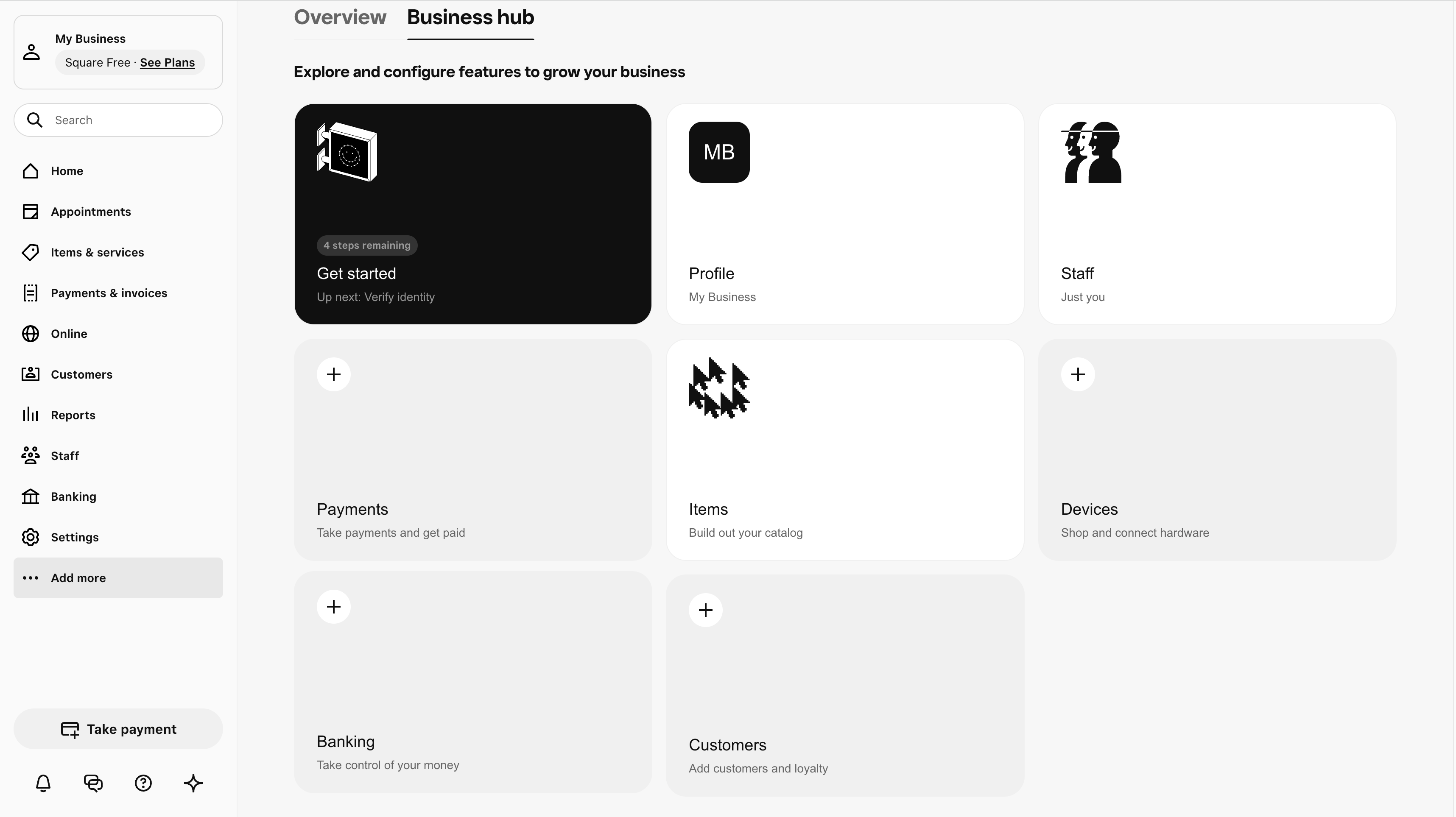
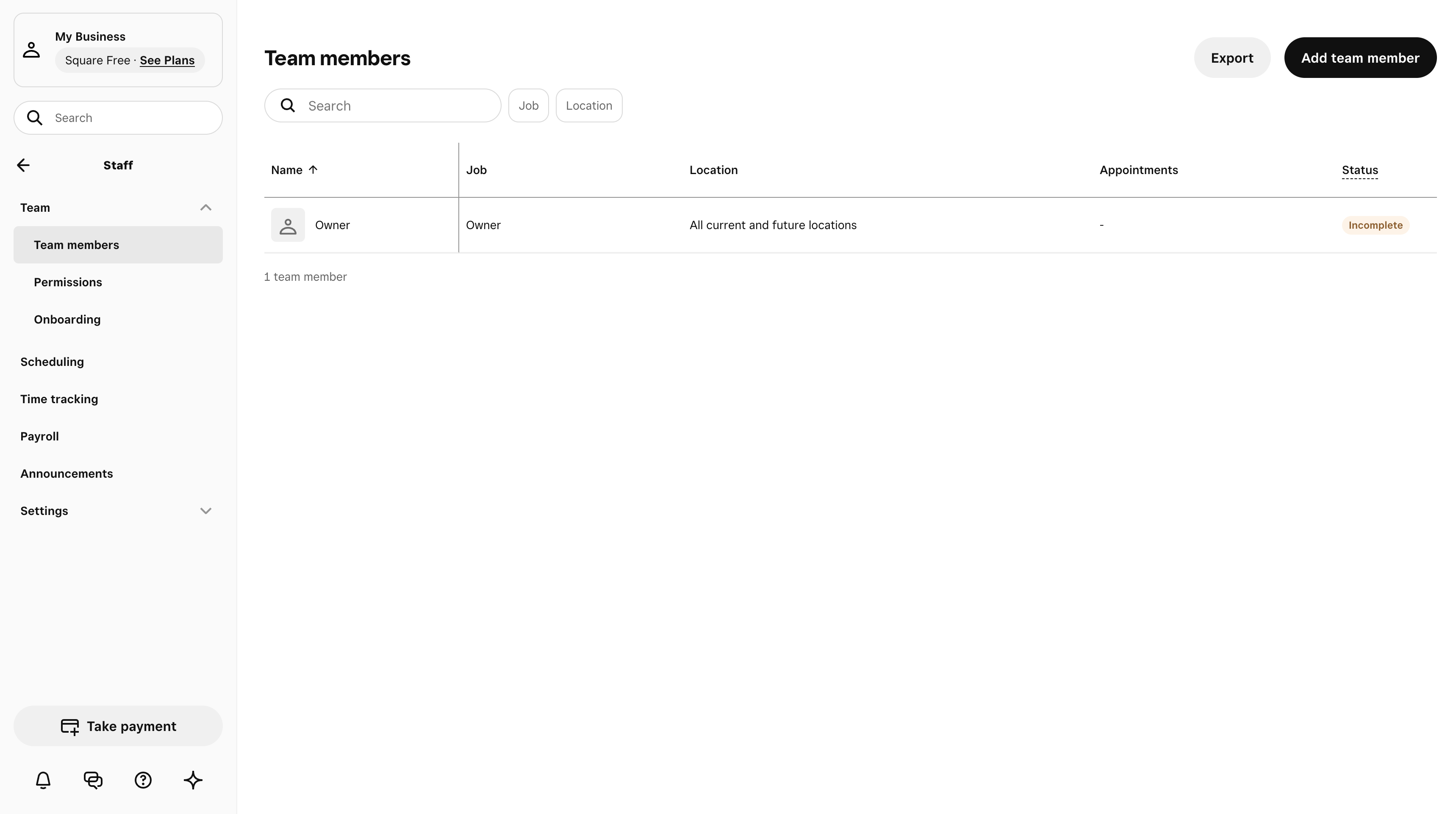
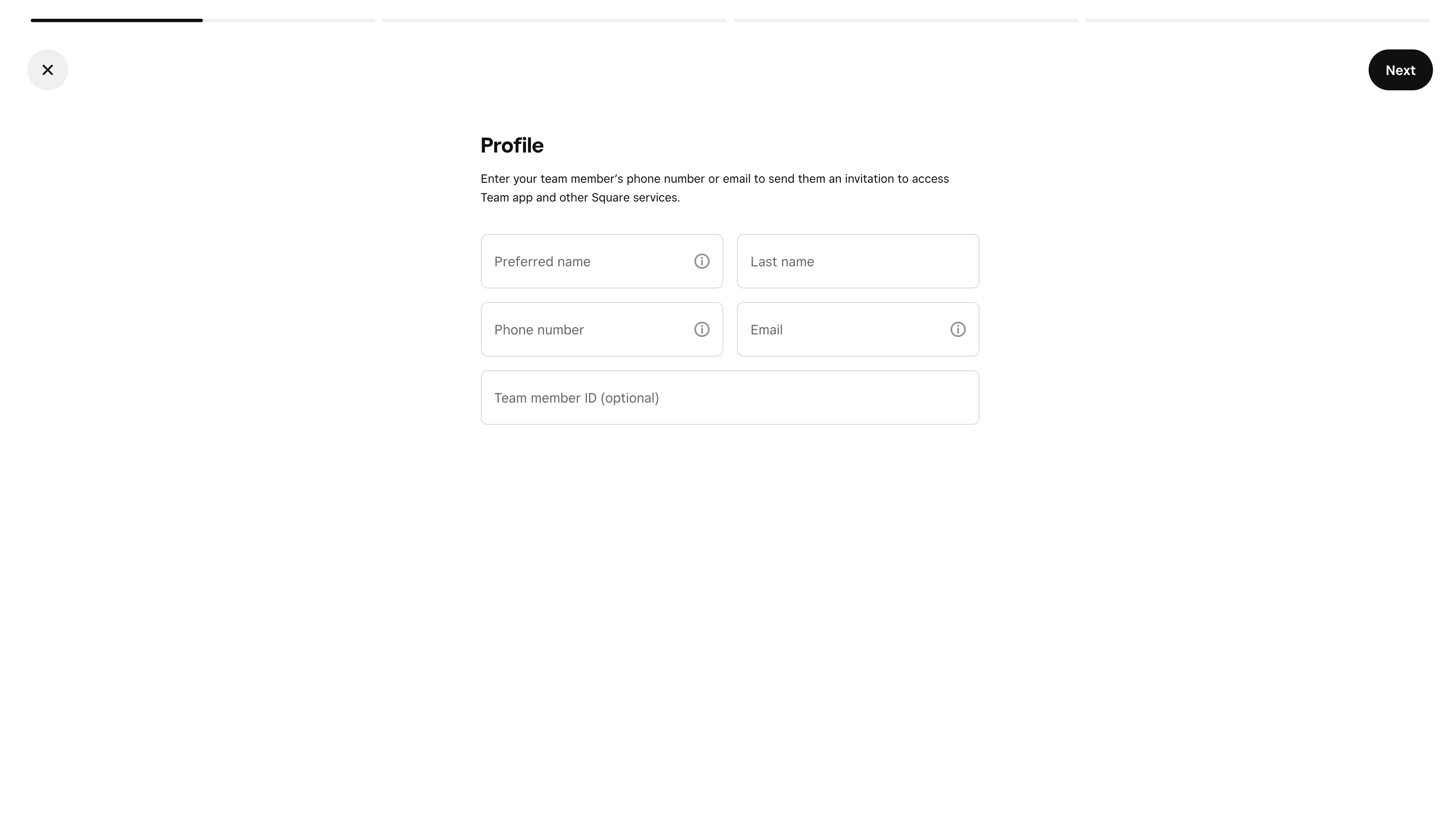
1c. Add at least one team member who can take bookings
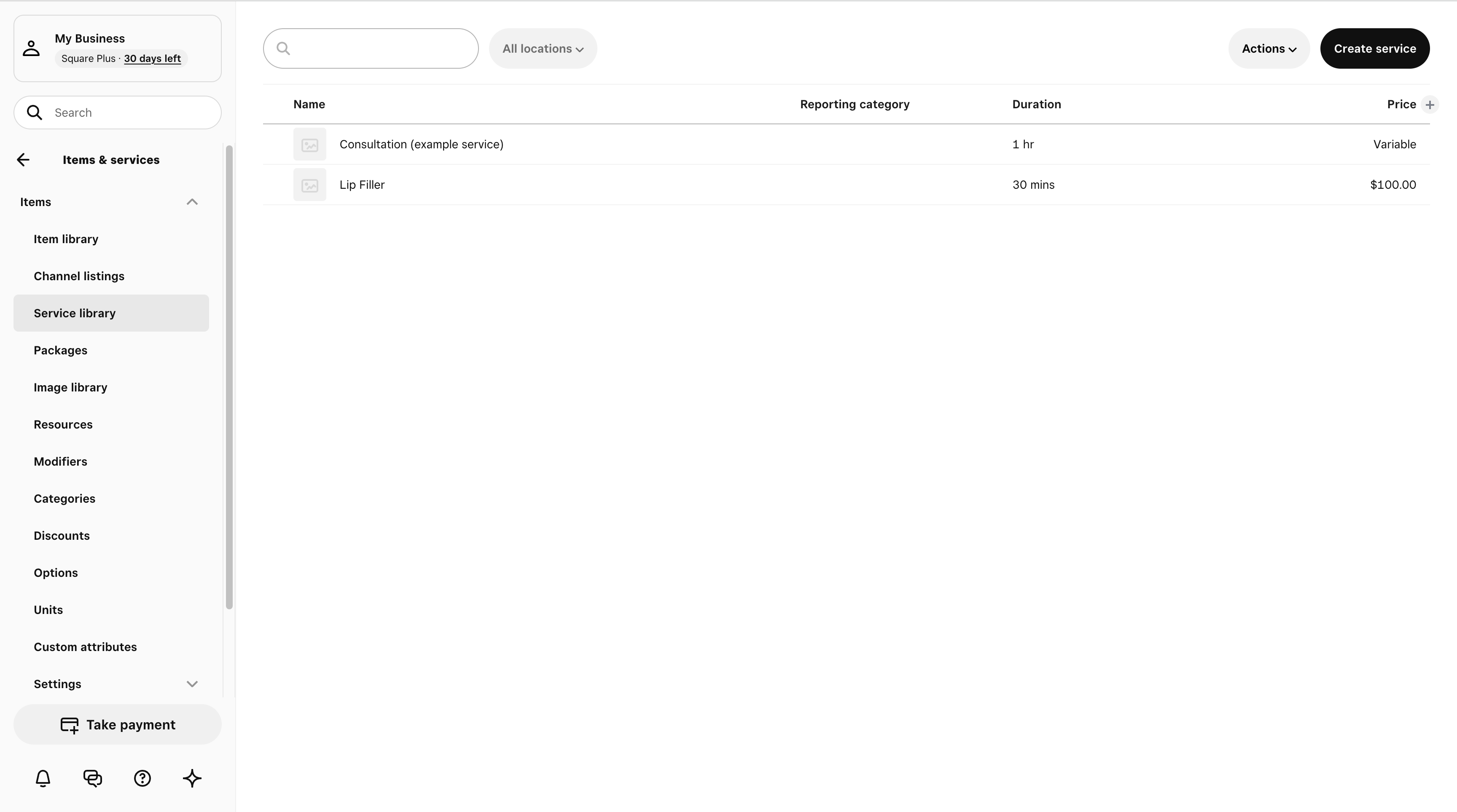
1d. Define services
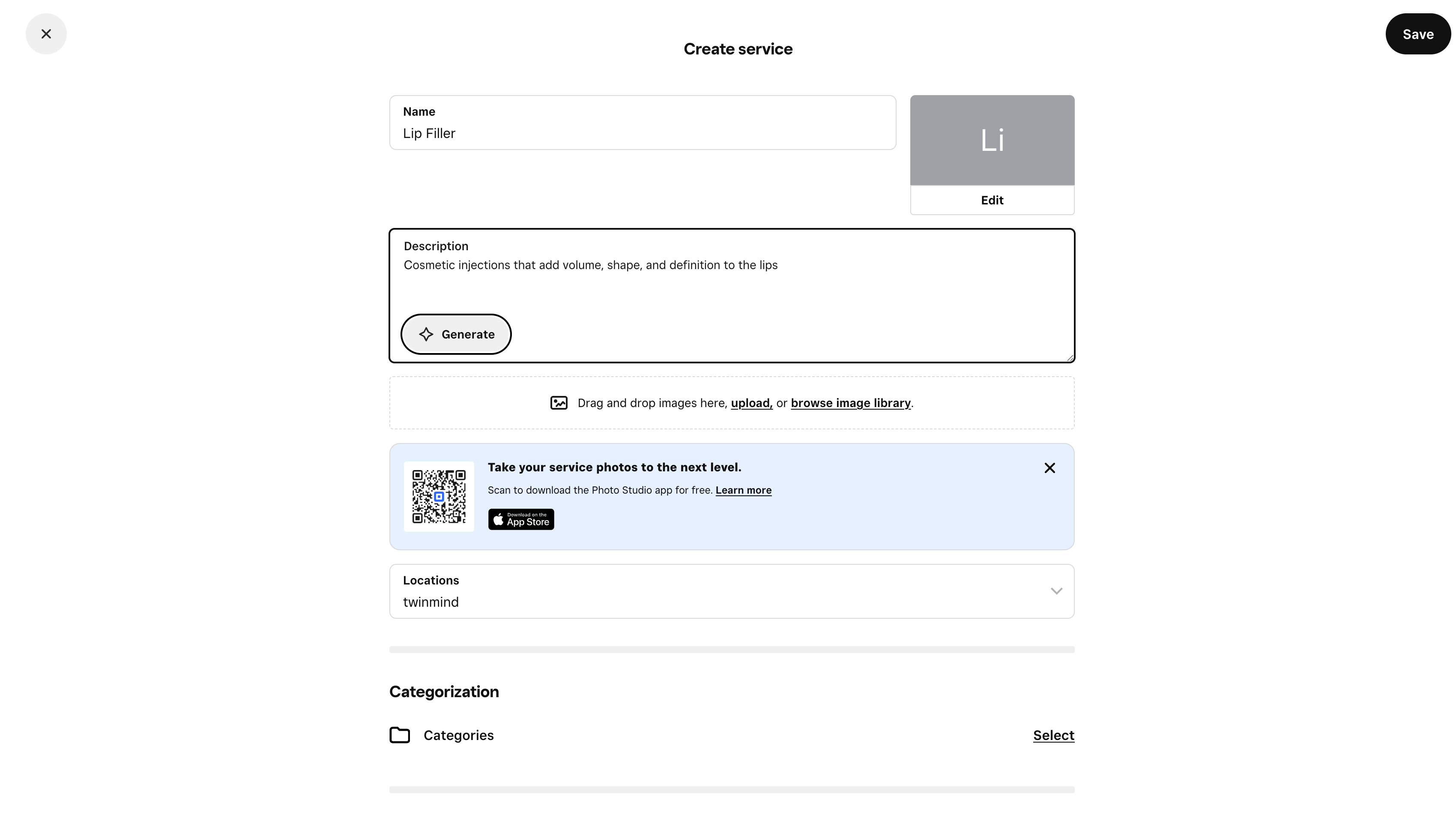
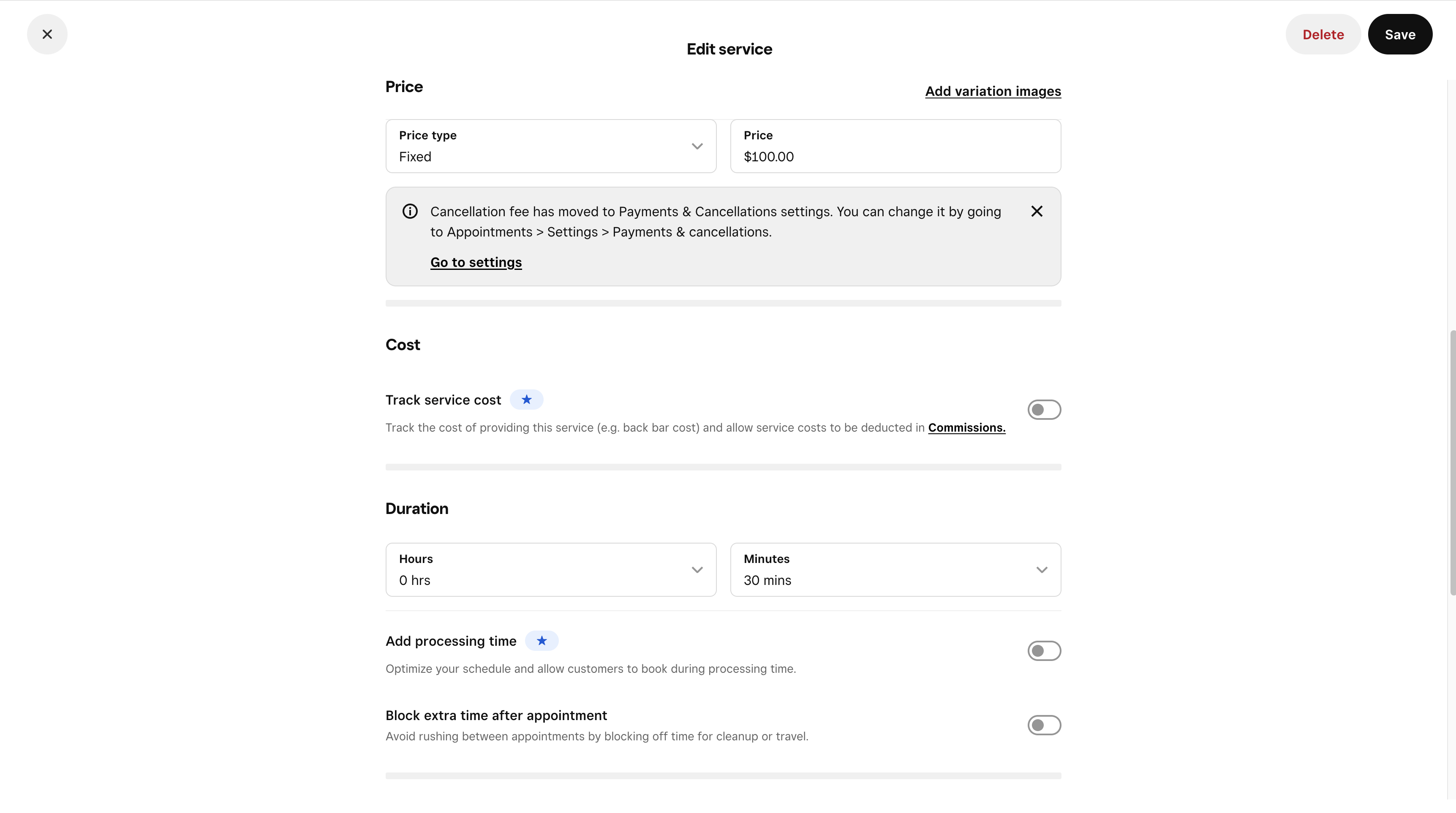
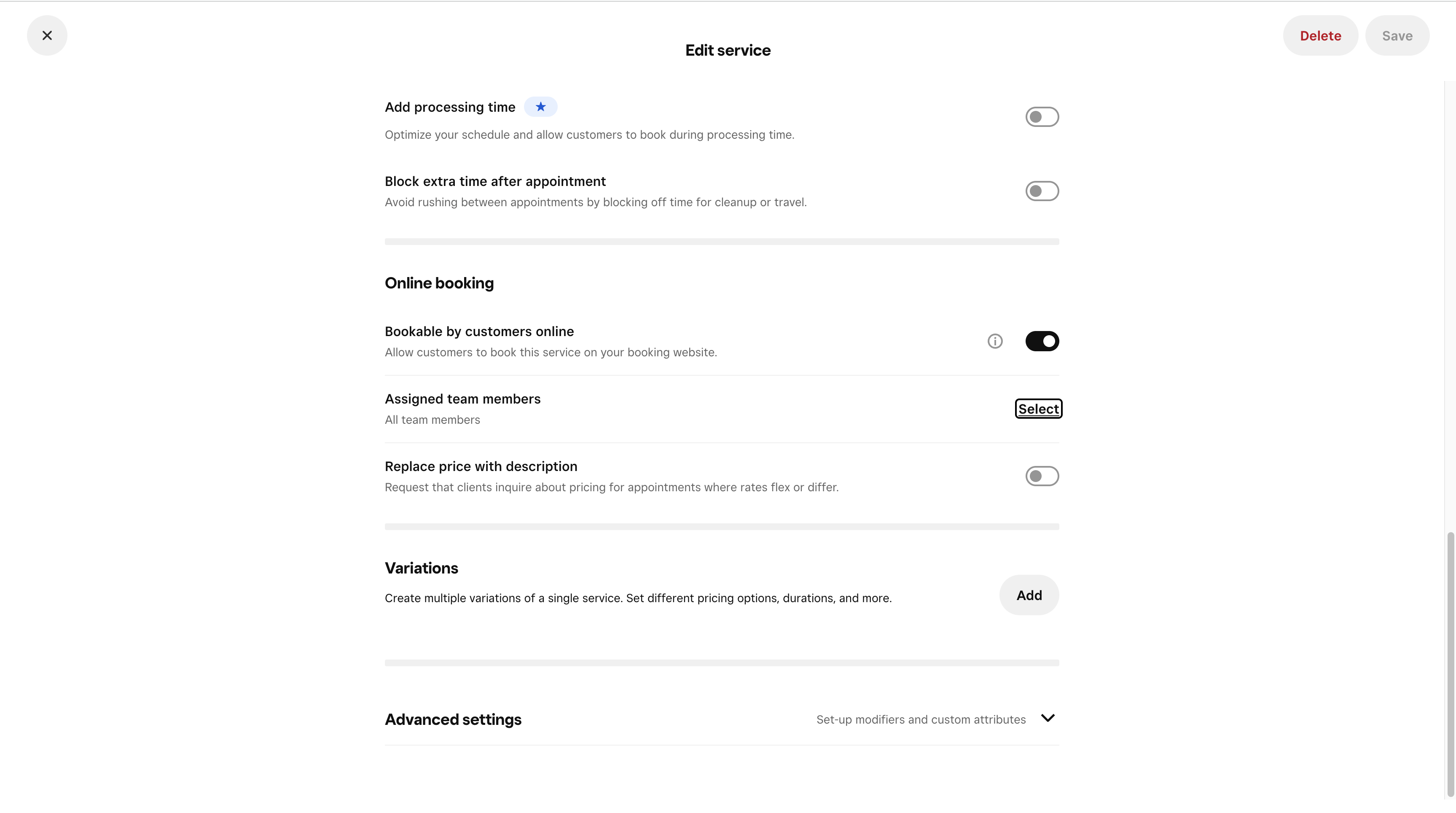
Open Square Appointments → Services and add every service the agent should offer. Each service must have a price and duration; tick Available for booking on every variation the agent should offer; use VARIABLE_PRICING only when the price genuinely is variable.
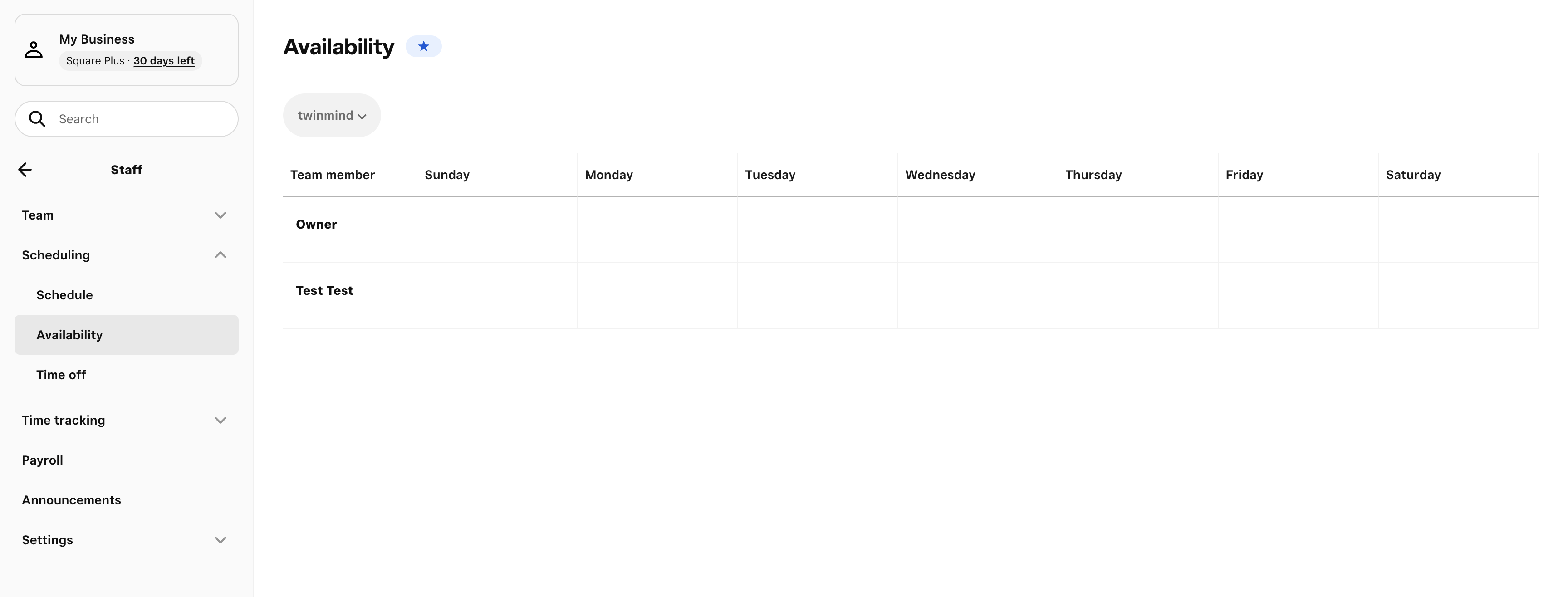
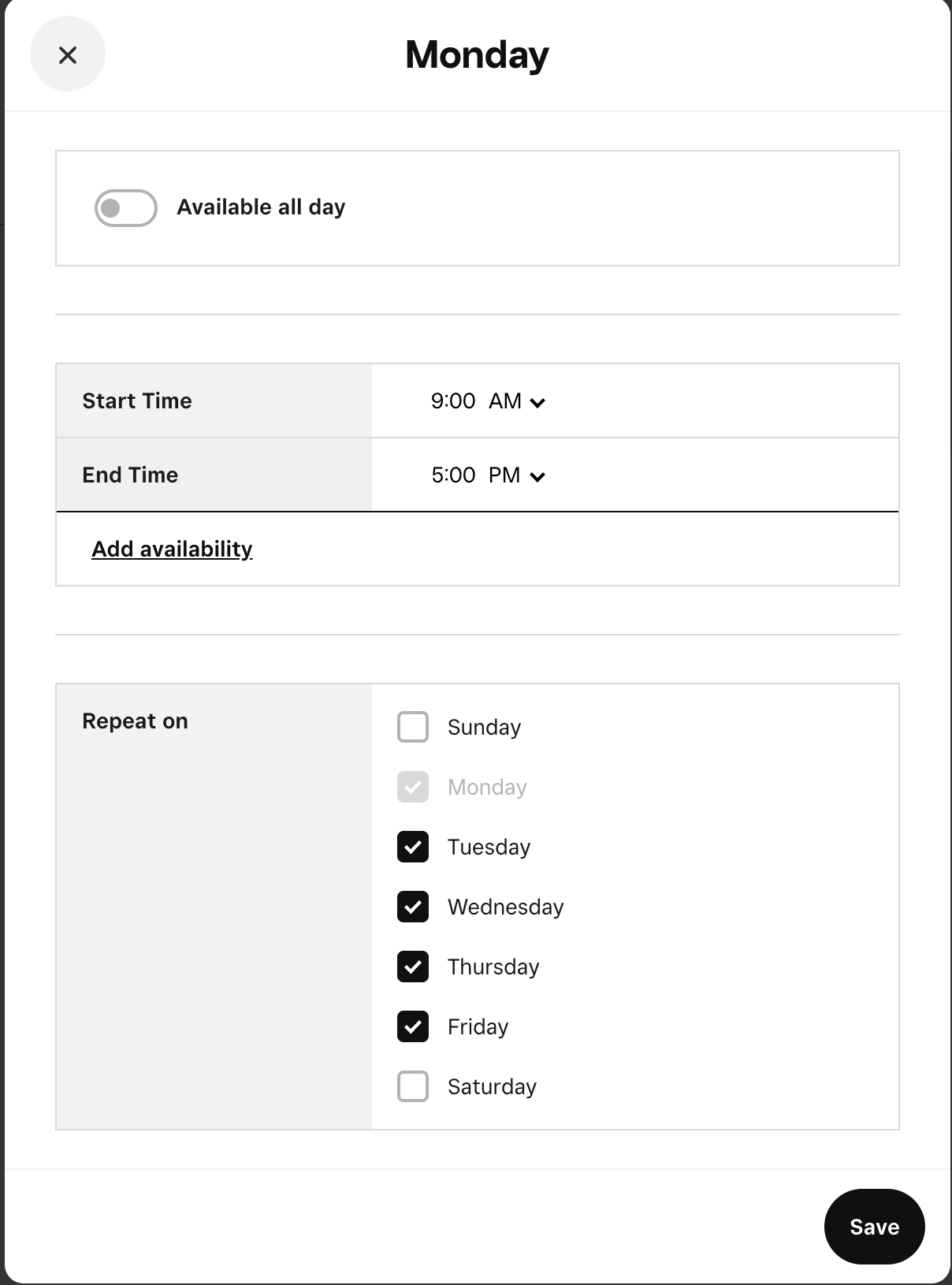
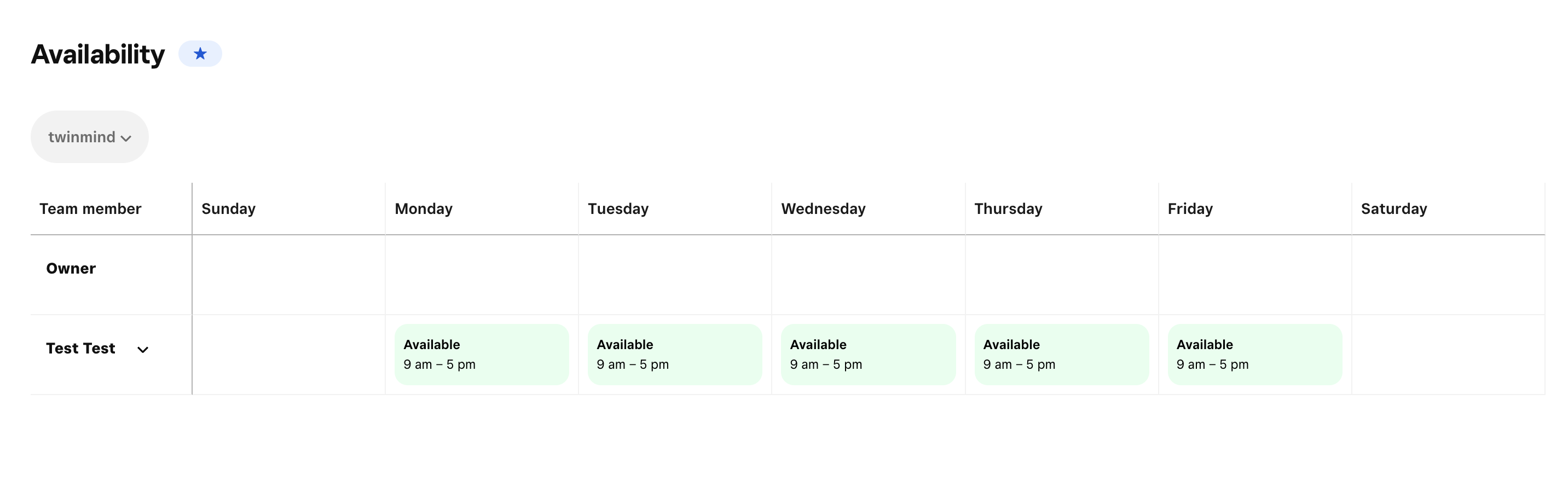
1e. Confirm availability
Open Square Appointments → Calendar / Availability and make sure each team member has working hours.
2. Get your Square credentials
Option A — Personal Access Token (recommended)
- Go to https://developer.squareup.com/apps.
- Create a new application, or use an existing one.
- Open the app → Credentials → Production tab.
- Copy the Personal Access Token.
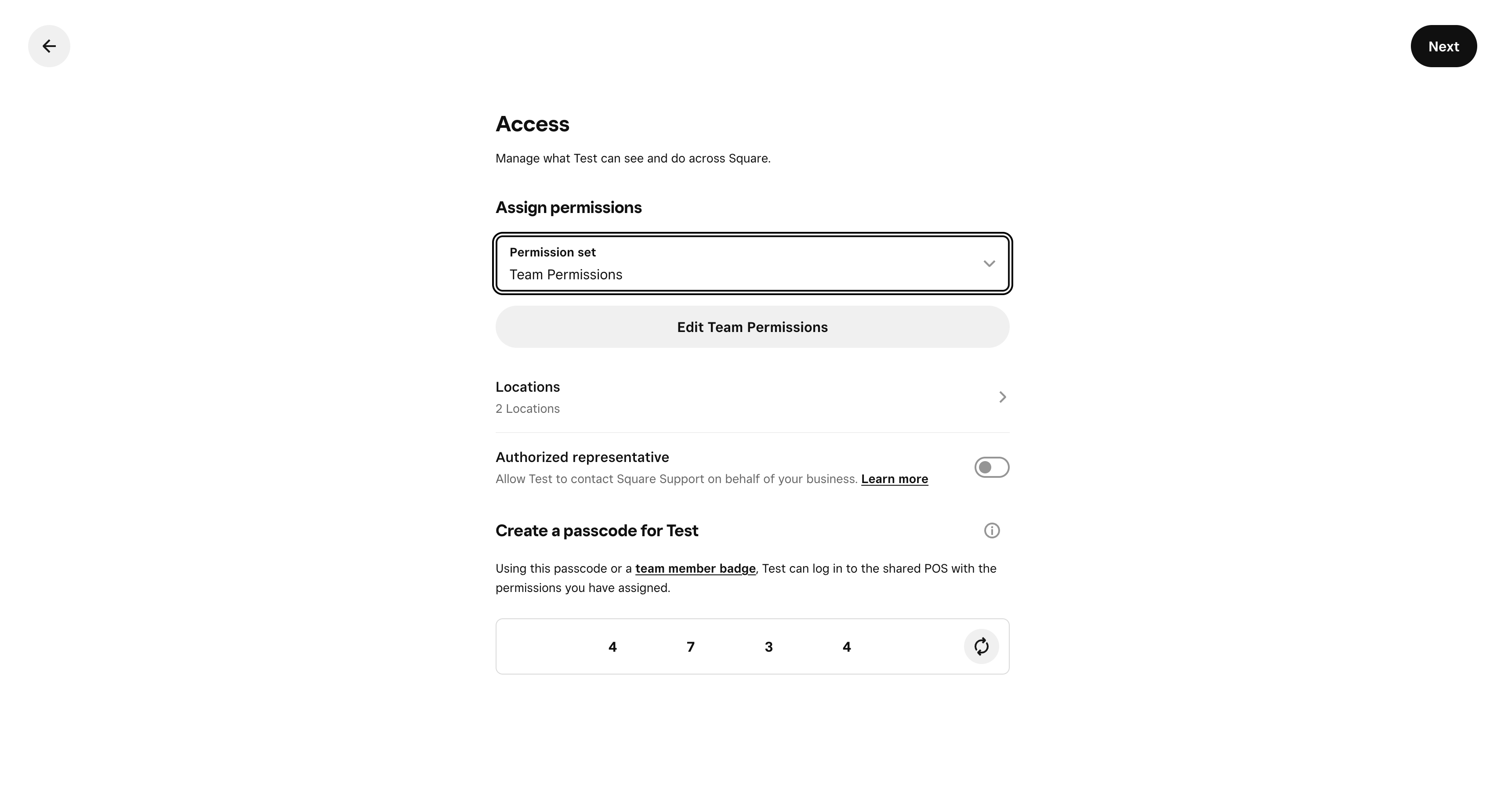
Option B — OAuth 2.0
- In the same Developer Dashboard app, copy the Application ID and Application Secret.
- During setup you'll be redirected to Square to authorize the app and paste the resulting code back into Newo.
3. Configure in Newo
- Open the project and find the Module - Square Integration attribute group.
- Choose auth method in
square_auth_type(TokenorOAuth). - For Token: paste the token into
square_personal_token. Hit Publish All. - For OAuth: fill in
square_client_idandsquare_secret_id, follow the Square authorize link, paste the returned code intosquare_oauth_code, then Publish All. - After the first successful auth, select the location in the
square_locationsdropdown (auto-populated) and hit Publish All again. - (Optional) review the feature toggles:
| Setting | Purpose | Default |
|---|---|---|
| Availability Feature | Live slot lookup on/off | on |
| Booking Feature | Booking creation on/off | on |
| Cancellation Feature | Cancellation on/off | on |
| Service Consultation Feature | "Do you offer X?" / "How much is Y?" lookup | on |
| Existing Client Lookup | Auto-recognise returning customer by phone, pre-load their Square bookings on every conversation start | on |
| Auto-Setup Canvas Scenarios | Publishes the consultation/booking/cancel scenarios on first install | on |
4. Hit Publish All
On publish, the agent will:
- Create the Square connector.
- Register the custom tools (consultation, availability, booking, cancellation, search bookings).
- Pull the Square catalog for the selected location and load it into the agent's knowledge base.
- Add the consultation / booking / cancellation scenarios and intents to the canvas (existing customizations are preserved).
Place a test chat message or call to confirm.
AKB ↔ Square Catalog Sync
The agent's Service Consultation and Availability tools never call Square mid-conversation to "find" a service — that would be too slow on a live call. Instead, the integration mirrors the Square catalog into the agent's AKB (Active Knowledge Base) as a set of topics that the agent can fuzzy-match against in milliseconds.
What ends up in AKB
For every bookable variation in Square, the integration writes one AKB topic on the SquareupAgent persona with:
| AKB field | Value |
|---|---|
| Name | <service_name> - <variation_name> (e.g. Brow Lift - Regular) |
| Summary | Human-readable blob: Service: <name> — Variation: <name> (ID: <variation_id>) | Price: 120.00 GBP | Duration: 15 min | Description: … |
| Facts | Structured key/value list: service_name, variation_name, variation_id, price, duration. Service description lives only in Summary — gating filters substring-match against it directly. |
| Source | square_catalog |
| Labels | square_catalog |
| Confidence | 90 |
The label is what scopes every read — both the consultation tool and the availability tool query AKB with labels=["square_catalog"], so other AKB topics on the persona are never confused with Square data.
When the sync runs
| Trigger | What happens |
|---|---|
| Every Publish All in Newo | InitFlow → SetupSkill emits square_update_catalog after the integration is initialised. CatalogFlow paginates Square Catalog API → /v2/catalog/list?types=ITEM for the selected location, filters by product_type=APPOINTMENTS_SERVICE and available_for_booking=true, then rewrites the AKB. |
| Service added / renamed / re-priced in Square | Hit Publish All in Newo. The new state is live on the next customer turn. |
| Service marked unavailable / deleted in Square | Same — publish and the topic is removed from AKB. |
Square webhook (catalog.version.updated) | Not wired in this version. Operators must publish to pick up changes. |
| Scheduled re-sync | Not implemented — the publish-on-demand model is intentional so the operator controls when the catalog goes live. |
How duplicates are handled
The sync is an upsert — never a wipe-and-rebuild. AKB stays consistent during the refresh, so a customer asking about availability while the catalog is being re-synced still gets a real answer instead of "we don't offer that".
_saveCatalogToAkbSkill does the following on every publish:
- Loads existing
label=square_catalogtopics and builds avariation_id → topicIdmap from their Facts. - For each variation in the fresh Square pull:
variation_idalready in AKB →UpdateAkbrewrites the topic in place (new price, duration, description, name).- New
variation_id→SetManualAkbcreates a fresh topic.
- After every variation has been upserted, only then does it
DeleteAkbthe orphans — topics whosevariation_idis no longer in Square — plus any legacy rows whose Facts don't carry a parseablevariation_id.
There is no moment when AKB is empty. The consultation and availability tools can fire safely throughout the refresh.
Duplicate variation names across different services are still kept separate — Styling - Fringe Cut and Styling - Ladies Wash, Cut and Finish are distinct topics because their AKB Name is <service> - <variation> and the Facts carry the unique variation_id. The agent disambiguates via variation_id whenever it books or quotes a price, so two topics that share a variation_name (e.g. two services that both have a Regular variation) never collide.
How stale records are removed
There is no soft-deprecate / archive flag. Each publish reconciles the AKB against the fresh Square pull and deletes any topic whose variation_id is no longer in Square (or whose Facts are corrupt / legacy). Any service no longer present (or no longer bookable) in Square is gone from AKB after the next publish. The consultation tool will then answer "we do not offer that" and offer to suggest a related service, exactly as if the service had never existed.
How the agent uses these records
| Tool | How it queries AKB |
|---|---|
Service Consultation (_serviceConsultationSkill) | SearchFuzzyAkb(query=<customer's words>, searchFields=["name", "summary"], labels=["square_catalog"]) — match width and strictness come from Catalog max topics (default 10) and Catalog score threshold (default 0.1). The reply to the customer is then capped to Consultation max services (default 3) so voice channels don't enumerate ten options. |
Availability (_checkAvailabilitySkill) | SearchFuzzyAkb(...) with the same two attributes. The agent then either picks one variation (if a single match is unambiguous) or asks the customer to disambiguate before checking slots — see the disambiguation case in Scenario 7. |
| Booking | Uses the variation_id already resolved by the availability step — no fresh AKB lookup. |
The fuzzy match is forgiving: typos, partial names, and reordered words still resolve to the right topic as long as the score clears the configured threshold. Operators can tighten the threshold (e.g. 0.3) or widen the candidate cap (e.g. 20) without a redeploy by editing the square_akb_* attributes and republishing.
Verifying the catalog in Newo (AKB search via UI)
Operators can inspect what the agent actually sees at any moment:
-
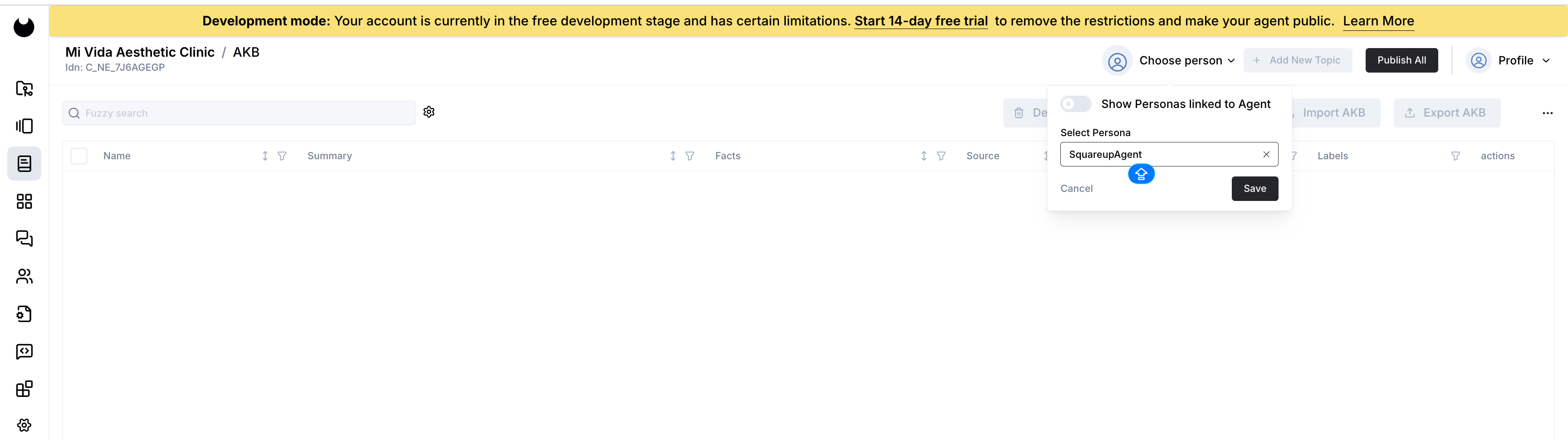
Open your project in Newo and click the AKB icon in the left navigation.
-
In the top-right corner, click Choose person, toggle on Show Personas linked to Agent, and select SquareupAgent in the Select Persona dropdown. Click Save.
-
The grid is now scoped to the SquareupAgent's knowledge base. Type a service name into the Fuzzy search box (e.g.
Brow Lift) and press Enter. Matching topics appear with their Summary, Facts, Source (square_catalog), and Labels (square_catalog).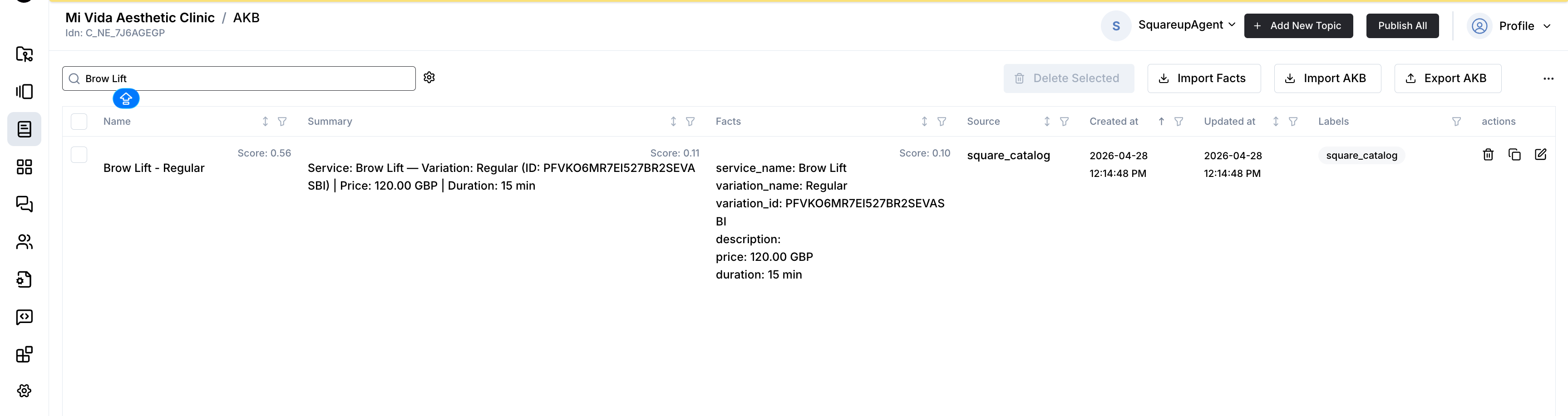
The Score next to Name / Summary / Facts is the fuzzy-match score for the query — the agent uses the same scoring on every customer turn.
This view is the source of truth when troubleshooting: if a service is missing here, it is missing for the agent.
Troubleshooting
| Symptom | Likely cause | Fix |
|---|---|---|
| AKB is empty after Publish All. | Auth not yet configured (token / OAuth code missing or invalid) — the catalog skill bails out early and logs [CATALOG] Skipping catalog sync — no auth configured yet. | Finish the auth step in Setup, then Publish All again. |
| AKB is empty but auth works. | Square location has zero items with product_type=APPOINTMENTS_SERVICE, or every variation is marked not available for booking. | In Square: confirm the items are Appointments services (not Retail) and tick Available for booking on at least one variation. Republish. |
| Some services missing after Publish All. | The variation isn't bookable for the selected location (present_at_location_ids filter), or available_for_booking=false. | Adjust the variation in Square (Locations + Available for booking), republish. |
| Price or duration look wrong in AKB. | Catalog in Square was edited but operator did not republish. | Publish All in Newo. AKB is a snapshot of Square at publish time. |
Price shows variable. | Variation uses pricing_type=VARIABLE_PRICING in Square. | Intentional — the agent will not quote a fake price. Set a fixed price in Square if you want a number quoted. |
| Two near-identical AKB rows for the same service. | Two different bookable variations with the same variation_name exist in Square. | Expected — the rows differ by variation_id in Facts. The agent picks the right one via variation_id at booking time, not by name. |
| Old (deprecated) service still appears in AKB. | Operator removed it from Square but did not republish. | Publish All. The upsert step removes any topic whose variation_id is no longer in the fresh Square pull (and any legacy row without a parseable variation_id). |
| Fuzzy search in the UI returns 0 hits but the topic exists. | The persona filter in the top-right is wrong (e.g. left on a previous agent). | Re-open Choose person, pick SquareupAgent, Save, retry the search. |
Customizing the agent
The scenario bodies on canvas are fully editable. Common tweaks:
- Ask for more info during booking. Add steps like "ask for the allergy history" or "ask for preferred staff".
- Change the consultation tone. Scenario 9 can be rewritten — just keep the code-phrase "Let me check our services for you, I will get back to you shortly." intact so the lookup still fires.
- Restore defaults. If you break a scenario, delete it from the canvas and republish — the original is restored from the integration's library.
Frequently asked questions
Q. Does the agent ever charge the customer? No. It only books and cancels. Payment is handled inside Square by staff as normal.
Q. What happens if two customers try to book the same slot? Square serializes the bookings. The second request comes back with a "slot no longer available" error; the agent apologizes and offers the remaining slots.
Q. Can the caller reschedule in one step? Not directly — the agent cancels the old booking and starts a new booking flow.
Q. The customer asked about a service we stopped offering last week. After the next Publish All, the old service is gone from the knowledge base — the consultation scenario will tell the customer it's not offered and invite them to suggest a related service.
Q. We just added a new service in Square. When does the agent see it? Hit Publish All in Newo. The agent already knows about the new service on the next customer turn.
Q. Does the agent answer policy questions? Yes — those come from the Business Context on the canvas, not from the Square catalog.
Q. Can I connect multiple Square locations at once? One location per integration instance.
Q. What happens if the token expires or is revoked?
Token mode: tokens don't expire but can be revoked. Generate a new one and update square_personal_token. OAuth mode: the integration auto-refreshes on 401 using the refresh token — no manual action needed.
Q. Can I turn off the consultation tool? Yes — set Service Consultation Feature to off and republish.
Q. Can I turn off the existing-client lookup at conversation start? Yes — set Existing Client Lookup to off. The agent will still be able to find bookings on demand via the search-bookings tool when the customer asks to cancel.
Q. Why E.164 phone numbers only?
Square's customer search and booking endpoints reject domestic formats (e.g. UK 07426906344). The integration insists on the international format (+447426906344) so the API accepts the request.
Limitations
- Reschedule endpoint is not wired (Square API shape differs per region). Workaround: cancel + rebook.
- Multi-service bookings are intentionally routed to a human manager.
- Historical data — the agent only sees services and bookings that exist in Square at or after the first publish.
- One location per instance — to serve two locations, deploy two Newo projects.
All settings reference
Every attribute the integration adds to the Module - Square Integration group in Newo. Operators typically only touch the "Primary" rows; the rest are good out of the box.
Primary (set these during setup)
| Attribute | Title in UI | Purpose | Default |
|---|---|---|---|
square_auth_type | Authentication Method | Token (paste Personal Access Token) or OAuth (go through Square authorize flow). | Token |
square_personal_token | 04. Personal Access Token | The token from Square Developer Dashboard (Token mode). | (empty) |
square_client_id | 02. Application ID | OAuth application ID (OAuth mode). | (empty) |
square_secret_id | 03. Application Secret | OAuth application secret (OAuth mode). | (empty) |
square_oauth_code | 01. OAuth Code | One-time authorization code returned by Square (OAuth mode). | (empty) |
square_locations | Square Location | Dropdown of locations. Pick the one this integration instance serves. | (empty) |
square_feature_availability_enabled | Availability Feature | Master on/off for live slot lookup. | on |
square_feature_booking_enabled | Booking Feature | Master on/off for creating bookings. | on |
square_feature_cancellation_enabled | Cancellation Feature | Master on/off for cancelling bookings. | on |
square_feature_consultation_enabled | Service Consultation Feature | Master on/off for the catalog lookup tool. | on |
square_check_existing_client | Existing Client Lookup | Master on/off for the auto-load-bookings-by-phone behaviour at conversation start. | on |
square_setup_scenarios | Auto-Setup Canvas Scenarios | Publishes the consultation/booking/cancel scenarios on first install. | on |
Advanced fine-tuning (hidden by default)
There are advanced settings — labelled Advanced — for admins only in the UI — that let you fine-tune what the agent extracts from the conversation (which service, what date, what time, which slot, which phone number) and how strict the catalog match is. They're hidden by default. Clear a value and Publish All to restore the shipped default.
| Attribute | Title in UI | Purpose | Default |
|---|---|---|---|
| Catalog score threshold | AKB Catalog Score Threshold | Minimum fuzzy-match score for a candidate to surface. Lower = more permissive (more candidates), higher = stricter. Raise to 0.3–0.5 if the agent picks the wrong variation on ambiguous names; lower toward 0 if good matches are missed. | 0.1 |
| Catalog max topics | AKB Catalog Max Topics | Maximum candidates the AKB returns to the agent's ranking step. Wider = more context, narrower = tighter prompt. Raise for large catalogs (20–30) or lower for small ones. | 10 |
| Consultation max services | Consultation Max Services | Caps how many variations the agent reads out in a single consultation reply. Voice channels usually want 2–3; chat channels can handle more. | 3 |
square_gated_services_marker | Gated Services Marker | Marker phrase the integration scans for in the Square service description to flag the service as existing-client-only. Case-insensitive substring match. Set to a clear, unique phrase or wrap it in brackets ([Existing clients only]) for visual clarity in the Square UI. Leave empty to disable the gate. | Only for existing client |
Internal settings (OAuth tokens, the resolved Square endpoint, a setup persona ID) are managed automatically and never need manual editing.
Changelog
v2.5.0 — Session-driven AKB sync, NAF procedures, gating polish
- Catalog sync moved to a session-driven model with TTL + race lock. Replaces the "rebuild on every publish" model.
CatalogFlow/MaybeSyncCatalogOnSessionSkillsubscribes tosession_startedand runs a fresh sync at most once every 2 hours;CatalogFlow/UpdateCatalogSkillenforces the TTL plus an in-progress lock (with 10-minute stale-takeover) on every entry. Newo's project-publish flow wipes AKB topics, soInitFlow/SetupSkillclearssquare_catalog_last_sync_atbefore dispatching a publish-time refresh — that re-populates the AKB immediately on every Publish All. Two new hidden attributes manage the cycle:square_catalog_last_sync_at(UTC ISO-8601 of the last successful sync) andsquare_catalog_sync_in_progress(in-flight lock). - Defensive guard against an "empty save" race. If
_saveCatalogToAkbSkillever sees an emptysquare_catalog_rawwhile existingsquare_catalogtopics are still in AKB, it refuses to proceed to the orphan-delete step — that combination means another sync chain already saved successfully and proceeding wouldDeleteAkb-wipe every topic. The lock is still released so the next legitimate sync isn't blocked. Closes #1144. - Booking scenario rewritten around shared NAF procedures. The hand-written "ask name → ask phone → ask email" block in step 5.5 is replaced with delegated calls to canonical procedures:
Gathering Preferred Date and Time,Reconfirming or Gathering Phone Number,Reconfirming or Gathering First and Last Name. The phone procedure now runs before availability so the integration can verify existing-client status by phone before the AKB gating filter strips topics — this fixes the silent block of generic parent terms ("YAG Laser Tattoo Removal") when only specific variations ("Package") were gated. - Date/time captured before availability. Step 7.2 (was: enumerate slots after lookup) now ALWAYS asks the User for preferred date AND time first, then the availability code-phrase fires with the captured preference in context. Eliminates the "agent picks the first slot from the list without asking" hallucination.
- Catalog AKB cleanup. Service description is no longer duplicated as a
descriptionfact — it lives only inSummary(... | Description: …). The existing-client gating filter substring-matches againstSummarydirectly. -1 redundant copy of every description text, +1 less brittle parse path. - Explicit-block fires only when there are no non-gated alternatives that match.
_checkAvailabilitySkillnow pre-checks the request against kept (non-gated) topic names: if the request also matches any of them, fall through to silent LLM substitution instead of blocking. Generic parent terms (e.g. "YAG Laser Tattoo Removal" when only "YAG Laser Tattoo Removal Package" is gated) no longer trigger the block. - Centralised end-of-session prompt-section cleanup.
ExistingClientFlow/ClearDataSkillnow removes all five tool-owned prompt sections (AvailableSlots,BookingResult,CancellationResult,ExistingBookings,ExistingCustomerInfo) onend_sessioninstead of only the two it owned. Guards against future regressions where another flow's ClearDataSkill silently fails to fire. - Canvas scenarios re-numbered to avoid NAF preset collisions. The NAF beauty preset already uses Scenario 5 (Regular Transfer) and Scenario 6 (Consultation and Lead Qualification); our custom scenarios collided with those. Renamed:
- "Scheduling Appointment in Square via Agent": 5 → 7
- "Canceling Appointment in Square via Agent": 6 → 8
- "Service Consultation in Square": 7 → 9
v2.4.0 — Existing-client gating + chat phone-lookup workaround + slot presentation polish
- Gate services marked "for existing clients only". New
square_gated_services_markersetting (defaultOnly for existing client) flags services whose description contains the marker. New callers no longer see those services in availability or consultation results; if they ask for one by name, the agent replies with a polite block message and offers a non-gated alternative. Returning customers identified by phone see the full catalog. Closes #1046. - Returning-customer flag.
ExistingClientFlow/_processClientResultSkillnow writes"true"/"false"after every Square/v2/customers/search, so other flows can branch on verified existing-client status without re-running the lookup. - Chat workaround for phone identification. Voice channels auto-fire
define_user_phone_numberon conversation start, but chat sessions don't carry caller-id. The availability skill now extracts the phone from the conversation memory mid-turn, fires the same Square customer search, saves the conversation context to a persona attribute, and re-firessquare_check_availabilityonce the lookup resolves — so existing clients in chat are unblocked automatically without requiring a second user message. - Catalog parser fix — descriptions reach AKB.
_processCatalogPageSkillwas readingdescriptionfrom the wrong nesting level (object.descriptioninstead ofitem_data.description_plaintext). Every AKB topic was being written with an emptydescriptionfact, which silently broke the marker-based gating. Now the parser prefersdescription_plaintextwithdescriptionanddescription_htmlas fallbacks. - Sub-case slot presentation. Booking scenario step 5.3 / Case2 now picks one of three sub-cases based on what the customer said:
- Sub-case A — specific date and time → confirm in one line:
"Yes, [date] at [time] is available — would you like me to book it?". No more enumerating the day's slots after a specific request. - Sub-case B — only a day named → compact one-line-per-day list, then "Which time works best?".
- Sub-case C — no date → next 1–3 days in compact form, then "Which day and time work best?".
- Sub-case A — specific date and time → confirm in one line:
- Self-cleaning canvas section. Every early exit in
_checkAvailabilitySkill(gated, no-match, ambiguous) now writes a freshAvailableSlotssection with an explicit status (not_available_for_new_clients,no_match,needs_clarification) — the canvas no longer gets stuck inIn progressafter an early exit, and the booking scenario reacts to each status with the right behaviour.
v2.3.0 — Mi Vida hardening: catalog upsert, disambiguation, advisory consultation
- Catalog sync is now an upsert. Replaces the previous wipe-and-rebuild. AKB stays consistent throughout every Publish All —
SearchFuzzyAkbcalls during the refresh always return real results. Topics are created, updated in place, and deleted only after the new snapshot has been written. Orphans (variations no longer in Square) and legacy rows without a parseablevariation_idare swept on the same pass. - Tunable AKB fuzzy match. New advanced settings let admins dial match strictness without a redeploy:
- Catalog score threshold (default
0.1) — minimum fuzzy score for a candidate. - Catalog max topics (default
10) — how many candidates feed the agent's ranking step.
- Catalog score threshold (default
- Consultation reply cap. New Consultation max services (default
3) caps how many variations the agent voices in a single consultation reply, so voice channels don't enumerate ten options. - Service disambiguation in availability. When the catalog returns several plausible matches for the customer's request, the agent no longer guesses: it lists the candidates with optional short hints, asks which one, and re-fires the availability lookup with the clarified service. Booking scenario step 5.3 has a new case for this — operator-visible without code changes.
- Comparative follow-ups stay in context. Questions like "which is cheapest?", "what's the longest one?", "what's the difference between 1 session and 3?" are now answered from the data the agent already has, without re-firing the consultation tool. Consultation reply now includes price + duration so this is possible.
- Advisory consultation queries. Phrases like "what do you have for legs?", "popular brow options", "something for hair removal" now go to the catalog using the area as a search hint, instead of looping on "tell me a specific service name".
- Anti-hallucination guard. Canvas instruction makes the agent strict about only reading out catalog services that came from a tool result. No more invented Profhilo / Dermal Filler suggestions.
v2.2.0 — Existing-client recognition + cross-session and multi-booking cancel
- New
ExistingClientFlow. When phone is detected on a conversation, the agent searches Square customers, loads the upcoming bookings, populates the persona cache, and emits<ExistingCustomerInfo>and<ExistingBookings>prompt sections so the canvas can read the booking list directly. Gated by Existing Client Lookup . - Cross-session cancellation works. A customer who books today and calls tomorrow is recognised; the agent finds their booking via Square and cancels it without asking for a booking ID.
- Multi-booking disambiguation. When the customer has more than one upcoming booking, the agent reads the list back and asks which to cancel. The right one is picked via an LLM extraction validated against the actual booking_id list — never guesses.
- Custom search-bookings tool (custom booking-search behavior). Replaces the standard NAF
search_booking_toolso cancellation can be triggered explicitly when needed. - Booking flow hardening. Phone is now extracted from the conversation in E.164 with a 6-step fallback chain; bookingDateTime is normalized at write time so the persona cache always carries the canonical
YYYY-MM-DD HH:MMshape; every bail-out branch clears the<BookingResult>/<CancellationResult>placeholder so the agent never gets stuck waiting for a result that won't arrive. - Canvas Step 5.1 is no longer gated by the consultation match — the agent always proceeds to live availability lookup once a single service has been named.
- Catalog the old catalog timestamp removed. The catalog is rebuilt on every publish; the timestamp attribute is dropped automatically by a migration.
v1.3.0 — Tighter slot presentation + reliability fixes
- Compact slot presentation. Up to three days with up to five well-spaced slots per day instead of dumping every 30-minute interval.
- Better handling of "next Tuesday" and similar phrases. Agent stops inventing dates that don't match the day of the week the customer named.
- Catalog reliably reaches the agent on first publish.
- Smoother first-time setup — the location-actor resolution error is fixed.
v1.2.0 — Service Consultation tool + live pricing + better extraction
- Service Consultation tool and scenario for "do you offer X?" / "how much is Y?".
- Price and duration stored alongside every variation in the agent's knowledge base.
- Calendar-aware date / time extraction for both availability and booking.
- Forgiving catalog matching — typos and partial names resolve to the right service.
v1.1.x — earlier Square integration work
Historical versions before the v1.2.0 catalog/consultation overhaul. Full commit history: branch 912-improvesquareup-hcp-style-akb.