Launch27 Integration Guide
What the AI can do
The Newo AI Agent integrates with Launch27 so your Agent can check real service availability and create new cleaning or local-service bookings directly inside a conversation.
Once configured, the AI Agent can:
- Check Launch27 availability for a requested date and service
- Match caller requests to real Launch27 services from a local service cache
- Match caller frequency preferences to Launch27 frequencies from a local frequency cache
- Collect required service details such as bathroom count and selected extra services, which Launch27 uses when calculating the total service duration
- Create new Launch27 bookings through the public booking endpoint
- Store bookings in the caller's Newo persona so future sessions can recognize bookings made through the Agent
This integration does not require a Launch27 login, bearer token, password, or 2FA code. It also does not cancel, reschedule, update, or look up existing Launch27 bookings through the API. If a caller asks to manage an existing booking, the Agent explains that direct booking management is not supported here and offers to help with a new booking.
In plain terms: callers can ask "do you have anything Tuesday morning?" and then book one of the returned Launch27 slots without leaving the conversation.
Before You Start
Make sure you have:
- An active Launch27 tenant
- The tenant subdomain, for example
acmeforhttps://acme.launch27.com - A default Launch27 frequency ID for bookings, such as your one-time cleaning frequency
- Access to the Newo project builder
- Permission to edit project attributes and publish
2.1 Find Your Launch27 Tenant Domain
Log in to Launch27 in a browser and look at the URL. The subdomain, the part between https:// and .launch27.com, is your Tenant Domain. For https://acme.launch27.com, enter only acme in Newo.

Figure S01. The Launch27 URL bar. Copy only the subdomain, not the full URL.
2.2 Find Your Default Frequency ID
Launch27 requires a frequency_id when creating a booking. Choose the frequency Newo should use when the caller does not specify one, usually your one-time service frequency.
Open Launch27's frequency settings. The ID is visible in the URL of the frequency edit page, for example:
https://acme.launch27.com/admin/frequencies/1/edit
In this example, the frequency ID is 1.
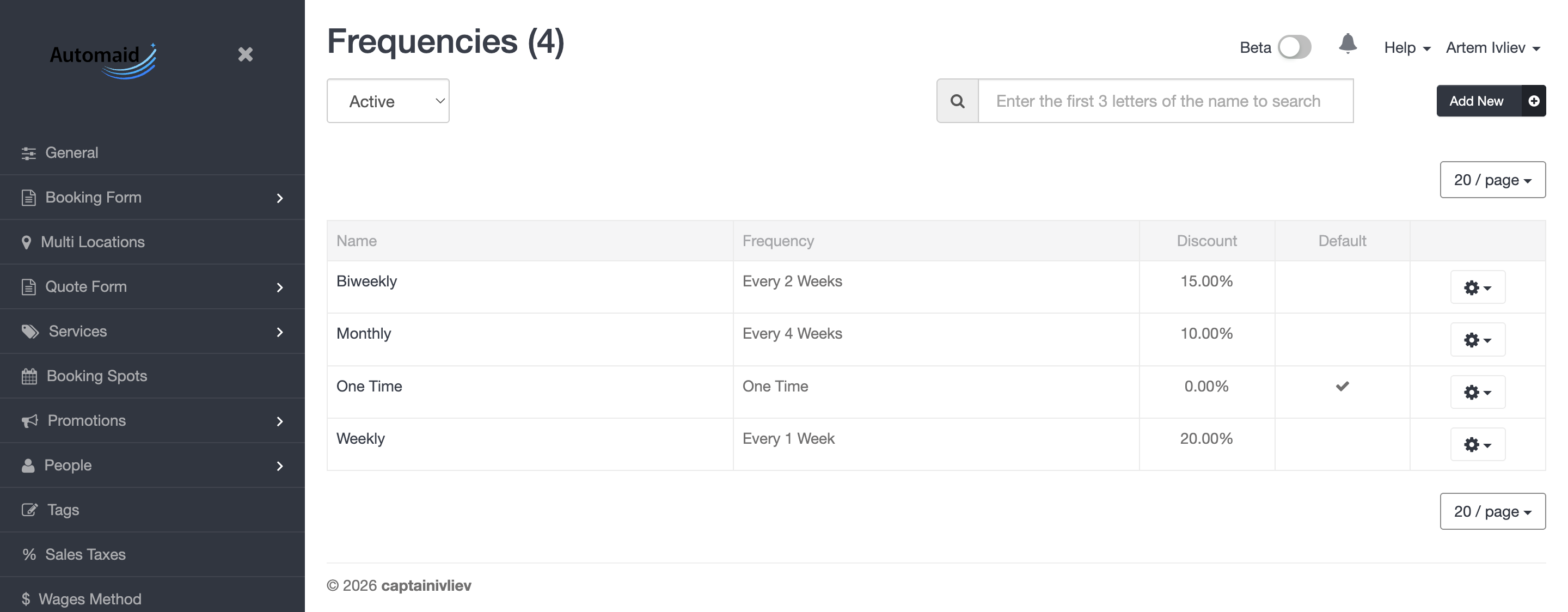
Figure S02. The Launch27 frequency settings. Copy the ID of the cadence you want as your default.
Setup
Create the Newo project
If this project already exists in Newo Builder, skip this subsection and continue with the integration-specific settings below.
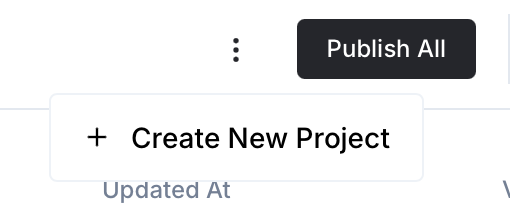
- In Newo Builder, open the projects list and click Create Project (or Create New Project from the top-right menu).
- Fill IDN and Title. The exact names do not matter; use any clear names your team will recognize.
- In Registry, choose the release channel:
- staging — the newest module fixes appear here first. Use it when you need the latest fix, but expect possible unfinished changes.
- production — the final stable version for live projects.
- In Module, select the module for this integration.
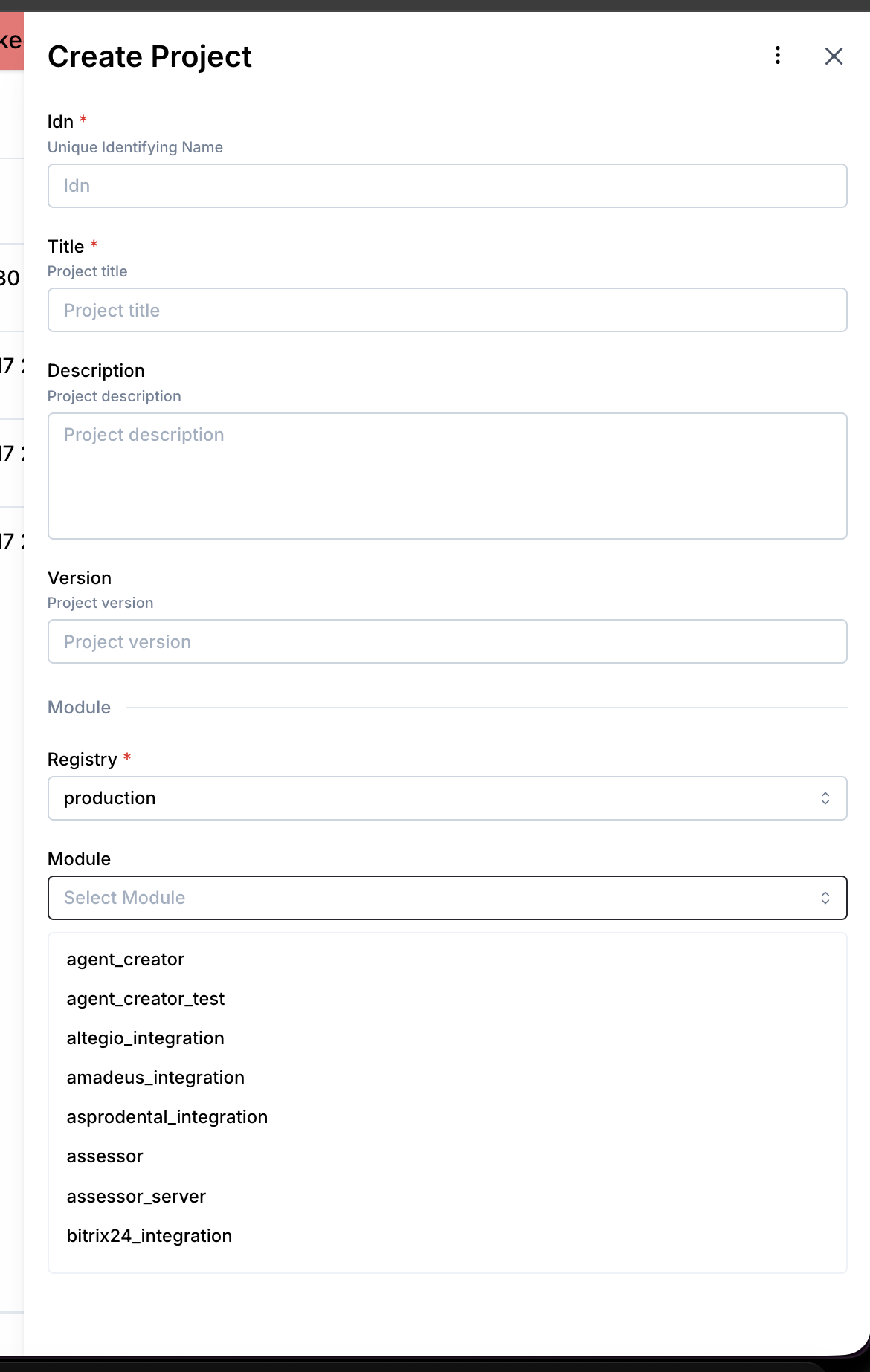 5. Leave Module version on Latest version unless support tells you to pin a specific version, then click Create.
- Open your project in Newo and go to Builder -> Attributes.
- Find the Module - Launch27Integration group.
- Fill in the required fields:
- Tenant Domain — your Launch27 subdomain only, for example
acme. - Default Frequency ID — the Launch27 frequency ID to use when the caller does not specify a cadence.
- Tenant Domain — your Launch27 subdomain only, for example
- Keep Base URL Template at the default unless your Launch27 tenant uses a custom API root.
- Click Save.
- Click Publish All at the project level.
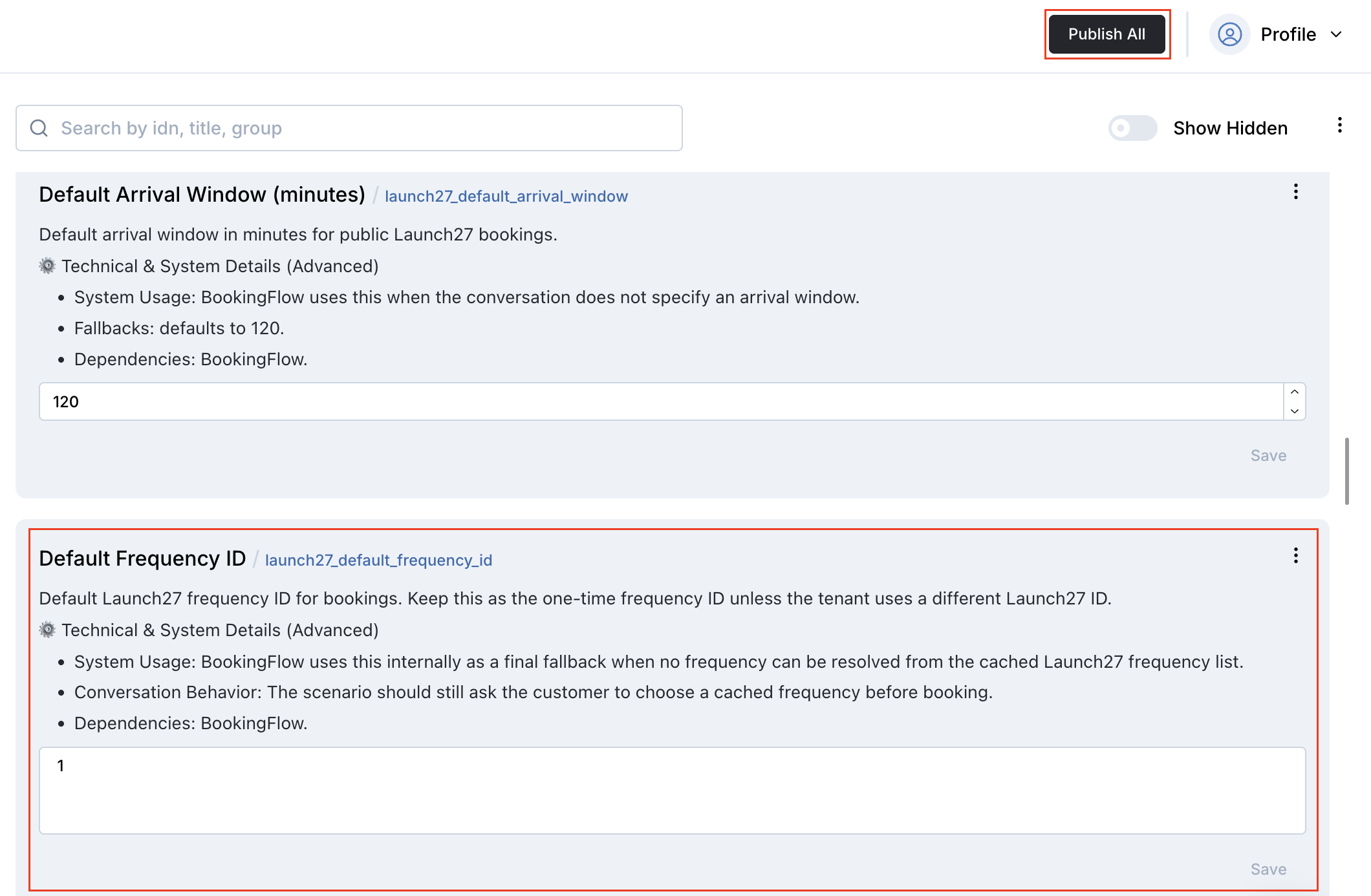
Figure S03. The Launch27 attributes group with Default Frequency ID filled.
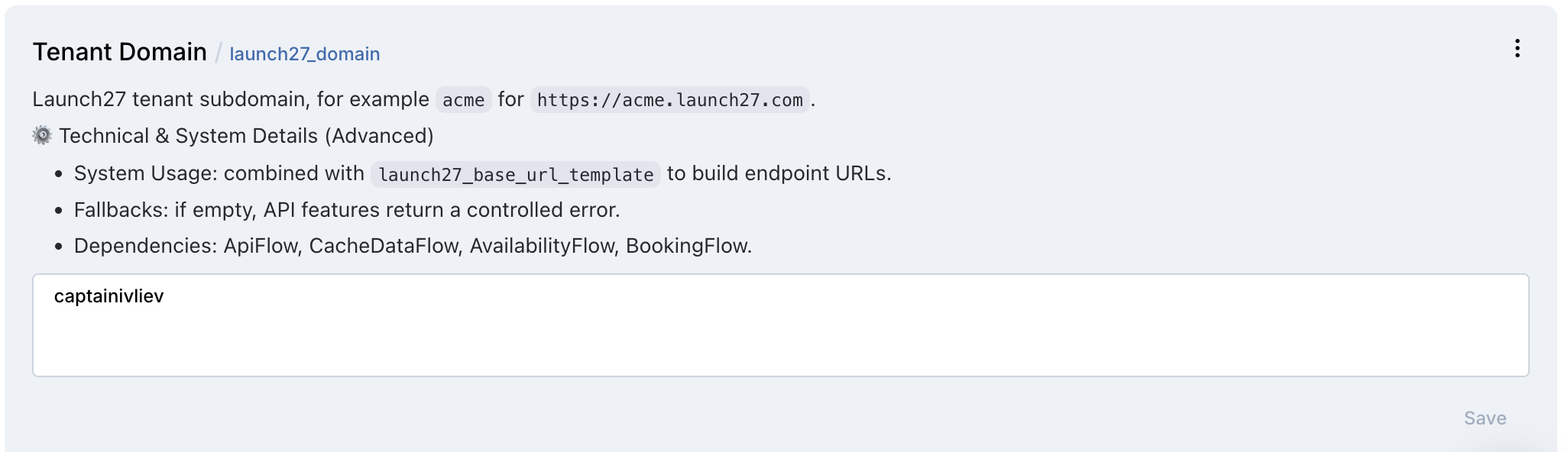
Figure S04. The Launch27 attributes group with Tenant Domain filled.
What happens after publish:
- The Launch27 custom tools
launch27_check_availabilityandlaunch27_book_appointmentare registered with the Agent. - The generic NAF availability, booking, cancellation, calculation, and ZIP-code service-area tools are disabled so they do not conflict with Launch27's custom tools.
- Launch27-specific booking scenarios, procedures, and intent types are inserted into the Agent canvas unless Setup Scenarios is set to
False. - The services and frequencies caches refresh on conversation start when the cache is stale.
All settings reference
You can find all settings in Builder -> Attributes -> Module - Launch27Integration.
4.1 Connection Settings
| Setting | What it does | Required |
|---|---|---|
Tenant Domain (launch27_domain) | Launch27 subdomain, for example acme. Used to build every Launch27 API URL. | Yes |
Base URL Template (launch27_base_url_template) | URL template with {domain} placeholder. Default: https://{domain}.launch27.com/v1. | Yes, default provided |
No Launch27 username, password, OTP code, bearer token, or token expiry setting is required for the current integration.
4.2 Feature Switches
Each capability can be independently enabled or disabled. When a switch is False, the corresponding flow exits before extraction or API calls.
| Setting | Default | What it controls |
|---|---|---|
Availability Feature Enabled (launch27_feature_availability_enabled) | True | Whether launch27_check_availability runs |
Booking Feature Enabled (launch27_feature_booking_enabled) | True | Whether launch27_book_appointment runs |
Setup Scenarios (launch27_setup_scenarios) | True | Whether Publish All installs Launch27 scenarios, procedures, and intent types |
SMS Notifications Supported (launch27_sms_notifications_supported) | False | Whether BookingFlow sends Launch27's optional sms_notifications field |
4.3 Booking Defaults
| Setting | What it does |
|---|---|
Default Frequency ID (launch27_default_frequency_id) | Launch27 frequency ID used when the conversation does not specify one. Booking returns a controlled error if both the extracted value and this default are empty. |
Default Arrival Window (minutes) (launch27_default_arrival_window) | Used when the conversation does not specify an arrival window. Default: 120. |
4.4 Services Cache
The integration keeps a local cache of Launch27 services so caller requests can be matched to real bookable services.
| Setting | What it does |
|---|---|
Services Cache (launch27_services_cache) | Cached the lookup request response. Source of truth for service matching in availability and booking. |
Services Cache Updated At (launch27_services_cache_updated_at) | Timestamp of the last successful cache refresh. Empty means the cache is stale. |
Services Cache TTL (seconds) (launch27_services_cache_range_seconds) | How long the cache stays fresh. Default: 86400 seconds. |
Services Cache Tags (launch27_services_cache_tags) | Cached tags_info metadata returned by service queries. |
Frequencies Cache (launch27_frequencies_cache) | Cached the lookup request response. Used to map one-time, weekly, biweekly, monthly, or similar caller preferences to Launch27 frequency IDs. |
Frequencies Cache Updated At (launch27_frequencies_cache_updated_at) | Timestamp of the last successful frequency cache refresh. |
What the AI can do
The Launch27 integration exposes two custom tools:
launch27_check_availabilitylaunch27_book_appointment
The generic NAF availability, booking, cancellation, calculation, and ZIP-code service-area tools are disabled to avoid conflicting behavior.
5.1 Check Availability
The Agent calls the create/update request for a requested date, service, and optional location, then reads the returned slots back to the caller.
Example: "Can you do a two-bedroom deep clean Thursday afternoon?" The Agent extracts the service name, cleaning preference, bathroom count, selected extras, and date, matches the service against the local services cache, and queries Launch27 for available spots.
How it works:
- Service matching — requested service names are matched against
launch27_services_cache. - Bathroom count — if the matched Launch27 service has a required Bathroom pricing parameter, the Agent asks how many bathrooms before checking availability.
- Extra services — if the matched Launch27 service has optional extras, the Agent asks whether the caller wants any of them before checking availability.
- Duration-aware availability — bathroom count, pricing parameters, and selected extras are sent to Launch27 because they can affect the overall service duration and therefore which slots are available.
- Date normalization — past dates without a year are rolled forward to the next future occurrence.
- Missing service guard — if no service matches and no explicit duration is provided, the Agent asks the caller to confirm the exact Launch27 service or home-size option.
- In-progress guard — duplicate availability requests inside the same session are skipped.
You will see no Launch27 booking record at this step because availability checking is read-only.
5.2 Tool Trigger Phrases
The Agent uses custom Launch27 tools. The exact wording does not have to match these examples, but the Agent must clearly commit to checking availability or booking before the tool runs.
| Caller phrase | Agent commitment that triggers the tool | Tool |
|---|---|---|
| "Do you have anything next Tuesday morning for a two-bedroom cleaning?" | "I'll check Launch27 availability now." | launch27_check_availability |
| "Can you see if Friday afternoon is open?" | "I'll check Launch27 availability now." | launch27_check_availability |
| "I need a deep clean next week." | The Agent first gathers service/home size, required pricing parameters, extras, date, and time. Then: "I'll check Launch27 availability now." | launch27_check_availability |
| "Book the 10 AM slot." | The Agent gathers any missing frequency, name, email, phone, and address details, then asks for final confirmation. | Prepares data for booking |
| "Yes, please book it." | "I'll submit the Launch27 booking now." | launch27_book_appointment |
| "Schedule that appointment for me." | After all required details are known and the caller confirms: "I'll submit the Launch27 booking now." | launch27_book_appointment |
5.3 Book an Appointment
The Agent books the appointment the caller confirms by calling the create/update request.
What happens automatically:
- The Agent extracts
serviceName, bathroom count or other required pricing parameters, selected extra services, customer information, service address, city, state, ZIP code, appointment date/time, optional arrival window, optional frequency ID, optional location ID, customer notes, and SMS preference. - Customer info can be filled from the persona's stored
full_name,email, andprovided_phone_number_with_country_codewhen available. - The service is matched against the Launch27 services cache.
- Frequency is matched against the Launch27 frequencies cache, with Default Frequency ID as the final fallback.
- Pricing parameters, such as bathroom count, and selected extras from the matched service are included in the request. Launch27 uses these details when calculating the booking's service duration.
- On success, the booking is saved to the caller's
bookingspersona attribute with the Launch27booking_id, date/time, service name, and status.
You will see a new booking in Launch27. The request uses cash as the default payment method.
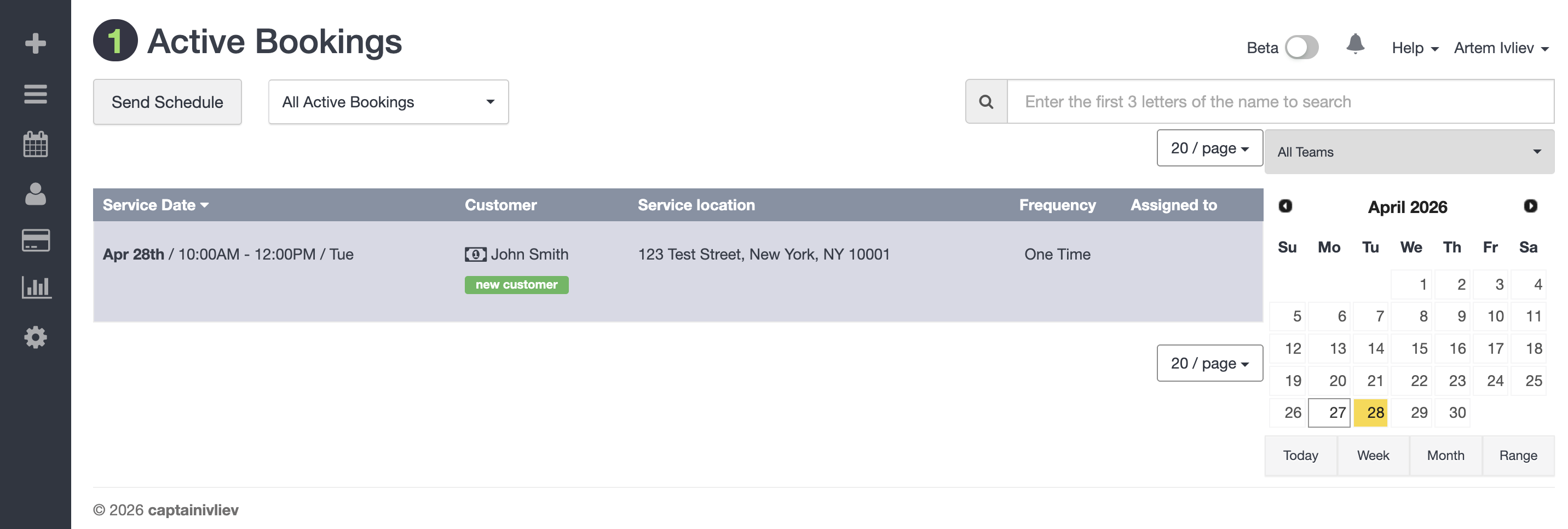
Figure S05. The new booking as it appears in the Launch27 dashboard.
5.4 Existing Booking Management
Direct management of existing bookings is not supported in the current Launch27 integration.
The Agent does not:
- Cancel existing Launch27 bookings
- Reschedule existing Launch27 bookings
- Update existing Launch27 bookings
- Search Launch27 for bookings created outside Newo
If a caller asks to cancel, reschedule, update, or look up an existing booking, the Agent should explain that direct booking management is not supported here, suggest contacting the business, and offer to help with a new booking.
How to test that everything works
Before going live, run through this checklist on a demo contact.
6.1 After Setup
After clicking Publish All, confirm:
- Tenant Domain is set to the Launch27 subdomain only.
- Default Frequency ID is set.
- No errors appear in the publish status.
- On the first conversation start, Services Cache populates with your real Launch27 services.
- On the first conversation start, Frequencies Cache populates with your real Launch27 frequencies.
6.2 Test Availability
- Start a test chat or call session.
- Ask: "Do you have anything next Tuesday morning for a one-bedroom cleaning?"
- The Agent should match
One Bedroom Home, or your equivalent service name, against the services cache. - If the matched service requires bathroom count or supports extras, the Agent should ask for those details before checking availability.
- The Agent should read back real Launch27 slots.
6.3 Test Booking
- Continue from the availability test.
- Choose one returned slot.
- Provide a test name, email, phone number, full address, city, state, and ZIP code if the Agent asks.
- Confirm that you want to book the selected appointment.
- Check Launch27. A new booking should appear with the chosen service, date/time, and customer information.
- Confirm the booking is also visible in the persona's
bookingsattribute in Newo. - If SMS Notifications Supported is
False, confirm the booking still succeeds without sending the optionalsms_notificationsfield.
7. Updating Settings Later
You do not need to rotate credentials because this integration does not store Launch27 credentials.
Update settings when:
- Your Launch27 subdomain changes
- Your Launch27 API base URL changes
- You want to use a different default frequency ID
- You want to refresh service matching behavior
- You want to enable or disable Launch27's optional SMS notification field
After changing settings:
- Open Builder -> Attributes -> Module - Launch27Integration.
- Update the relevant value.
- Click Save.
- Click Publish All.
- Run at least one availability test.
To force a services or frequencies cache refresh, clear Services Cache Updated At or Frequencies Cache Updated At and start a new conversation.
Common errors and recovery
"launch27_domain is not configured"
Likely cause: Tenant Domain is empty.
Fix: Enter only the Launch27 subdomain, for example acme, then save and publish.
"I need the exact Launch27 service type before I can check availability"
Likely cause: the caller's requested service did not match any entry in the services cache.
Fix:
- Ask the caller for the exact service or home-size option, such as
One Bedroom Home. - Confirm Services Cache is populated.
- If needed, clear Services Cache Updated At and start a new conversation to refresh the cache.
"I could not confidently match the requested service to a Launch27 service"
Likely cause: the booking step received a service name not present in the services cache.
Fix: confirm the cache contains the expected Launch27 service name, then have the caller choose that exact service.
"Why is the Agent asking how many bathrooms or whether I want extras?"
Expected behavior: the Agent asks these questions when the matched Launch27 service has required pricing parameters or optional extras.
Why it matters: bathroom count and selected extras can change the total service duration. The Agent sends those details to Launch27 before checking availability so the returned slots match the actual service length.
"A Launch27 frequency ID is required"
Likely cause: Default Frequency ID is empty and the caller did not specify a frequency ID.
Fix: set Default Frequency ID in Newo, then save and publish.
"The Agent asks me to choose One Time, Weekly, Biweekly, or Monthly"
Expected behavior: the Agent asks for a Launch27 frequency after the caller selects an available slot and before final booking confirmation.
Fix: no fix is needed if these options match your Launch27 frequency cache. If the options are wrong, clear Frequencies Cache Updated At, start a new conversation, and confirm the cache refreshed from Launch27.
"I need the customer's first name, last name, and email before I can book"
Likely cause: the customer info was not gathered in conversation and the persona has no stored full_name or email.
Fix: continue the conversation. The Agent should ask for the missing fields and retry.
"Can you cancel/reschedule/update my booking?"
Expected behavior: the Agent should not call Launch27. Existing booking management is outside the current integration scope.
Fix: direct the caller to the business's normal booking-management process, or offer to help create a new booking.
FAQ
Does this integration require Launch27 authentication? No. The current integration uses Launch27 public booking endpoints and does not store a Launch27 login, password, OTP code, bearer token, or token expiry.
Can the Agent cancel or reschedule Launch27 bookings? No. The current integration only checks availability and creates new bookings. Existing booking management is not supported.
Where are bookings stored?
Launch27 remains the source of truth for the real booking. Newo also stores bookings created through the Agent in the caller's bookings persona attribute so future sessions can recognize them.
Can the Agent book recurring services? Yes, if the correct Launch27 frequency ID is provided through Default Frequency ID or extracted from the conversation.
What HTTP endpoints does the integration call?
- the lookup request — refresh services cache
- the lookup request — refresh frequencies cache
- the create/update request — check availability
- the create/update request — create booking
All endpoints are called against the configured base URL, normally https://{your-domain}.launch27.com/v1.
What happens to in-progress flags between sessions?
Session-scoped flags such as launch27_availability_in_progress and launch27_booking_in_progress are cleared on end_session. The bookings list and matched-service state are preserved.