Housecall Pro Integration
Connects Housecall Pro with the Newo AI agent so callers can book, reschedule, or cancel field-service jobs entirely by voice or chat — no dispatcher required.
What the AI can do
- Recognize returning customers. When a caller rings in, the agent looks them up by phone in Housecall Pro and greets them by name, with context about their upcoming job.
- Check availability. The agent offers real open time slots pulled live from Housecall Pro (not a best guess).
- Book the appointment. Once the customer picks a slot and gives their details, the agent creates the job and schedules the appointment in Housecall Pro — a dispatcher sees it immediately.
- Reschedule the appointment. The customer can move an existing booking in one conversation. The agent looks up their booking (even from a previous session, by phone), runs an availability check for the new day, and submits the change to Housecall Pro.
- Cancel an appointment. If the customer changes their mind or calls back later, the agent can find the booking (even across sessions) and cancel it in Housecall Pro.
- Capture any extra info. Whatever the agent gathers during the conversation (brand, model, symptoms, access code, pets on site, warranty info — anything the operator asks for) is summarized into the job notes visible to dispatchers.
- Capture warm prospects as HouseCallPro Leads. When a conversation ends without a booking and the caller is not yet a HouseCallPro customer, the integration posts a Lead with the captured name / phone / email so the dispatcher can follow up. Off by default — toggle
Lead Creation on Session Endon if your dispatchers work the Leads tab in HCP.
Customer records in Housecall Pro
The agent manages Housecall Pro customer profiles automatically — no manual data entry:
| Action | When it happens |
|---|---|
| Find customer (by phone) | On every inbound call and during booking. If a profile exists, the agent reuses it. |
| Create customer | During booking, if no profile matches the caller's phone. Name, phone, email, and service address are copied from the conversation into a new Housecall Pro customer record. |
| Update customer | During booking, if the address the caller provided differs from what's on file — the integration adds the new address to their profile. |
Duplicates aren't created. Historical jobs remain visible. All fields captured during the call appear in Housecall Pro exactly where a dispatcher expects them.
Features at a glance
| Feature | Included |
|---|---|
| Check live availability | ✅ |
| Book appointment | ✅ |
| Reschedule appointment in one step | ✅ |
| Cancel appointment | ✅ |
| Identify returning caller by phone | ✅ |
| Search customer's prior bookings (cross-session) | ✅ |
| Pick the right technician by Point of Contact (round-robin if several) | ✅ |
| Pick the right technician by job type (AI match on tags) | ✅ |
| Pick the right technician by ZIP code zone | ✅ |
| Auto-match line items from a service catalog | ✅ |
| Dispatcher notes auto-filled from the conversation | ✅ |
| Re-pick a technician when the customer reschedules to a different slot | ✅ |
| Auto-create HCP Leads on session end (no booking + no existing customer) | ✅ |
Scenarios
The integration ships with three editable scenarios on the canvas. Operators can tweak them in the Newo UI; the agent picks up the changes on the next publish.
Scenario 12 — Scheduling Appointment in Housecall Pro via Agent
Runs when the caller wants a new appointment. Rough flow:
- Ask what service is needed.
- Ask for brand and model (example of extra info capture — replace with whatever your business needs).
- Ask for the ZIP code.
- Check live slots — agent says "Let me check available time slots for you. Please give me a moment." and real slots appear.
- Customer picks a slot → confirm.
- Collect name → phone → email → address (the agent extracts the state from the conversation or infers it from ZIP / city; falls back to
CAif it cannot tell). - Confirm booking → agent says "I'm booking your appointment now" → booking confirmed in Housecall Pro.
Triggered by intent "[L] Appointment in Housecall Pro via Agent".
Scenario 7 — Rescheduling Appointment in Housecall Pro via Agent
Runs when the caller wants to move an existing appointment. Rough flow:
- Look up bookings — agent says "Give me a moment to double-check if I have information about your bookings, I will get back to you shortly."
- If no bookings found → during working hours transfer to a human; after hours start the relay-to-manager scenario.
- If one booking → reconfirm date and time, ask which day to move it to.
- If multiple → list them, ask which to move, then ask the new day.
- Check live slots for the new day — agent says "Let me check available time slots for you. Please give me a moment." The customer picks from the offered slots only (the agent will not accept a time that wasn't on the list).
- Reconfirm — "Are you sure you want to move your booking to [new date and time]?"
- Customer confirms → agent says "Give me a moment, I will reschedule your booking right now" → reschedule confirmed in Housecall Pro.
Triggered by intent "[T] Reschedule in Housecall Pro via Agent".
Scenario 6 — Canceling Appointment in Housecall Pro via Agent
Runs when the caller wants to cancel. Rough flow:
- Look up bookings — agent says "Give me a moment to double-check if I have information about your bookings".
- If one booking found → reconfirm date/time, ask "Are you sure?".
- If multiple → list them, ask which one.
- If none → transfer to a human (working hours) or leave a message (after hours).
- Customer confirms → agent says "Give me a moment, I will cancel your booking right now" → cancellation confirmed in Housecall Pro.
Triggered by intent "[T] Cancellation in Housecall Pro via Agent".
Each scenario's exact code-phrase is required — it's what signals the agent to actually call Housecall Pro (vs. just talk about it). If you rewrite the scenario, keep those phrases intact.
Example dialogs
All four based on real test runs. Agent lines are shortened slightly for readability.
Example 1 — Booking, new customer
Customer: Hi, my kitchen faucet is leaking. Can you send a technician? Agent: Hello there! Yes, we can help with a leaking kitchen faucet. Customer: It's a Moen kitchen faucet, the hot-water handle. Agent: Got it — Moen, hot-water handle. What's your ZIP code? Customer: 94105. Agent: Thank you. Let me check available time slots for you. Please give me a moment. (5-10 seconds — agent fetches slots) Agent: I have openings on April 23, April 24, and April 27 at 9 AM, 11 AM, or 1 PM. Which works for you? Customer: April 23 at 9 AM. Agent: Wonderful. Can I have your name? Customer: Riley Chen. Agent: Thank you, Riley. Could you share a phone number? Customer: 415-555-0188. Agent: And an email? Customer: riley.chen@example.com. Agent: Could you give me the service address with street and city? Customer: 350 Mission Street, San Francisco, 94105. Agent: Thank you. Can I submit the booking now? Customer: Yes, please. Agent: I'm booking your appointment now. Please give me a moment, and I'll get back to you shortly. (5-15 seconds — new customer created in HCP, job created, appointment scheduled) Agent: Your appointment for Wednesday, April 23 at 9 AM has been successfully booked!
What lands in Housecall Pro:
- New customer "Riley Chen", phone
+14155550188, email, service address (state inferred asCAfrom the ZIP). - Job with notes: "Leaking kitchen faucet — Moen, hot-water handle."
- Appointment at April 23, 9:00 AM, assigned to the POC technician (or rotated round-robin if several POCs).
Example 2 — Booking, returning customer
Customer: Hi, it's Sarah Johnson. My washing machine is leaking. Agent: Welcome back, Sarah! I see you're at 2006 SW 2nd St, Coral Gables. Is the service at the same address? Customer: Yes, same address. Agent: What brand is the washing machine? Customer: Whirlpool. Agent: Got it. Let me check available time slots for you. Please give me a moment. (slots come back) Agent: I have Thursday April 24 at 10 AM or 1 PM. Which works? Customer: Thursday at 10 AM. Agent: I'll use your phone and email on file. Can I submit the booking now? Customer: Yes. Agent: I'm booking your appointment now... Agent: Your appointment for Thursday, April 24 at 10 AM has been successfully booked!
What lands in Housecall Pro:
- Existing Sarah Johnson profile reused (no duplicate).
- New job with notes: "Leaking washing machine — Whirlpool."
- Appointment on her existing address.
The caller was recognized by phone number on the inbound call — the <ExistingCustomerInfo> context gave the agent her name and address so it didn't have to re-ask.
Example 3 — Reschedule in the same call
Customer: Actually, something came up — can we move the appointment to a different day? Agent: Give me a moment to double-check if I have information about your bookings, I will get back to you shortly. Agent: I see your current appointment is scheduled for Friday, May 1 at 1 PM. Which day would you like to move it to? Customer: Sunday May 3 if you have anything that day. Agent: Let me check available time slots for you. Please give me a moment. (slots come back) Agent: For Sunday, May 3, we have available time slots at 10 AM and 12 PM. Which of these times works best for you? Customer: 10 AM works. Agent: Are you sure you want to move your booking to Sunday, May 3 at 10 AM? Customer: Yes, please. Agent: Give me a moment, I will reschedule your booking right now. Agent: Your appointment has been successfully rescheduled to Sunday, May 3 at 10 AM.
What lands in Housecall Pro:
- The same Housecall Pro appointment (the update request) —
start_time/end_timeupdated, technician re-picked for the new slot. No new job is created and no booking is left behind.
Example 4 — Cross-session cancel after reschedule
A day later Sarah calls a fresh session. The agent has no context yet, but recognises her by phone:
Customer: Hi, I need to cancel my appointment. Agent: Give me a moment to double-check if I have information about your bookings, I will get back to you shortly. Agent: Could you share a phone number we can use to look up your appointment? Customer: +14155557777. Agent: (looks up bookings via phone in Housecall Pro) Agent: I found your appointment for Sunday, May 3 at 10 AM. Are you sure you want to cancel? Customer: Yes, please. Agent: Give me a moment, I will cancel your booking right now. Agent: Your appointment has been successfully cancelled.
The same lookup mechanism powers cross-session reschedule — the agent loads the booking by phone, runs an availability check for the new day, and submits the change.
Setup
Create the Newo project
If this project already exists in Newo Builder, skip this subsection and continue with the integration-specific settings below.
- In Newo Builder, open the projects list and click Create Project (or Create New Project from the top-right menu).
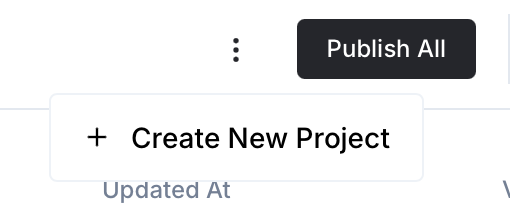
- Fill IDN and Title. The exact names do not matter; use any clear names your team will recognize.
- In Registry, choose the release channel:
- staging — the newest module fixes appear here first. Use it when you need the latest fix, but expect possible unfinished changes.
- production — the final stable version for live projects.
- In Module, select the module for this integration.
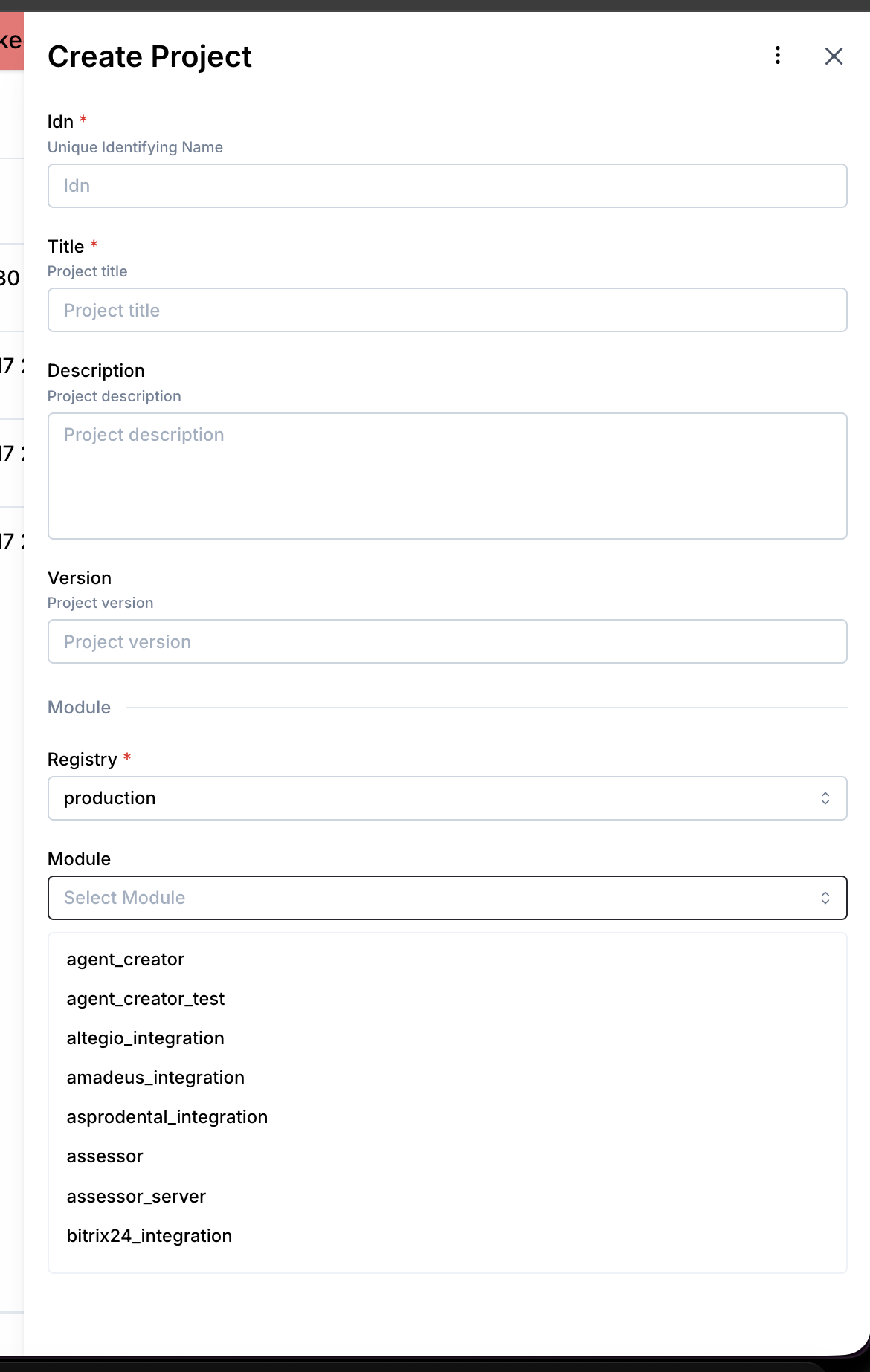 5. Leave Module version on Latest version unless support tells you to pin a specific version, then click Create.
1. Get your Housecall Pro API key
- Log in to Housecall Pro.
- Go to Account Settings → Developer / API.
- Generate or copy your API key.
2. Configure in Newo
- Open the project and find the Module - Housecall Pro attribute group.
- Paste the API key into
01. Housecall Pro API key(hcp_api_key). - (Optional) review the Feature toggles and the assignment method:
| Setting | Purpose | Default |
|---|---|---|
| 02. Check existing client | Looks up returning callers by phone on inbound calls. | on |
| 03. Availability Feature | Turns slot lookup on/off. | on |
| 04. Booking Feature | Turns booking creation on/off. | on |
| 05. Cancellation Feature | Turns cancellation on/off. | on |
| 06. Reschedule Feature | Turns reschedule on/off. | on |
| 07. Availability search window (days) | How many days ahead the agent searches for slots (1–7). | 5 |
| 08. Employee Assignment Method | poc (default — POC employees only get appointments; availability still shows slots from every bookable employee, and multiple POCs share work via round-robin), job_type (AI matches job description to technician tags), or zip_code (technician tagged with the ZIP). | poc |
| 09. Booking duration (minutes) | Default appointment length. | 120 |
| 10. Availability search start offset (days) | Minimum lead time from today before slots are shown. Use 2 to prevent same-day bookings, 0 to allow them. | 2 |
| 13. Auto-Setup Canvas Scenarios | Publishes the default scenarios on first install. | on |
The agent extracts the customer's state from the conversation (or infers it from ZIP / city) and falls back to CA if it cannot tell — there is no separate "default service state" attribute to set.
3. Prepare employees in Housecall Pro
- Every technician who should receive bookings must be marked Available for booking in Housecall Pro → Booking Settings.
- For
pocmethod: at least one employee must have the "Dispatch/Messaging POC" permission. If you mark several employees as POC, the agent rotates appointments across them in round-robin order — each new booking goes to the next POC, the rotation index is stored inhcp_poc_round_robin_index. - For
job_typemethod: add skill tags to each employee (e.g.HVAC,Plumbing,Appliance Repair). The agent's AI matches the customer's request to these tags. - For
zip_codemethod: add ZIP-code tags to each employee for the areas they serve (e.g.94105,94110).
4. Hit Publish All
The agent will:
- create the
hcp_connectorconnection, - register the booking / reschedule / cancel / search tools,
- add the three scenarios and three intents to the canvas (only if no conflicting items are already there — existing customizations are preserved),
- refresh the Housecall Pro employee/job-type cache (forced on every publish, plus a 1 h TTL check at session start).
That's it — place a test call or chat message to confirm.
Customizing the agent
The scenario bodies on canvas are fully editable. Common tweaks:
- Ask for more info. Add steps like "ask for the serial number" / "ask whether there's a pet". Everything the agent collects ends up in the Housecall Pro job Notes.
- Adjust slot presentation. Change how many slots the agent offers, grouping by day, etc.
- Restore defaults. If you break a scenario, delete it from the canvas and republish — the original is restored from the integration's library.
- Restore the default extraction prompts/schemas. Set
hcp_use_default_feature_instructions=Trueand/orhcp_use_default_feature_schemas=Trueand re-publish — setup overwrites the four extraction-instructions and four extraction-schema attributes on publish while these flags areTrue.
FAQ
Q. Does the agent ever charge the customer? No. It only books, reschedules, and cancels. Payments are handled inside Housecall Pro by the dispatcher/tech as normal.
Q. What happens if two customers are trying to book the same slot? Housecall Pro serializes the bookings. The second request will come back with a "slot no longer available" error; the agent apologizes and offers the remaining slots.
Q. Can the caller reschedule in one step? Yes. The agent finds the existing booking, checks availability for the new day, and updates the same Housecall Pro appointment. No new job is created.
Q. Does the agent re-use the same technician on a reschedule?
Not necessarily. It re-picks the technician for the new slot using the same logic as booking: slot-employee map first (whoever HCP showed as free at the chosen time), then POC round-robin if Employee Assignment Method=poc, then a fall-back to the originally-assigned technician.
Q. Does the agent work for anonymous web chat (no phone number)? Yes for booking — the agent asks for all contact info. Customer lookup-by-phone, reschedule, and cancel ask the customer for their phone first if it isn't already known on the session.
Q. What if the caller isn't sure about the appliance brand? The scenario tells the agent to acknowledge and move on. Missing brand isn't a blocker.
Q. Can I disable cross-session cancellation or reschedule? Yes — turn off Cancellation Feature and/or Reschedule Feature. The corresponding tool stays registered but the agent ignores the request.
Limitations
- Historical data import — the agent only sees jobs created after it was activated.
- Token auto-refresh — Housecall Pro uses a static API key. If the key changes, update
hcp_api_keyand republish.
All settings reference
Every attribute the integration adds to the Module - Housecall Pro group in Newo. Numbering matches what operators see in the UI (visible 01..16, hidden 17..33). Operators typically only touch the "Primary" rows; the rest are good out of the box.
Primary (set these during setup)
| # | Attribute | Title in UI | Purpose | Default |
|---|---|---|---|---|
| 01 | hcp_api_key | 01. Housecall Pro API key | Authenticates every call to Housecall Pro. Must be pasted before anything works. | (empty) |
| 02 | hcp_check_existing_client | 02. Check existing client | Look up the caller by phone on inbound calls and surface their info to the agent. | on |
| 03 | hcp_feature_availability_enabled | 03. Availability Feature | Master on/off for live slot lookup. | on |
| 04 | hcp_feature_booking_enabled | 04. Booking Feature | Master on/off for creating bookings. | on |
| 05 | hcp_feature_cancellation_enabled | 05. Cancellation Feature | Master on/off for cancelling bookings. | on |
| 06 | hcp_feature_reschedule_enabled | 06. Reschedule Feature | Master on/off for rescheduling bookings. | on |
| 06a | housecallpro_enable_lead_creation | 06a. Lead Creation on Session End | When on, every conversation that ends without a booking and where the caller wasn't matched to an existing HCP customer is posted to HouseCallPro as a Lead (the create/update request with the captured name / email / 10-digit US mobile). Dispatchers work follow-ups from the HCP Leads tab. Turn on if you want warm-prospect leads in the HCP Leads tab. | off |
| 13 | hcp_setup_scenarios | 13. Auto-Setup Canvas Scenarios | Publishes the default scenarios + intents on first install. Turn off only if you maintain a fully custom canvas. | on |
Availability & booking tuning
| # | Attribute | Title in UI | Purpose | Default |
|---|---|---|---|---|
| 07 | hcp_show_for_days | 07. Availability search window (days) | Enum 1..7. How many days ahead of the requested date the agent will search for slots. | 5 |
| 08 | hcp_auto_employee_type | 08. Employee Assignment Method | Picks the technician: poc (availability is computed across all bookable employees; appointments are routed to a POC employee — round-robin if several), job_type (AI matches by tags), zip_code (tag matches ZIP). | poc |
| 09 | hcp_booking_duration | 09. Booking duration (minutes) | Default appointment length. Values 1–12 are auto-converted from hours for backward compatibility. | 120 |
| 10 | hcp_availability_offset | 10. Availability search start offset (days) | Minimum lead time from today before slots are shown. Use 2 to prevent same-day bookings, 0 to allow them. | 2 |
| 11 | hcp_line_items | 11. Service Catalog (Line Items Library) | JSON list of services/materials with title, description, price, quantity. The AI uses this when auto-adding line items to a job. | [] |
| 12 | hcp_auto_add_line_items | 12. Enable Auto-Assignment of Line Items | When on, the AI matches the customer's job description against hcp_line_items and attaches the best fit to the job. Off means dispatchers add line items manually. | off |
Prompt-state and reset toggles
| # | Attribute | Title in UI | Purpose | Default |
|---|---|---|---|---|
| 14 | hcp_prompt_state_mode | 14. Prompt State Mode | Compatibility lever for projects whose canvas mixes new HouseCallPro scenarios with legacy / default ones. new writes only the custom-tool sections (<AvailableSlots> / <BookingResult>); legacy writes only the legacy ConvoAgent persona attributes; both writes both. Leave on both unless you are certain the canvas is exclusively one style. | both |
| 15 | hcp_use_default_feature_instructions | 15. Reset Feature Extraction Instructions on Publish | When on, every publish overwrites the four extraction-instructions attributes with the shipped defaults (so you stay on the latest templates). Turn off after you have customised the instructions for your business. | on |
| 16 | hcp_use_default_feature_schemas | 16. Reset Feature Extraction Schemas on Publish | Same as above for the four extraction-schema attributes. | on |
Hidden / advanced (toggle-visible from Newo metadata)
These appear in the 01..16 block once you reveal them. Leave them alone unless you know what you're changing — clearing the value and republishing while the matching reset flag is on restores the default.
| # | Attribute | Purpose |
|---|---|---|
| 17 | hcp_base_url | Change only if Housecall Pro support gave you a non-production URL. Defaults to https://api.housecallpro.com/. |
| 18 | hcp_availability_extraction_instructions | Plain-English instructions the agent follows when filling the availability schema (job description, ZIP, date, weekday). |
| 19 | hcp_availability_extraction_schema | JSON schema for what the agent extracts from the conversation when checking slots. |
| 20 | hcp_booking_extraction_instructions | Instructions for booking extraction. Controls how the agent turns conversation into the booking payload — including what counts as "notes" (brand, model, symptoms, access info, etc.) and how addressState is filled (extract from text, infer from ZIP/city, fall back to CA). |
| 21 | hcp_booking_extraction_schema | JSON schema for booking extraction (customer info, address incl. addressState enum of US states, date/time, notes, details). |
| 22 | hcp_cancellation_extraction_instructions | Instructions for cancellation extraction. |
| 23 | hcp_cancellation_extraction_schema | JSON schema for cancellation extraction (picks which of the customer's bookings to cancel). |
| 24 | hcp_reschedule_extraction_instructions | Instructions for reschedule extraction (which booking to move + the new date/time, with the same Calendar-grounded rules used by booking). |
| 25 | hcp_reschedule_extraction_schema | JSON schema for reschedule extraction (booking_id + new bookingDateTime in YYYY-MM-DD HH:MM). |
| 26 | hcp_job_type_employee_selection_prompt | The prompt the AI uses when hcp_auto_employee_type = job_type — tells it how to rank technicians by tags. |
| 27 | hcp_poc_round_robin_index | Counter that distributes appointments across multiple POC employees. Maintained automatically by the booking flow; reset only if you intentionally want to restart the rotation. |
Static-data cache (managed automatically — read-only for dispatchers)
Forced refresh on every publish; on every session-start the cache is rechecked against a 1 h TTL and pulled again if stale. Don't edit by hand.
| # | Attribute | Title in UI | What's cached |
|---|---|---|---|
| 28 | hcp_company_employees | 28. Company Employees (static data) | Full employee list with tags, permissions, booking availability. |
| 29 | hcp_location_employees | 29. Location Employees (static data) | Per-location employee map for multi-location companies. |
| 30 | hcp_company_info | 30. Company Info (static data) | Company metadata: locations, timezone, phone, email. |
| 31 | hcp_job_types | 31. Job types (static data) | Housecall Pro job-type list used by the AI for matching. |
| 32 | hcp_static_data_updated_at | 32. Static data updated at: | Timestamp of the last successful refresh. |
| 33 | hcp_static_data_update_interval | 33. Static Data Update Interval. | How often (seconds) to refresh the cache on session-start. Default 3600 (1 h). Independent from the publish-time refresh, which always runs regardless of this value. |
System-only (do not edit)
| Attribute | Purpose |
|---|---|
hcp_setup_persona_id | Internal persona used to send setup and static-data refresh events. Created automatically on first publish. |
hcp_connector | Connector name the integration uses to talk to Housecall Pro HTTP. |
Changelog
v4.7.2 — forced static-data refresh on publish, 1 h TTL
- Every
project_publish_finishnow triggers an unconditional static-data refresh (company info, locations, job types, employees), so cache updates land immediately after a publish instead of waiting for the TTL window to expire. - Session-start refresh still runs, but the default TTL is shortened from 24 h to 1 h so longer-running sessions see fresher data.
- Migration
_migration_4_7_2_static_data_ttl_1hrewrites the legacy default value (86400) to3600on the first publish at v4.7.2. Operators who had explicitly tuned the interval to any other value keep their custom setting.
v4.4.2 — RescheduleFlow + attribute cleanup
- New RescheduleFlow. Eight skills + canvas Scenario 7 + intent + custom tool
hcp_reschedule_appointment. The agent triggers reschedule via the code-phrase "Give me a moment, I will reschedule your booking right now." Cross-session reschedule works out of the box: ExistingClientFlow loads the booking by phone (with the assigned technician id captured intometa.employee_id), andRescheduleFlowupdates the same Housecall Pro appointment via the update request. - Mandatory availability check before slot pick. Step 7.3 of the reschedule scenario forces the agent to say the availability code-phrase before accepting a new time, mirroring the booking flow. The customer can only pick from the slots HCP showed as free.
- Re-pick technician for the new slot. Reschedule resolves the new
dispatched_employees_idswith the same priority as booking: slot-employee map (populated by the Step 7.3 availability check) → POC round-robin → fall-back to the booking's stored technician id. - Attribute cleanup. Renumbered every Housecall Pro setting into a single
01..33sequence (visible 01..16, hidden 17..33) with a new operator-friendly order: API key → existing-client lookup → four feature flags → tuning knobs → setup/canvas/prompt-state toggles → reset flags → system internals → static-data cache. Every feature-flag description was rewritten with a structured🔧 Tuningblock followed by⚙️ Technical & System Details (Advanced)(System Usage / Fallbacks / Dependencies). - Removed retired settings.
hcp_mode(DevMode toggle was never wired to a runtime gate) andhcp_company_address_state(replaced byaddressStateextraction insidehcp_booking_extraction_schema, with aCAfallback applied by_extractBookingParamsSkill) are gone. A migration removes them on the first publish at v4.4.2. - Other tweaks.
hcp_show_for_daysconstrained to enum 1..7.bookingDayOfWeekremoved from the booking schema (the LLM resolves dates against the project Calendar block, the cross-check field is no longer needed).hcp_use_default_feature_instructions/hcp_use_default_feature_schemasnow also cover the new reschedule extraction attributes. - Migration plumbing fix. Versions 4.4.0 and 4.4.1 shipped a cleanup migration that the dispatcher silently skipped because the platform fired
project_publish_finishwithprevious_version == current_version. The migration is re-keyed at 4.4.2 and the dispatcher now emits[MIG-DISPATCH] previous_version=… current_version=… firing/skipping …traces so we can read the actual upgrade window in production logs.
v4.3.19 — Inline payload into urgent_message (async section race)
AvailabilityFlow/AvailabilityApiResultSkillandAppointmentFlow/_emitBookingSuccessSkillnow embed the canonical payload (available_slots/booking_info) directly intourgent_message.baseInstruction. Previously the message asked the LLM to read the<AvailableSlots>/<BookingResult>section, butconvoagent_update_custom_user_datais processed asynchronously — the section was sometimes still empty when the same turn'surgent_messagewas rendered, causing the agent to stall ("waiting for slots…") or fabricate a reply that didn't match the real outcome.- The parallel section update is still emitted (legacy scenarios and follow-up turns continue to read it); the inline payload guarantees the immediate reply has the correct data on the same turn.
v4.3.18 — Canvas dedup against NAF library clones
- Canvas setup now avoids adding duplicate Housecall Pro items when an equivalent canvas item is already present.
- New aliases recognised:
library_intent_types_common_appointment_agent,library_intent_types_common_cancellation_agent,scenario_common_schedule_appointment_agent,scenario_home_service_appointment_request,scenario_home_service_advanced_appointment_request,scenario_common_canceling_appointment_agent. Operators who forked any of these from the NAF library no longer end up with two scenarios doing the same thing after every publish. - Stale-cleanup list now also drops vanilla
idn=hcp_*library-refs each publish so previously-added HCP scenarios don't linger when the operator switches to a NAF-library clone. Operator-edited HCP clones (UUID idn +origin_idn=hcp_*) survive — they're matched by the alias check above and preserved. - Old
migration_mappingsblock removed; clone preservation, legacy-ref deletion, and NAF-library overlap are all handled by the unified loop.
v4.3.17 — Prompt-state compatibility mode for legacy scenarios
- New hidden compatibility attribute
hcp_prompt_state_modewith three values:new,legacy,both(default). It controls which prompt blocks the integration updates after availability and booking actions:new— only the HouseCallPro custom-tool sections (<AvailableSlots>/<BookingResult>).legacy— only the legacy ConvoAgent persona attributes (booking_slots_availability_*andaction_state_booking_submitting) read by<AvailabilityForTheUserRequestedDateTime>/<ActionsStates>.both— both. Safe default for canvases that still mix HouseCallPro scenarios with legacy/default ones.
- Affected skills:
AvailabilityFlow/AvailabilityApiResultSkill,AvailabilityFlow/_emitAvailabilityErrorSkill,AppointmentFlow/_emitBookingSuccessSkill,AppointmentFlow/_emitBookingErrorSkill. Each writes the matching sections independently per mode; unknown values fall back toboth. - The
urgent_messageinstruction the agent receives is mode-aware: inbothmode it references both new and legacy section names so whichever scenario style the canvas has running picks up the result. - The attribute is
is_hidden: true— it is a compatibility lever, not a feature toggle. Operators should leave it onbothunless they are migrating an existing canvas in a controlled way.
v4.3.16 — POC company-wide availability (single request)
- In POC mode (
hcp_auto_employee_type=poc) with at least one POC employee,_availabilitySkillnow sends a singleavailability_allrequest to HouseCall Pro without theemployee_ids[]filter — HCP returns the company's full availability in one round-trip. - The per-employee
availabilityfan-out (one request per top-3 employee, used to build the slot→employee map) is skipped entirely in this case. The booking flow already round-robins POC selection fromhcp_company_employees, so the slot→employee map is unused. - Other modes (
job_type,zip_code, or POC mode when the company has no POC employee) keep the legacy top-3 + fan-out behaviour.
v4.3.15 — state from attribute, POC round-robin
- New attribute
hcp_company_address_state(visible, required) — every booking is stamped with this state code. The agent no longer asks the caller for a state, and the booking extraction schema dropped theaddressStatefield. (Removed in v4.4.2 — the agent now extractsaddressStatefrom the conversation again, with aCAfallback.) - POC mode (
hcp_auto_employee_type=poc) now decouples availability from booking: slot lookup runs against all bookable employees so the customer sees the company's full availability, while appointment dispatch still goes to a POC employee. - Multiple POC employees are rotated round-robin across bookings. The current position is tracked in the new hidden technical attribute
hcp_poc_round_robin_index(number, default0). _filterEmployeesSkillPOC branch simplified — POC selection is now done at booking time inside_getEmployeeSkillrather than inside the availability filter.
v4.3.7 — scenario step order enforced
Booking scenario body rewritten so the agent actually asks for brand and model, ZIP, and availability check in order. Earlier versions had these steps in the scenario but the LLM was skipping ahead to contact collection.
v4.3.6 — brand and service details reach HCP notes
details captured from the conversation (brand, model, symptoms, access notes, anything an operator added to the scenario) are now merged into the Housecall Pro job notes alongside the short summary. Dispatchers see the full context without extra configuration.
v4.3.5 — canvas refresh works in the presence of legacy items
Removed an over-strict guard that blocked canvas updates when any old NAF-common booking intent was still on the canvas. Stale items are now purged; Housecall Pro intents and scenarios appear on fresh publishes.
v4.3.4 — library always refreshes on publish
The library now gets new versions of our intents and scenarios on every publish (previously it added an item only if missing, so renames went unnoticed). An invisible <!-- hcp-managed --> marker identifies library clones on canvas so updates can flow through without overwriting operator edits.
v4.3.0–v4.3.3 — canvas rename + brand step example
- New intents: [L] Appointment in Housecall Pro via Agent and [T] Cancellation in Housecall Pro via Agent.
- Scenarios renamed to match ("Scheduling Appointment in Housecall Pro via Agent" / "Canceling Appointment in Housecall Pro via Agent").
- Scenarios now observe the correct prompt blocks (
<AvailableSlots>,<BookingResult>,<CancellationResult>) with<Case1>/<Case2>/<Case3>loading / success / error handling. - Scenario 12 ships a "Ask for brand and model" step as an example of extra data capture. Operators can copy it to request anything else (access code, pets, warranty, etc.).
- User-edited clones on canvas are preserved per-item; un-edited clones get refreshed.
v4.2.0 — simpler Feature descriptions and hidden advanced settings
- Every Feature toggle (Availability / Booking / Cancellation) now carries a Sample Observe block in its description so operators see how the agent should react to each prompt-section state.
- Extraction schemas and instructions are hidden by default (they're advanced tuning). Schemas store pretty-printed JSON (
indent=2) for readability when revealed. - Removed the
hcp_project_infoscratch attribute; the help-center link moved into thehcp_api_keydescription.
v4.1.0 — Feature flags renamed with automatic migration
hcp_enable_slot_check→hcp_feature_availability_enabled(title: Availability Feature)hcp_enable_booking→hcp_feature_booking_enabled(title: Booking Feature)hcp_enable_cancellation→hcp_feature_cancellation_enabled(title: Cancellation Feature)
Existing customer values are migrated automatically on publish — no manual action needed. The Feature toggles are visible (is_hidden=false) so operators can flip them in the UI.
v4.0.0 — cross-session cancel, new architecture
- Cross-session cancellation — the agent can now cancel a booking in a fresh session even with no prior context: it looks up the caller in Housecall Pro by phone, finds their upcoming jobs, and cancels the right one.
- Phone normalisation —
+, spaces, and leading US1are stripped before Housecall Pro lookups. - Silent failure fix — empty customer search returns a proper "not found" response instead of hanging the agent.
- Correct schedule parsing — reads
job.schedule.scheduled_start(nested, matching the real HCP response). - Availability fixes — correct API keys (
booking_windows,start_time/end_time), hours→minutes duration conversion, 24h slot map,service_durationparameter. - In-progress prompt sections — Availability, Booking, Cancellation show
In progressstatus while processing. - Cleaner user-facing messages — internal IDs removed from booking and cancellation confirmations.
- Session cleanup on end — temporary persona data (slot maps, progress flags) cleared automatically; booking data preserved for cross-session cancellation.
v2.4.0 and earlier
Historical versions before the v4.x overhaul. Inline CHANGELOG.md was retired in v4.0.0; the integration now tracks history here. Full commit history: branch 895-hcp-improve-fix-bug.