Yelp Integration
What the AI can do
Summary
Yelp Integration connects Yelp (business directory and lead generation platform) with Newo Platform.
It enables:
- Automatic processing of incoming Yelp leads (job requests)
- AI-powered responses to customer inquiries via Yelp chat
- Human manager takeover with configurable auto-resumption
- Message deduplication to prevent duplicate agent responses
- Developer/test mode for safe development without contacting customers
- Custom per-business conversation scenarios
This integration is designed for service businesses and contractors on Yelp who need automated lead qualification and customer communication through a conversational AI agent (chat channel).
Common use cases
- When a new Yelp lead arrives → AI analyzes lead details, identifies missing info, and asks clarifying questions
- When a customer sends a follow-up message → AI continues the conversation, maintaining context
- When a manager joins the conversation → Automation pauses, then resumes after a configurable delay
- When the manager wants to take full control → Permanently pause automation via human intercept flag
- When developing/testing → Dev mode processes events but doesn't send responses to real customers
Features at a glance
| Feature | Supported | Notes |
|---|---|---|
| Lead Processing | ✅ | Extracts job name, email, postal, survey answers |
| Customer Message Handling | ✅ | Full conversation context, deduplication |
| AI Lead Response | ✅ | LLM-powered analysis and clarifying questions |
| Manager Takeover | ✅ | Auto-pause on manager join, timer-based auto-resume |
| Human Intercept | ✅ | Permanent pause flag for manual control |
| Message Deduplication | ✅ | Hamming distance similarity (threshold 0.9) |
| Developer Mode | ✅ | Processes events without sending to Yelp |
| Custom Scenarios | ✅ | Per-business behavior customization |
| Message Delivery via Zapier | ✅ | Outbound messages routed through Zapier webhook |
| Session Cleanup | ✅ | Auto-clear persona attributes on session end |
| Phone Lead Handling | ❌ | Phone type events are received but not processed |
| Review Management | ❌ | No review reading or response capabilities |
| Yelp Ads Integration | ❌ | Not implemented |
Before You Start
Before installation:
- Active Yelp for Business account with lead generation enabled
- Zapier account with a webhook configured to relay messages to Yelp
- Webhook endpoint for receiving Yelp events (configured in Yelp → Newo)
Setup
Create the Newo project
If this project already exists in Newo Builder, skip this subsection and continue with the integration-specific settings below.
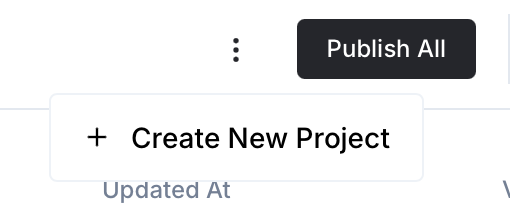
- In Newo Builder, open the projects list and click Create Project (or Create New Project from the top-right menu).
- Fill IDN and Title. The exact names do not matter; use any clear names your team will recognize.
- In Registry, choose the release channel:
- staging — the newest module fixes appear here first. Use it when you need the latest fix, but expect possible unfinished changes.
- production — the final stable version for live projects.
- In Module, select the module for this integration.
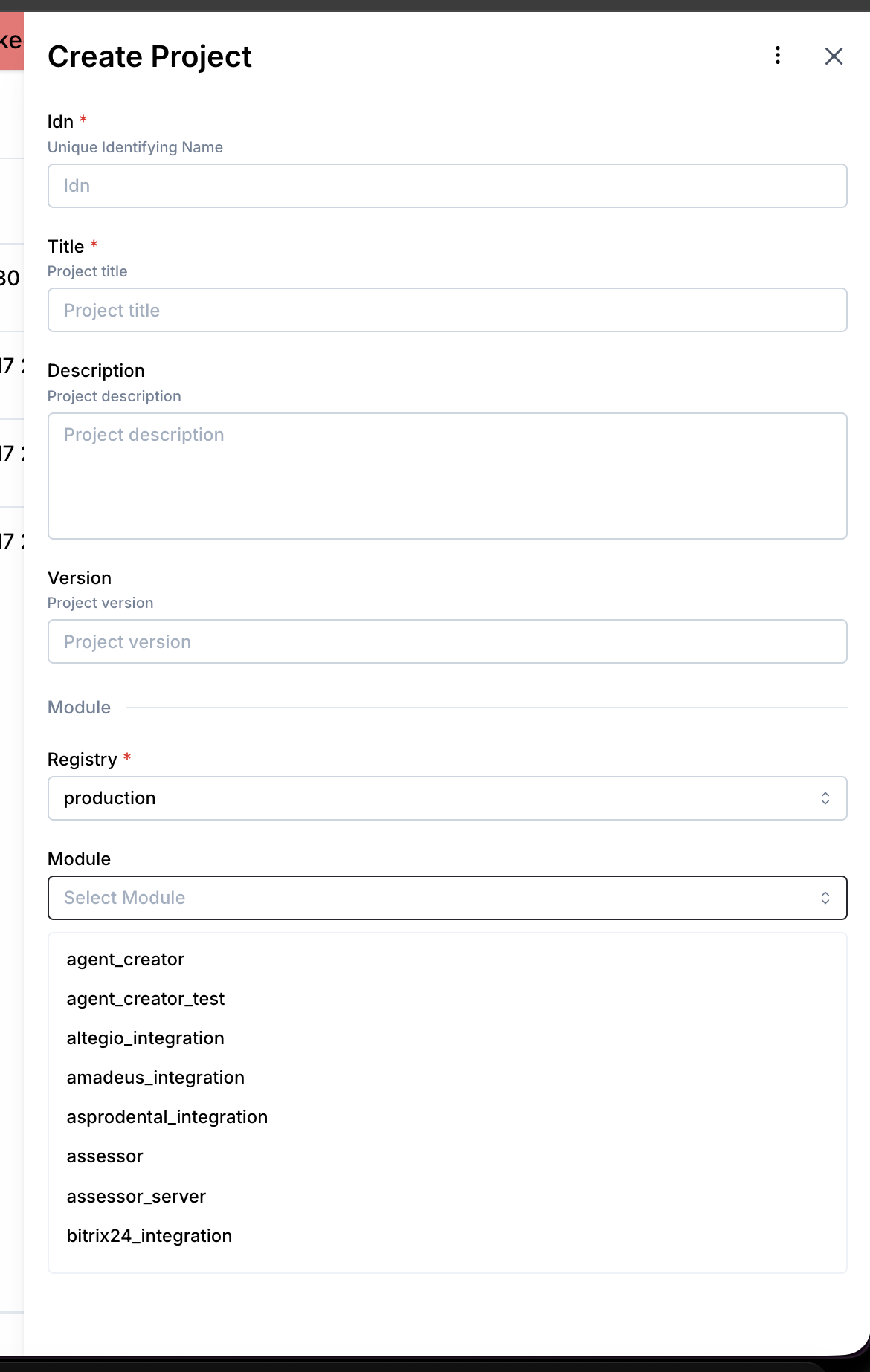 5. Leave Module version on Latest version unless support tells you to pin a specific version, then click Create.
3.1 Step 1 — Configure Zapier Webhook
- Create a Zapier Zap that receives webhook POSTs and sends messages to Yelp
- Copy the Zapier webhook URL (this is how the agent sends responses to Yelp)
- Set the URL in the
yelp_zapier_webhookattribute
3.2 Step 2 — Connect in Platform
- Open Newo → Projects
- Set the following attributes in Builder / Attributes:
| Attribute | Required | Description |
|---|---|---|
yelp_zapier_webhook | ✅ | Zapier webhook URL for sending messages to Yelp |
yelp_integration_enabled | ❌ | Master switch (default: True) |
yelp_take_over_enabled | ❌ | Auto-pause/resume on manager join (default: True) |
yelp_take_over_delay | ❌ | Seconds before auto-resume after manager leaves (default: 120) |
yelp_human_intercept | ❌ | Permanently pause automation (default: False) |
yelp_dev_mode | ❌ | Developer mode — process but don't send (default: True) |
yelp_custom_scenario | ❌ | Custom instructions/scenario for agent behavior |
- Click Save + Publish All
- On publish, the SetupFlow automatically:
- Prepares the connection for Zapier communication
- Creates timer connector for takeover delay management
- Initializes all attributes with defaults
Important:
yelp_dev_modedefaults toTrue. Set toFalsewhen ready for production to enable actual message sending.
How to use the integration
This section explains how the integration works, how to configure automation, and how to test it.
4.1 How the Integration Works
The integration receives Yelp events via webhook and routes them based on type: lead (new inquiry), user_message (customer reply), business_message (manager reply), or phone (ignored). Outbound messages are sent to Yelp through a Zapier webhook relay.
- A Trigger is a system event that starts a flow
- An Action is the operation performed in response
Where to test
Testing can be done in developer mode (yelp_dev_mode = True, the default). In dev mode, the integration processes all incoming Yelp events, generates AI responses, but does not send messages to Yelp via Zapier. This allows safe testing of the full pipeline.
How to test that everything works
To test the integration:
- Setup: Publish the project and verify connectors are created
- Dev Mode: Keep
yelp_dev_mode = Trueduring testing - Lead: Trigger a test lead webhook — verify AI generates appropriate response with clarifying questions
- User Message: Send a test customer message — verify deduplication and response generation
- Business Message: Send a manager message — verify takeover activates and timer starts
- Timer: Wait for takeover delay — verify automation resumes and checks for pending questions
- Go Live: Set
yelp_dev_mode = Falsewhen ready for production
If no action occurs:
- Ensure
yelp_integration_enabledisTrue - Verify
yelp_zapier_webhookis set to a valid Zapier webhook URL - Check
yelp_human_interceptisFalse(unless intentionally pausing) - Confirm
yelp_dev_modeisFalsefor production (messages won't send in dev mode) - Verify webhook connectivity: Yelp events must reach the
yelp_incomeendpoint - Re-publish the project if attributes were changed
Note: This integration sends messages to real customers when dev mode is off. Always test thoroughly in dev mode before going live.
FAQ
Q: How does the AI respond to new leads? A: When a lead arrives, the integration extracts all details (job name, email, postal code, survey answers) and injects them as a custom prompt section. The LLM analyzes the lead, identifies missing information, and generates a friendly response with clarifying questions (3-6 sentences).
Q: What is the difference between human intercept and takeover?
A: Human intercept (yelp_human_intercept) is a permanent pause — automation stops until manually re-enabled. Takeover (yelp_take_over_enabled) is automatic — when a manager sends a message, automation pauses for yelp_take_over_delay seconds (default: 120), then resumes. Takeover is designed for managers who briefly check in; intercept is for full manual control.
Q: Why does the integration use Zapier instead of direct Yelp API? A: Zapier acts as a message relay middleware. This decouples Yelp API authentication from the integration, allows businesses to enrich or modify messages in Zapier flows, and provides a simpler webhook-based interface.
Q: What is dev mode?
A: When yelp_dev_mode = True (the default), the integration processes all events and generates AI responses, but does not send them to Yelp. This allows safe development and testing. Set to False for production.
Q: How does message deduplication work? A: The integration stores the last agent message and uses hamming distance similarity (threshold 0.9) to detect near-identical messages. This prevents the agent from sending duplicate responses when the same event is processed multiple times.
Q: Can I customize the AI's behavior per business?
A: Yes. Set the yelp_custom_scenario attribute with custom instructions. These are injected into the LLM prompt during lead response generation, allowing per-business tone, process, or requirement customization.
Q: What happens when a conversation ends?
A: The SessionEndedSkill clears all persona attributes (last agent message, takeover flags, intercept state, message direction). This ensures a clean state for the next conversation.
Q: Does the integration handle Yelp phone calls? A: Phone-type events are received but not processed. The integration currently supports only chat/text-based communication through Yelp.