OpenEMR Integration
What the AI can do
Summary
OpenEMR Integration connects OpenEMR (open-source electronic health records and medical practice management system) with Newo Platform.
It enables:
- Checking available appointment slots for a selected provider and facility
- Booking appointments with automatic patient record search and creation
- Cancelling existing appointments
- Pre-configured facility and provider selection during setup
- OAuth2 token management with automatic refresh on expiration
This integration is designed for medical practices and clinics using OpenEMR who need automated appointment scheduling through a conversational AI agent (voice or chat).
Common use cases
- When a patient asks about available slots -> AI checks the configured provider's schedule and returns open time slots
- When a patient wants to book an appointment -> Search or create patient record, then create appointment in OpenEMR
- When a patient wants to cancel an appointment -> Delete the appointment via OpenEMR API
- When a new patient books -> Automatically create patient record in OpenEMR before booking
- When the project is published -> Facilities and providers are fetched and stored for selection
Features at a glance
| Feature | Supported | Notes |
|---|---|---|
| Check Availability | Yes | Date range lookup for selected provider and facility |
| Book Appointment | Yes | With automatic patient creation if needed |
| Cancel Appointment | Yes | Requires booking_id and contact_id from prior booking |
| Facility Selection | Yes | Pre-configured during setup via enum attribute |
| Provider Selection | Yes | Pre-configured during setup, filtered by facility |
| Patient Search | Yes | By phone number via OpenEMR API |
| Patient Creation | Yes | Auto-creates during booking flow |
| Token Auto-Refresh | Yes | OAuth2 with password grant and refresh token rotation |
| Multi-Provider Scheduling | No | Single provider selected during setup |
| Reschedule Appointment | No | Cancel + rebook as workaround |
| Historical Data Import | No | Only new events after activation |
Before You Start
Before installation:
- Active OpenEMR instance with REST API enabled
- OAuth2 Client ID and Client Secret registered in OpenEMR
- Username, password, and email for an OpenEMR user with API access
- The OpenEMR instance must be accessible via HTTPS from the platform
Setup
Create the Newo project
If this project already exists in Newo Builder, skip this subsection and continue with the integration-specific settings below.
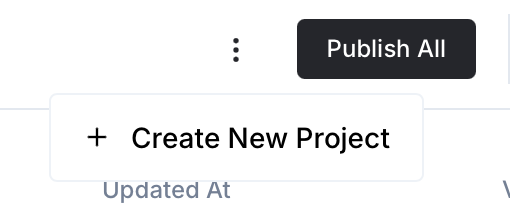
- In Newo Builder, open the projects list and click Create Project (or Create New Project from the top-right menu).
- Fill IDN and Title. The exact names do not matter; use any clear names your team will recognize.
- In Registry, choose the release channel:
- staging — the newest module fixes appear here first. Use it when you need the latest fix, but expect possible unfinished changes.
- production — the final stable version for live projects.
- In Module, select the module for this integration.
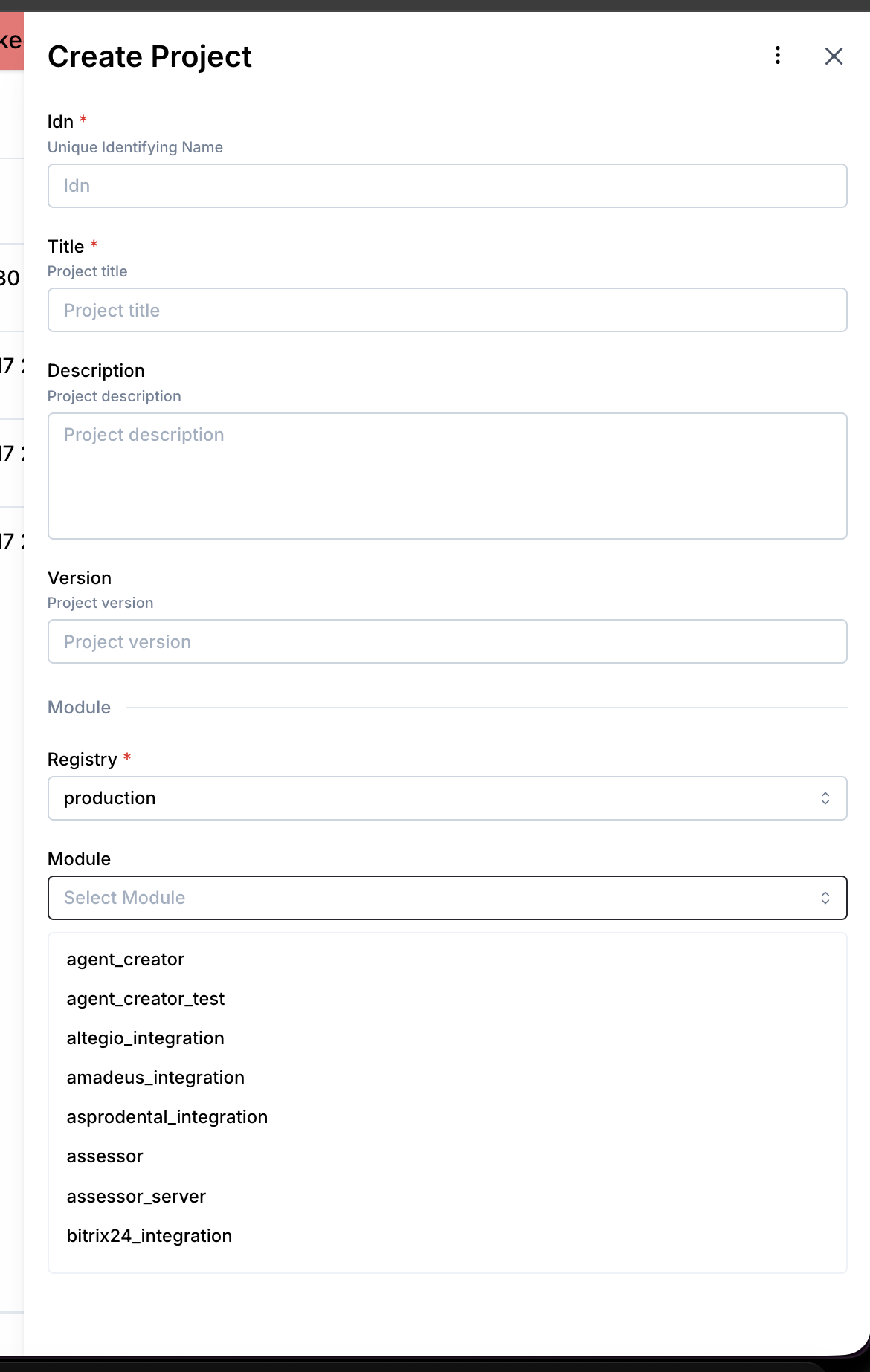 5. Leave Module version on Latest version unless support tells you to pin a specific version, then click Create.
3.1 Step 1 — Get API Credentials
- Log in to your OpenEMR instance as an administrator
- Navigate to Administration -> System -> API Clients
- Register a new OAuth2 client application
- Note the Client ID and Client Secret
- Ensure the API user has appropriate permissions for appointments and patient management
3.2 Step 2 — Connect in Platform
- Open Newo -> Projects
- Set the following attributes in Builder / Attributes:
| Attribute | Required | Description |
|---|---|---|
openemr_base_url | Yes | Base URL of your OpenEMR instance (e.g., https://emr.example.com) |
openemr_client_id | Yes | OAuth2 Client ID |
openemr_client_secret | Yes | OAuth2 Client Secret |
openemr_username | Yes | OpenEMR user username for API access |
openemr_password | Yes | OpenEMR user password |
openemr_email | Yes | OpenEMR user email |
openemr_scope | No | OAuth2 scopes (pre-configured with full access) |
openemr_facility | No | Selected facility (auto-populated during setup) |
openemr_provider | No | Selected provider (auto-populated during setup) |
openemr_enable_slot_check | No | Enable availability checks (default: True) |
openemr_enable_booking | No | Enable appointment creation (default: True) |
openemr_enable_cancellation | No | Enable cancellations (default: True) |
openemr_check_existing_client | No | Check if patient exists before creating (default: True) |
openemr_show_for_days | No | Number of days to check for availability |
openemr_override_agent_attributes | No | Override SuperAgent attribute schemas (default: True) |
- Click Save + Publish All
- On publish, the SetupFlow automatically:
- Exchanges credentials for an OAuth2 access token (password grant)
- Prepares the connections for API and token operations
- Fetches all facilities and populates the facility selector
- Fetches providers for the selected facility and populates the provider selector
- Registers availability, booking, and cancellation tools with the agent
- Injects payload schemas for the ConvoAgent tool calling framework
How to use the integration
This section explains how the integration works, how to configure automation, and how to test it.
4.1 How the Integration Works
The integration uses OpenEMR's REST API for appointment management, patient records, and facility data. Unlike multi-provider integrations, the facility and provider are pre-selected during setup, simplifying runtime slot lookups. The OAuth2 token is auto-refreshed on 401 responses using the refresh token grant.
- A Trigger is a system event that starts a flow
- An Action is the API operation performed in OpenEMR
Where to test
Testing can be done through the Newo conversation interface (voice or chat). Each flow (Availability, Booking, Cancellation) has a dedicated webhook test endpoint for connectivity validation.
How to test that everything works
To test the integration:
- Setup: Publish the project and verify token exchange succeeds (check
openemr_access_tokenis populated) - Facilities: After publish, verify
openemr_facilityenum is populated with your clinics - Providers: Verify
openemr_providerenum shows providers for the selected facility - Availability: Ask "What slots are available on Monday?" — verify slots returned with correct times
- Booking: Complete a booking conversation — verify appointment appears in OpenEMR calendar
- Cancellation: Request cancellation of a booked appointment — verify appointment removed from OpenEMR
If no action occurs:
- Ensure
openemr_base_url,openemr_client_id, andopenemr_client_secretare set correctly - Verify
openemr_username,openemr_password, andopenemr_emailare valid OpenEMR credentials - Confirm
openemr_access_tokenwas obtained (check it's not empty after setup) - Ensure the relevant feature flags are enabled (
openemr_enable_booking,openemr_enable_slot_check,openemr_enable_cancellation) - Verify
openemr_facilityandopenemr_providerwere populated during setup - Check that OpenEMR's REST API is enabled and accessible from the platform
- Re-publish the project if credentials were changed
Note: This integration performs real operations in OpenEMR. Appointments created or cancelled through the agent are reflected in the live OpenEMR system.
FAQ
Q: How does facility and provider selection work? A: Unlike multi-provider integrations, OpenEMR uses a pre-selection model. During setup, all facilities are fetched and presented as an enum dropdown. After selecting a facility, providers for that facility are fetched and presented similarly. These selections are stored and used for all subsequent availability checks and bookings.
Q: What patient information is required for booking? A: First name, last name, date of birth (YYYY-MM-DD), sex (Male/Female), and phone number are required. Middle name is optional. If the phone number is not available, the agent will request it before proceeding.
Q: What happens if the OAuth token expires?
A: The UtilsFlow automatically detects 401 responses. If a refresh token is available, it uses the refresh_token grant to obtain a new access token. If no refresh token exists, it falls back to the password grant using the stored credentials. The original request is retried up to 3 times.
Q: How many days of availability does the agent check?
A: Configurable via the openemr_show_for_days attribute. The API call checks from the requested date through the configured number of days.
Q: What is the default appointment duration?
A: 15 minutes. All appointments are created with pc_duration: 15 and the end time is calculated as start time + 15 minutes. The appointment title defaults to "Office Visit".
Q: Does the integration support multiple facilities simultaneously?
A: No. A single facility and provider are selected during setup. To switch facilities, update the openemr_facility attribute and re-publish the project to refresh the provider list.
Q: What OAuth2 scopes are required? A: The integration pre-configures a comprehensive scope set covering appointments, patients, practitioners, locations, and related resources. The scope attribute is auto-populated during setup and typically does not need manual configuration.